


I am a software developer on the Jazz Team Build Component team. The Jazz project has been self-hosting on Rational Team Concert since before it was called Rational Team Concert . :-) It’s easy to get so used to the tool that I fail to notice how convenient some operations are and how much I’ve come to rely on features that didn’t exist in the tooling I used previously. To combat that complacency and replace it with a renewed appreciation, I offer here a list of my favorite features.
To get on this list of favorites, it couldn’t just be cool or useful; it must have caused me to pause and wonder how I developed software in a team environment without it. A few of these features have even saved my bacon in the past few weeks. Most of my day is spent developing features and fixing work items. This list reflects my everyday usage of Rational Team Concert.
The Top 4
My Top 4 features are:
- 4 Process Support for Preconditions
- 3 Streams and Workspaces
- 2 Annotate
- 1 Suspend Change set
The following sections describe each of my favorites in more detail.
4 Process Support for Preconditions
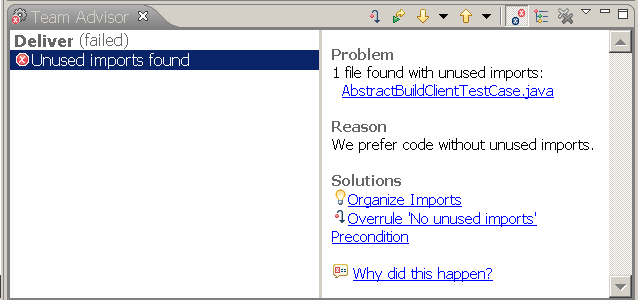
These handy little pieces of code run before an operation, such as “Save work item” or “Deliver baseline”, takes place. If the preconditions for an operation are not met, the operation does not occur and the description of the failing conditions AND possible automated quick fixes shows up in the Team Advisor view. Fixing the problem can be just as easy as clicking a hyperlink.
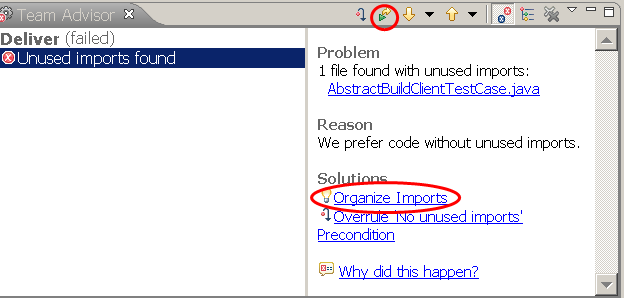
For example, my team has a standard that no unused imports should be in the Java code we deliver to the stream. Still, in the heat of refactoring I sometimes forget to use the handy Eclipse “Organize Imports” before I deliver and attempt to deliver code with bogus imports. The Process framework immediately bongs me when I try to deliver and shows the problem in the Team Advisor. No problem, I just click the “Organize Imports” link and then re-run the deliver operation — right from the view!!
3 — Streams and Workspaces
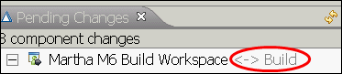

Before the Jazz SCM component was available, delivering to a communal build was a nightmare of tags and map files. Occasionally a cut and paste error or a forgotten text edit would wreak havoc on the build and take a while to find. With Jazz’s support for structured streams and workspaces, delivering to a build is as easy as accepting from one flow target and delivering to another. Not to mention you can create workspaces from other workspaces and from build results.
2 — Annotate
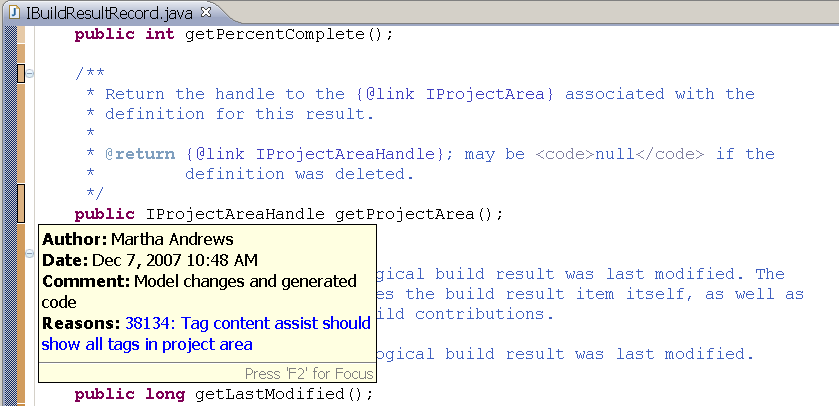
Some people call this the “blame” feature. I prefer to think of it as the “credit” feature. :-) Many times I’m reading code in the editor and wonder “how did these lines get here?” (or, “who the heck wrote this?”). It is a pleasure to right-click on the file, choose Team> Annotate and see colors appear indicating which lines belong to what change. Even better, if I hover on the edge of the editor, a handy tooltip with the name of the change author and the reason for the change appears. I use this all the time.
1 — Suspend Change Set
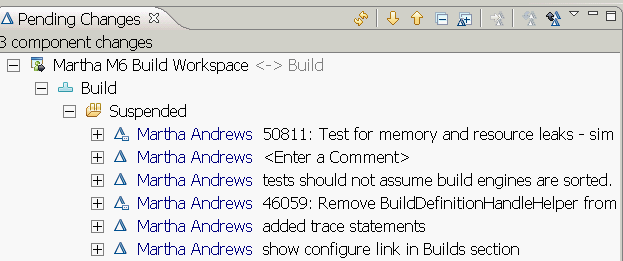
Suspending a change set removes the changes from the workspace, but keeps them available to be resumed at a later time. The changes still exist, but they are no longer part of the code in your workspace. It is a temporary “undoing” of code changes.
This one got the number one spot in part because I use it so often. For instance, the other day I was working away on some new code when a colleague pinged me for some help testing. Quickly, I suspended what I was working on and was able to run the test he requested. When it was finished, I simply resumed the change set and went back to writing my new code. I also use this when I start making changes in one way and decide there might be a better way I want to try. I can suspend the change set with my original attempt and know that I will be able to resume it if my “better way” turns out not to be better.
There you go, my top 4. Do you have any favorite features? Feel free to add them in the comments section.
—
Martha Andrews
Jazz Team Build

 (6 votes, average: 4.33 out of 5)
 Loading...
You must be logged in to post a comment.
Authors
 Adam Archer (1)
 Adam Neal (1)
 Adrian Cho (15)
 Alice Connors (3)
 Amy Silberbauer (24)
 Andrew Hans (1)
 Andy Lapping (15)
 Anindita Basu (3)
 Anthony Hunter (1)
 Benjamin Pasero (5)
 Benjamin Williams (3)
 Bernie Coyne (6)
 Beth Zukowsky (2)
 Bhawana Gupta (12)
 Bianca Jiang (3)
 Bill Higgins (2)
 Boris Kuschel (2)
 Brent Barkman (2)
 Brian Bryson (1)
 Brian King (4)
 Brian Lang (2)
 Brian Massey (3)
 Brian Sanders (2)
 Bruce MacIsaac (2)
 Carlos Ferreira (1)
 Carolyn Pampino (9)
 Catherine Burrows (1)
 Chandra Venkatapathy (1)
 Chris Daly (1)
 Chris Trobridge (1)
 Christophe Cornu (3)
 Christophe Elek (5)
 Christophe Telep (14)
 Clara Forero (1)
 Clare Carty (4)
 Dan Barbour (1)
 Dan Griffin (4)
 Dan Leroux (2)
 Daniel Berg (2)
 Daniel Moul (27)
 Daniel Toczala (4)
 Darin Swanson (1)
 Darrel Rader (1)
 Dave Thomson (7)
 David Brauneis (1)
 David Hodges (1)
 Dejan Glozic (2)
 Denise Cook (1)
 Derek Baron (8)
 Dibbe Edwards (3)
 Dirk Baeumer (1)
 Don Yantzi (1)
 Doron Ben-Ari (3)
 ELM Engineering (42)
 Eran Gery (1)
 Erich Gamma (5)
 Erik Craig (1)
 Ernest Mah (1)
 Evan Hughes (3)
 Fariz Saracevic (16)
 Frederic Fusier (1)
 Gary Cernosek (1)
 George DeCandio (4)
 Gili Mendel (1)
 Ginny Ghezzo (1)
 Graham Bleakley (5)
 Grant Covell (1)
 Greg Gorman (1)
 Guy Slade (1)
 Hadar Hawk (2)
 Heidi Stadel (1)
 James Branigan (2)
 James Moody (2)
 Jan Wloka (2)
 Jared Pulham (7)
 Jean-Michel Lemieux (23)
 Jeanette Deupree (1)
 Jim Amsden (1)
 Jim D'Anjou (2)
 Jim Ruehlin (1)
 Johannes Rieken (2)
 John Kellerman (2)
 John Vasta (1)
 John Whitfield (2)
 John Wiegand (1)
 Jozef deVries (1)
 Kai-Uwe Maetzel (6)
 Kalena Kelly (1)
 Karen Gosciminski (1)
 Kate Draper (2)
 Kate Hauser (1)
 Kevin Williams (2)
 Kim Peter (10)
 Kiran M N (1)
 Kit Lo (1)
 Kourken Aroyan (1)
 Kumaraswamy Gowda (15)
 Lauren Hayward Schaefer (15)
 Lawrence Mandel (2)
 Linda Watson (3)
 Liz Bonesteel (1)
 Luc Hatlestad (1)
 Lucinio Santos (1)
 Maneesh Mehra (3)
 Manoj Panda (1)
 Mario Maldari (1)
 Mark Guertin (2)
- Martha Andrews (3)
 Mary Yost (1)
 Masabumi Koinuma (1)
 Mats Gothe (1)
 Matt Lavin (1)
 Michael Fiedler (1)
 Michael Halder (2)
 Michael Valenta (3)
 Millard Ellingsworth (3)
 Miran Badzak (1)
 Monica Luke (5)
 Moshe Cohen (1)
 Nadra Rafee (1)
 Nathan Bak (5)
 Neil Leblanc (3)
 Nick Crossley (3)
 Nithya Rajagopalan (3)
 Palak Sheth (1)
 Patrick Streule (1)
 Paul Ellis (1)
 Paul Strachan (1)
 Paul Tasillo (2)
 Peter Haumer (1)
 Peter Steinfeld (1)
 Phil Vogel (3)
 Priyadarshini Gorur (3)
 Rahul Choudhary (4)
 Reuben Varzea (12)
 Richard Bone (3)
 Richard Watson (13)
 Rishikesh Agam (2)
 Robbie Minshall (1)
 Robin Bater (5)
 Roger LeBlanc (1)
 Rolf Nelson (16)
 Rosa Naranjo (1)
 Rosalind Radcliffe (1)
 Ryan Manwiller (4)
 Sandeep Kohli (1)
 Sandeep Somavarapu (1)
 Sanjesh Nair (1)
 Scott Rich (13)
 Sean Babineau (1)
 Seth Packham (11)
 Sharoon Shetty Kuriyala (1)
 Sreerupa Sen (5)
 Sridevi Sangaiah (1)
 Steve DiCamillo (2)
 Steven Beard (1)
 Subramanya Pilar (6)
 Sujan Surendrananitha (2)
 Suneel Santharam (2)
 Susan Yeshin (1)
 Tim Feeney (7)
 Tod Creasey (1)
 Tom Hollowell (4)
 Ubaidu Peediakkal (3)
 Vaibhav Srivastava (1)
 Vandana Shenoy (1)
 Vatsalkumar Parmar (3)
 Virginia Lovering (1)
 Will Streit (1)
I think probably my favorite features is the ability to share change sets with other users before delivering to the team. We used this a lot during the end game where each code change required two reviews. It was very easy for teammates to both inspect the code but also accept it into their local development environment and run it and perhaps walk through it in the debugger before making a decision about whether or not the code was ready to be delivered to the team and put on a path to the project integration stream.
– Bill Higgins, Jazz Web UI Foundation Team
Great post, Martha… Since I’m not in a development role, my favorite features are:
(1) The Dashboard – the ability to combine feeds, work item queries, bookmarks, etc. all on one page is very nice. It can truly become my homebase.
(2) Subscribing to work items – a feature that is missing in ClearQuest, along with the ability to access work items using feeds. This is nice to be able to see the items I’m interested in without having to hunt.
Now if I can just figure out why my profile on jazz.net won’t let me modify my dashboard I’ll be all set. :-)
I like the ability to trigger my own build when I want, how I want and with the change set composition that will compile and test what I have been working on.
As well the ease of following the progression of the build via the events and the build results editor and associating bugs with the build result. Or abandoning a build that is not quite right.
And don’t get me started on all the cool process features…but doc and blog entries are forthcoming this summer.
Darin Swanson, Jazz Process Team
Many of my favorite features actually have to do with your component: the team build. Before I worked on Jazz, I manually kicked off a handful of slightly different Ant scripts for different conditions or desired output of our DITA docs. Now, with the Jazz team build, we can easily define different builds on different workspaces that take different variables and properties – but they all run the same build script. It’s also great how build results and status are immediate and transparent, linking to work items and change sets in the build.
I also like the My Work view, dragging around my planned items to schedule my time.
– Seth Packham, Jazz User Assistance Team
Suspend is my favorite too!
Speaking of Annotate, did you know that the darkness/lightness of the colors you see are correlated to how old the change is? Old changes have that kind of faded look; newer changes are very dark.
I also like the integration of components with Eclipse Working Sets, so you can sort your Package Explorer view by component.
Carol Yutkowitz, Jazz CC Connector Team
I like all of the features mentioned so far, here are my personal favorites:
1. The all-you-need-to-do-is-unzip setup for the Express-C edition. In about 15 minutes or so you can be up and running; really a great out of the box experience!
2. I love the integrated IM experience; I particularly like that you can comment a work item with an IM conversation
3. The iteration plans are great; it’s so easy to balance work from one team member to another
4. The integrated screen shot capturing tool is really handy. It’s a simple thing, but it’s something that I think developers will really appreciate
5. The team events log is really a nice way to see what is going on; it is aesthetically very well done also.
I am not a Jazz user so that may disqualify my input, but…
In some projects I have seen a problem with concurrent editing (refactoring) of code. Especially if there are 100+ distributed developers active on the same product. One thing that might help communication between the developers would be an extension of the Annotate function: extended to display ongoing changes in code together with email/IM link to that user. Then it would be a simple thing to send off a message to the developer editing the same code as you are and ask for the reason for his/her change.
-Joachim Nilsson, Managing consultant at Capgemini