


Introduction
The increasing complexity of modern engineering systems has led to a surge in both the volume and granularity of requirements, making effective management critical for ensuring system quality, reliability, and compliance. To meet this challenge, Model-Based Systems Engineering (MBSE) and specifically, the model-based formalization of natural language requirements is becoming a cornerstone for driving efficiency and reducing risk across the development lifecycle.
Traditionally, creating use case diagrams, a foundational step in model-based requirements engineering, has been labor-intensive and time-consuming, particularly for large or evolving specifications. Today, AI-assisted modeling offers a transformative solution to accelerate this process.
By harnessing the power of Large Language Models (LLMs), organizations can partially automate the translation of natural language requirements into model-based representations. For real-world engineering use, these AI systems must process multiple requirements per use case and interpret heterogeneous, unstructured input data.
The MBSE Use Case Discovery Agent runs in the IBM Engineering AI Hub and is powered by IBM watsonx.ai. Together these components bring AI-driven automation directly into your workflow. The agent analyzes textual requirements to identify and recommend candidate actors and use cases, significantly reducing manual effort, improving consistency, and accelerating MBSE adoption as part of a broader digital transformation strategy.
Configuring AI Integration in IBM Rhapsody
Before You Begin
Ensure that you have a working workstation environment with Rhapsody 10.0.2 (or later). The AI integration brings intelligence directly into your modeling workflow, so preparation ensures a smooth setup.
Ensure that IBM Engineering AI Hub 1.1.0 (or later) is available, and you know the URL. See AI Hub Documentation
Step 1: Set Up the AI Environment
- Download and extract the AIAgent.zip package.
- Configure connectivity to your LLM (Large Language Model) server using one of the two simple options:
Option 1 – Modify rhapsody.ini:
Add the AI Hub URL under the [AIAgent] section.

Option 2 – Set an Environment Variable:
Define ENG_AI_HUB_URL in your system environment variables.
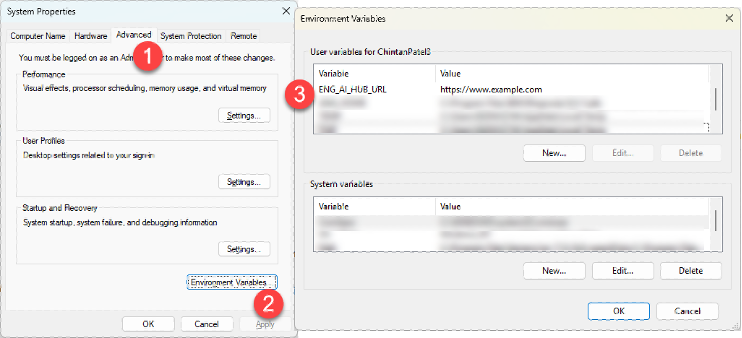
Step 2: Install the AI Agent Profile
- Copy the AIAgent folder to your Rhapsody Profiles directory ($OMROOT/Profiles).
- Open your Rhapsody project, then navigate to: File → Add Profile to Model → AIAgent.sbsx.
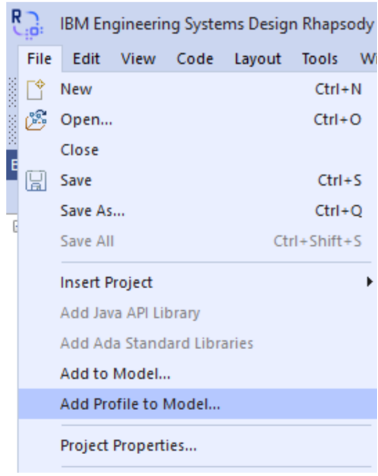
- Once loaded, a new AI Agent menu appears in the toolbar.

Step 3: Discover Actors and Use Cases
- In the model browser, select your requirements.
- Right-click and choose AI Agent → Discover Actors & Use Cases.
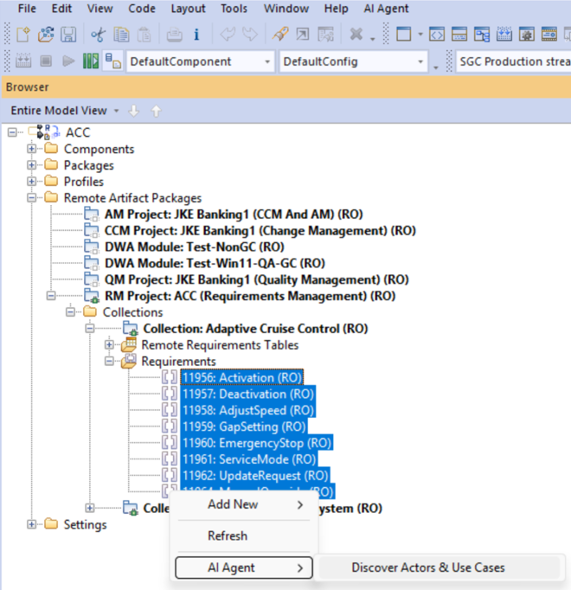
- Log in if prompted, and watch as the agent analyses requirements in real time.
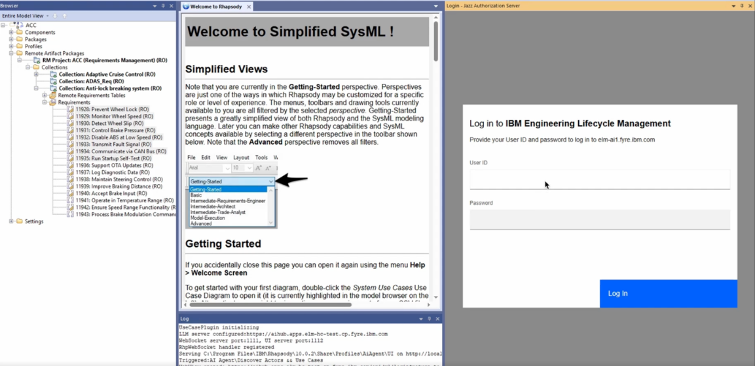
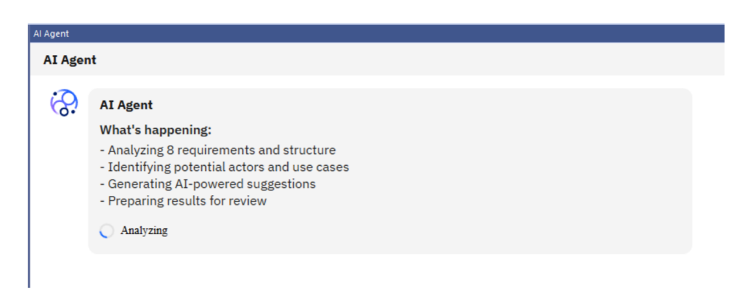
The results appear in an interactive panel ready for review and refinement.
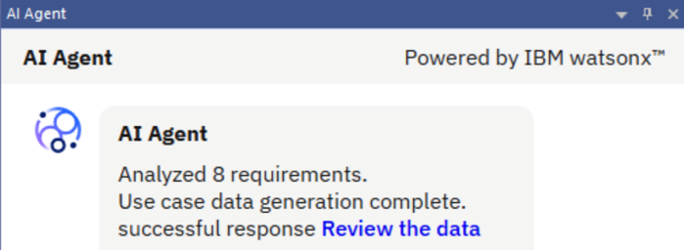
Step 4: Review and Create the Model
- Inspect AI-generated actors and use cases, edit as needed, and confirm selections.
- Click Create button.
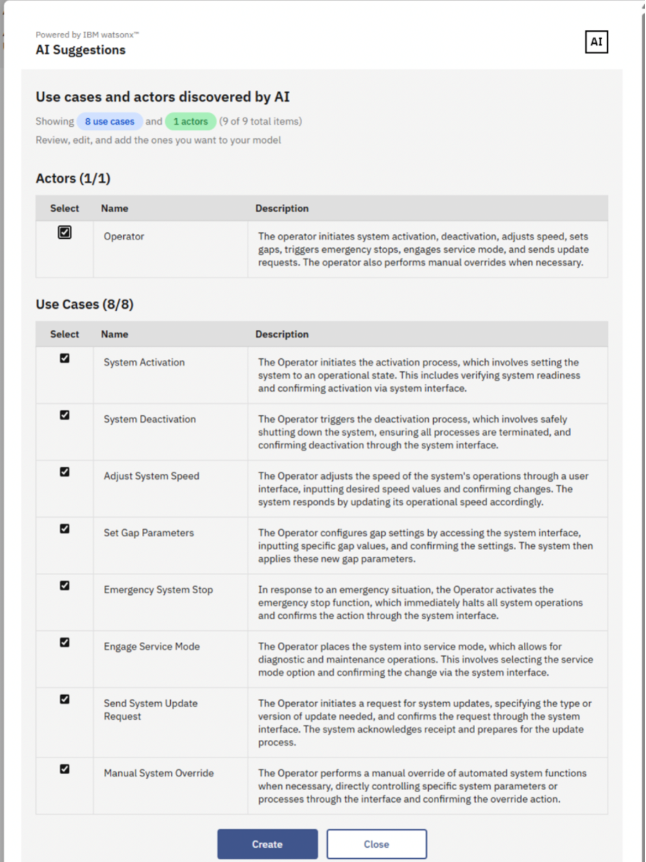
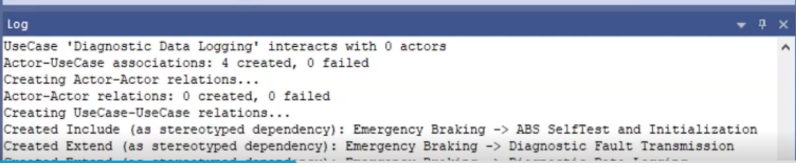
- Generate selected elements and diagrams.
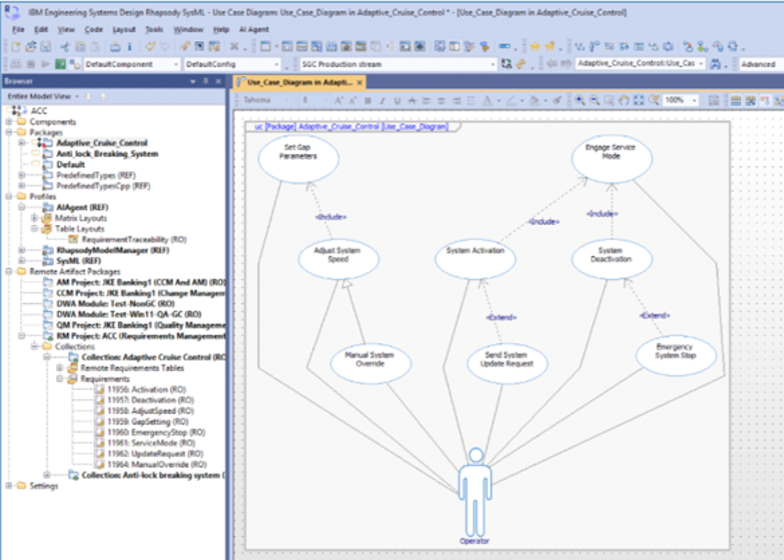
- Establish traceability links between model and requirements.
- Display progress in the log window.
Step 5: Visualize Traceability
- From the AIAgent profile, select Requirement Traceability Table Layout.
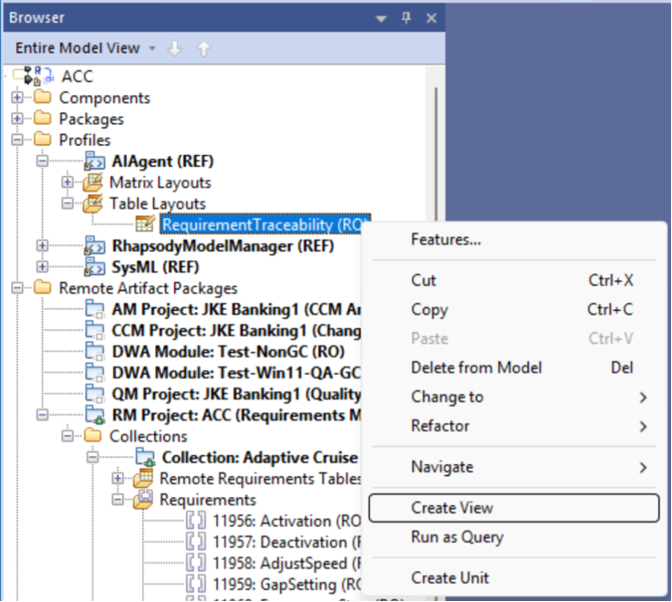
- Create a new view and open it to see clear, automatically built links between requirements, actors, and use cases.
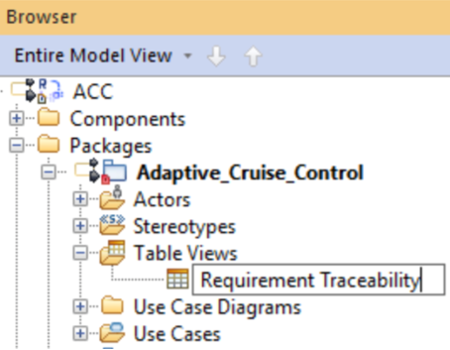
- Select the package where you want to create the requirement traceability view.

- Provide appropriate name to the traceability view and double-click it to open the view.
Once these steps are completed, you’re ready to begin using the MBSE Use Case Discovery Agent and experience the efficiency gains firsthand.
The MBSE Use Case Discovery Agent enables engineering teams to accelerate model creation, improve accuracy, and strengthen traceability all natively within IBM Rhapsody. It works with IBM Rhapsody Systems Engineering 1.6 (and later) too!, where the equivalent of the Rhapsody 10 AIAgent profile is built-in to the Rhapsody SE server.
By transforming natural language requirements into structured SysML models, it eliminates much of the manual effort and complexity traditionally involved in early-phase modeling.
More than a productivity tool, this capability serves as a strategic enabler helping organizations reduce modeling overhead, enhance collaboration across systems and software disciplines, and establish a robust foundation for digital thread continuity throughout the engineering lifecycle.
 (No Ratings Yet)
 Loading...
Authors
 Adam Archer (1)
 Adam Neal (1)
 Adrian Cho (15)
 Alice Connors (3)
 Amy Silberbauer (24)
 Andrew Hans (1)
 Andy Lapping (15)
 Anindita Basu (3)
 Anthony Hunter (1)
 Benjamin Pasero (5)
 Benjamin Williams (3)
 Bernie Coyne (6)
 Beth Zukowsky (2)
 Bhawana Gupta (10)
 Bianca Jiang (3)
 Bill Higgins (2)
 Boris Kuschel (2)
 Brent Barkman (2)
 Brian Bryson (1)
 Brian King (4)
 Brian Lang (2)
 Brian Massey (3)
 Brian Sanders (2)
 Bruce MacIsaac (2)
 Carlos Ferreira (1)
 Carolyn Pampino (10)
 Catherine Burrows (1)
 Chandra Venkatapathy (1)
 Chris Daly (1)
 Chris Trobridge (1)
 Christophe Cornu (3)
 Christophe Elek (5)
 Christophe Telep (14)
 Clara Forero (1)
 Clare Carty (4)
 Dan Barbour (1)
 Dan Griffin (5)
 Dan Leroux (2)
 Daniel Berg (2)
 Daniel Moul (27)
 Daniel Toczala (4)
 Darin Swanson (1)
 Darrel Rader (1)
 Dave Thomson (7)
 David Brauneis (1)
 David Hodges (1)
 Dejan Glozic (2)
 Denise Cook (1)
 Derek Baron (8)
 Dibbe Edwards (3)
 Dirk Baeumer (1)
 Don Yantzi (1)
 Doron Ben-Ari (3)
 ELM Engineering (42)
 Eran Gery (1)
 Erich Gamma (5)
 Erik Craig (1)
 Ernest Mah (1)
 Evan Hughes (3)
 Fariz Saracevic (16)
 Frederic Fusier (1)
 Gary Cernosek (1)
 George DeCandio (4)
 Gili Mendel (1)
 Ginny Ghezzo (1)
 Graham Bleakley (5)
 Grant Covell (1)
 Greg Gorman (1)
 Guy Slade (1)
 Hadar Hawk (2)
 Heidi Stadel (1)
 James Branigan (2)
 James Moody (2)
 Jan Wloka (2)
 Jared Pulham (7)
 Jean-Michel Lemieux (23)
 Jeanette Deupree (1)
 Jim Amsden (1)
 Jim D'Anjou (2)
 Jim Ruehlin (1)
 Johannes Rieken (2)
 John Kellerman (2)
 John Vasta (1)
 John Whitfield (2)
 John Wiegand (1)
 Jozef deVries (1)
 Kai-Uwe Maetzel (6)
 Kalena Kelly (1)
 Karen Gosciminski (1)
 Kate Draper (2)
 Kate Hauser (1)
 Kevin Williams (2)
 Kim Peter (10)
 Kiran M N (1)
 Kit Lo (1)
 Kourken Aroyan (1)
 Kumaraswamy Gowda (15)
 Lauren Hayward Schaefer (15)
 Lawrence Mandel (2)
 Linda Watson (3)
 Liz Bonesteel (1)
 Luc Hatlestad (1)
 Lucinio Santos (1)
 Maneesh Mehra (3)
 Manoj Panda (1)
 Mario Maldari (1)
 Mark Guertin (2)
 Martha Andrews (3)
 Mary Yost (1)
 Masabumi Koinuma (1)
 Mats Gothe (1)
 Matt Lavin (1)
 Michael Fiedler (1)
 Michael Halder (2)
 Michael Valenta (3)
 Millard Ellingsworth (3)
 Miran Badzak (1)
 Monica Luke (5)
 Moshe Cohen (1)
 Nadra Rafee (1)
 Nathan Bak (5)
 Neil Leblanc (3)
 Nick Crossley (3)
 Nithya Rajagopalan (3)
 Palak Sheth (1)
 Patrick Streule (1)
 Paul Ellis (1)
 Paul Strachan (1)
 Paul Tasillo (2)
 Peter Haumer (1)
 Peter Steinfeld (1)
 Phil Vogel (3)
 Priyadarshini Gorur (3)
 Rahul Choudhary (4)
 Reuben Varzea (12)
 Richard Bone (3)
 Richard Watson (13)
 Rishikesh Agam (2)
 Robbie Minshall (1)
 Robin Bater (5)
 Roger LeBlanc (1)
 Rolf Nelson (16)
 Rosa Naranjo (1)
 Rosalind Radcliffe (1)
 Ryan Manwiller (4)
 Sandeep Kohli (1)
 Sandeep Somavarapu (1)
 Sanjesh Nair (1)
 Scott Rich (13)
 Sean Babineau (1)
 Seth Packham (11)
 Sharoon Shetty Kuriyala (1)
 Sreerupa Sen (5)
 Sridevi Sangaiah (1)
 Steve DiCamillo (2)
 Steven Beard (1)
 Subramanya Pilar (6)
 Sujan Surendrananitha (2)
- Suneel Santharam (3)
 Susan Yeshin (1)
 Tim Feeney (7)
 Tod Creasey (1)
 Tom Hollowell (4)
 Ubaidu Peediakkal (3)
 Vaibhav Srivastava (1)
 Vandana Shenoy (1)
 Vatsalkumar Parmar (2)
 Virginia Lovering (1)
 Will Streit (1)
You must be logged in to post a comment.