Team Concert Shell: Use deliver menu on parent folder without a parent folder

I have a component structure like that:
Now I remove the rose.jpeg file.
After a few seconds I get a tool tip:
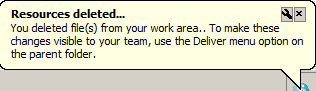
Unfortunately there is no parent folder except the work area itself which does not offer that menu entry.
Pross - Shell SandboxIm running the shell in basic mode without a load rule.
|-- .jazz5
|-- Rose
|-- rose.jpeg
|-- Tomate
|-- tomate.jpeg
Now I remove the rose.jpeg file.
After a few seconds I get a tool tip:
Unfortunately there is no parent folder except the work area itself which does not offer that menu entry.
I know about the pending changes view, which is from my point of view not the right way for the basic mode.
How to handle that?
Accepted answer
If the content of the sandbox appears as is described in the question, then the Rose folder would be the parent folder of the rose.jpeg file, and you would be able to deliver the Rose folder to commit the deletion change.
But based on https://jazz.net/forum/questions/121953 , I'm guessing that your sandbox actually looks like:
Pross - Shell Sandbox
|-- .jazz5
|-- rose.jpeg
|-- tomate.jpeg
where rose.jpeg is loaded from the Rose component, and tomate.jpeg is loaded from the Tomate component.
If so, then it is true that you would need to use the Pending Changes view to deliver the deletion of rose.jpeg (or tomate.jpeg), but it is also true that you couldn't have added these files to RTC via the Windows Explorer in "basic mode", because the Windows Explorer doesn't let you put top level files under source control ... only top level folders.
Comments
Geoff, you are right, that it looks like you described - without the component folders caused by the missing load rule.
And yes I - as the guy without the load rule - couldn't have added the structure, but I in my alter ego or a colleague running the shell in advanced mode could have done so. The small mistake not having a load rule leads to the result described above.
From my point of view, here is some room for improvement:
As suggested in my enhancement request, a default setting in the manner that components are loaded as root folders would be the result, which is expected in most of the times. The actual default setting resulting in the structure described above will cause discussions especially for less educated users; and those will be the main users of the shell in basic mode.

I agree, and have added a comment to the work item indicating my support.