


Long Running ETLNo Error
Authors: GeraldMitchell, StephanieBagotLast updated: 26 Feb 2013
Build Basis: Products, Editions and Versions as applicable
Page contents
- Why do my ETLs take so long to run?
- Initial Assessment
- Possible Causes and Solutions
- The Data warehouse is configured to use the same database as the JTS/CCM/QM application
- There is too much data collected by the Job
- Too many jobs are running or the jobs are unnecessarily run
- Not enough System Resources
- Database Backups
- Outdated JDBC Driver
- Custom SQL Queries are causing Delays in Running ETLs
- Network Delays
Why do my ETLs take so long to run?
This situation is to help discover the possibilities in correcting ETLs in the situation where the ETLs seem to be taking what is considered a longer time than expected to run. This specific topic will cover instances when no error occurs.If an error has occurred, navigate to the Long Running ETL with Error page.
Initial Assessment
After you have completed the Initial Troubleshooting, and the Initial Assessment ETL specific questions, you have been unable to identify any errors or other unexpected behaviour which is causing the long running ETL. This page will help to point you to where to investigate next.Possible Causes and Solutions
Significant improvements have been made to the performance of the ETL processes between 3.x and 4.x. Ensure you are running at least 4.0 to take advantage of these performance increases. Below are some possible causes and solutions we have experiences with long running ETL jobs:The Data warehouse is configured to use the same database as the JTS/CCM/QM application
The Data warehouse should be a seperate database than the JTS/CCM/QM application databases. Ensure that the JDBC Location connection string for the data warehouse, located onhttps://<servername>:9443/<app context root>/admin#action=com.ibm.team.reportsManagement.configureDataWarehouseConnectionpoints to a seperate database than the application database JDBC connectio string found on
https://<sever name>:9443/<app context>/admin#action=com.ibm.team.repository.admin.configureDatabaseConnection
There is too much data collected by the Job
Full data collection jobs occur during the initial run of the data collection jobs. These jobs take significantly longer than typical data collection jobs that run 'delta builds' which only collect changes from the last time that job was run. If you are manually initiating Data Collection, ensure that the Full Data Collection Job is not selected. Collecting too much data may also cause an error, as addressed in Long Running ETL with ErrorHow do I know if I am running the Full Collection Job? Under the Data Collection Jobs page
https://<servername>:9443/<app context>/admin#action=jazz.viewPage&id=com.ibm.team.reports.reportsManagementPageEach Data Collection job will be displayed. Under Actions, there are two buttons. The first is for the Delta Jobs and the second is for the Full Collection Job.
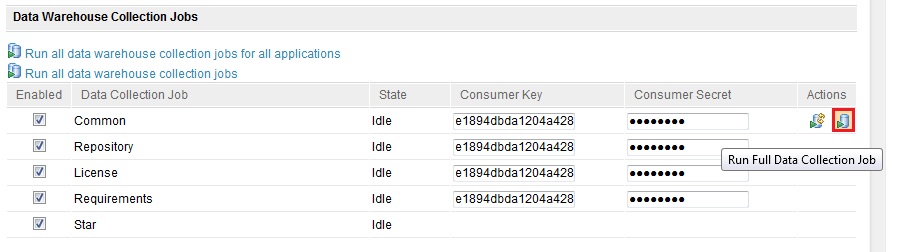 In addition delivery of data into the data warehouse is slow when projects contain too much data. It is possible to reduce the data delivered by customizing the ETL process to deliver raw data directly to a temporary table and then to separately transform that data into the target table. This requires the creation of a temporary table with the correct privileges, configuring the application server, customizing the ETL process, and executing the ETL job. See the Technote 1455870 for an example of Insight and Requisite Pro, though the general principal applies to all applications and data warehousing.
Too many jobs are running or the jobs are unnecessarily run
The ETL is data dependent and so should be treated as a queue, where only one ETL should be scheduled at a time. Additionally, ETL jobs that are duplicated or run too often can slow performance. Out of the box, the ETLs will run subsequently one after the other, so running multiple jobs should not be a concern. If you have customized any ETLs to run at the same time, this could cause the long running ETLs. Take a look into your customization to ensure no ETLs are running at the same time.*Example:* The ANALYZE_TABLE command is already run by the ETL jobs, so it is redundant to have it run twice. The ANALYZE_TABLE command can be disabled through a new parameter in the Data Warehouse connection page named: Automatically update the database statistics. Source: Technote 1590790
The ETL or the data collection jobs are not processing data as expected.
- Make sure the correct package is being run. The packages provided by the applications are specific to version. The extract, transform, and load (ETL) catalog contains the fact and dimension builds that define how the data is extracted, transformed, and loaded to the data warehouse.
- Insight 1.1.1 with CLM at 3.0.1.x and JTS at 4.0.0.x in a distributed topology must use the 'new with 1.1.1' data manager ETLs for 3.0.1. The data manager ETLs that ship with Insight come in various flavors: ones that are for use with CLM 3.0.1 and ones that are for use with CLM 4.0.
- Insight 1.1.1.1 with CLM 4.0.0 and JTS is at 4.0.1 must also use the 'new with 1.1.1.1' data manager ETLs for 4.0. The data manager ETLs that ship with Insight come in various flavors: ones that are for use with CLM 4.0 and ones that are for use with CLM 4.0.1.
Not enough System Resources
The ETLs are running and consuming system resources, but there is no Out of Memory or crash occurring. The ETLs may simply be running as quickly as possible based on your current system resources. An option to increase processing time would be to add more RAM or processing power to the server.Database Backups
Running a backup process during the scheduled ETL run time (by default, this is 12 AM) will also add additional load onto the database server, causing the ETLs to run longer. Ensure that no backup is being run during the ETL process.Outdated JDBC Driver
The JDBC driver allows the JVM to connect to the database and transfer data and therefore directly affects the performance of the database with respect to data loading. For large datasets, the corrections in recent JDBC drivers for performance will help alleviate problems associated with moving large amounts of data. Make sure that the JDBC driver is the latest recommended version for the Database and is the correct 64 bit (or 32 bit) version.Custom SQL Queries are causing Delays in Running ETLs
In some environments, third party tools are used to gather data by running SQL queries against the database. Running these additional SQL queries will put extra load on the database server, thus causing the ETLs to run longer. Ensure that there are no custom queries running against the database during the time the ETLs run.Network Delays
If there are too many network hops between the CLM Server and the database server, the latency may cause long running ETLs as the data is extracted and loaded. Ensure that your Database Server and CLM Server are located on the same network. Wireshark and other network troubleshooting tools can be used to troubleshoot network performance.Related Topics: Deployment Web Home, Deployment Web Home
External Links:
Additional Contributors: TWikiUser, TWikiUser


| I | Attachment | Action | Size | Date | Who | Comment |
|---|---|---|---|---|---|---|
 jpg jpg |
FullETL.jpg | manage | 60.7 K | 2013-02-26 - 19:55 | UnknownUser | Full Data Collection job |

 Copyright © by IBM and non-IBM contributing authors. All material on this collaboration platform is the property of the contributing authors.
 Contributions are governed by our Terms of Use. Please read the following disclaimer.
Dashboards and work items are no longer publicly available, so some links may be invalid. We now provide similar information through other means. Learn more here.