


IBM Quick Deployer updating Rational_QD_SystemPre-Requisite_60x* component parameters
Authors: ThomasPiccoli, KennethThomson, JenniferLiu, KenTessier, ClareCartyBuild basis: CLM 6.0, CLM 6.0.x, CE 6.0.x
Prior to running the UCD Install Applications application process, the out of the box installation of Quick Deployer requires you to run the following application processes
More information on creating an environment can be found in this topic - UCD environment construction
- Change Default LDAP Parameters application process
- Change the default user parameters application process
- Change the default database parameters application process
Create UCD environment
By following these steps you can create the environment for this processMore information on creating an environment can be found in this topic - UCD environment construction
- Install a UCD agent on a single dummy Linux machine.
- Create a dummy application environment
- Create a UCD resource
- Create a UCD environment
- Add the dummy agent to the environment
- Map the Rational_QD_SystemPre-Requisite_60x component to the agent
Run UCD processes
- Run the Change Default LDAP Parameters process - Change the default LDAP parameters
- Run the Change Default User Parameters process - Change the default user parameters
- Optionally run the change default DB2 database parameters process - change default DB2 database parameters
- Optionally run the change default Oracle database parameters process - change default Oracle database parameters
- If you are going to use the Quick Deployer installed DB2 or Oracle database then you should have your database administrator review the configuration to make sure it conforms to internal security and reliability policies.
Update UCD Rational_QD_SystemPre-Requisite_60x component
- On the dummy linux machine confirm the following property files have been created
- /IBMQD/UCDComponents/AutomationPrep/DatabaseParameters/DBParameter.properties
- /IBMQD/UCDComponents/AutomationPrep/DatabaseParameters/oracleParameter.properties
- /IBMQD/UCDComponents/AutomationPrep/UserParameters/userCreds.properties
- /IBMQD/UCDComponents/AutomationPrep/CustomLDAP/Custom_LDAPSecurity.properties
- Copy the four files to a temporary folder (e.g. /tmp/defaultFolder)
- Expand the IBM Quick Deployer installation package into a temporary folder (e.g. /media/QD)
- Ensure the following files are present
- versionUpdate.sh
- componentVersionDownload.sh
- componentVersionImport.sh
- Assign execute permission to the {agent install dir}/agent/opt/udclient/udclient script
- Assign execute permission to the versionUpdate.sh, componentVersionDownload.sh and componentVersionImport.sh scripts
- ensure JAVA_HOME is set. If not export JAVA_HOME={location of your jre} (e.g. /usr/lib/jvm/jre)
- ensure UCDCLIEXE is set. If not export UCDCLIEXE={location of your udclient exe} (e.g. /opt/ibm-ucd/agent/opt/udclient/udclient)
- Execute the versionUpdate.sh script
The script expects 7 arguments:- USERNAME =UCDAdminUserName
- USERPASSWORD =UCDAdminUserPassword
- UCDSERVER =UCDURL (e.g. https://UCDHostName:8443)
- COMPONENTNAME =the name of the component that will be updated, it has to be set Rational_QD_SystemPre-Requisite_60x
- COMPONENTOLDVERSION =the existing version name of the target component being updated (e.g. 6.0.2.0)
- COMPONENTNEWVERSION =the new version name of the target component (e.g. 6.0.2.1)
- DEFAULTFILESOURCEFOLDER =the folder containing the updated properties files (e.g. /tmp/defaultFolder)
    cd /media/QD
    chmod 755 {agent install dir}/agent/opt/udclient/udclient
    chmod 755 versionUpdate.sh
    chmod 755 componentVersionDownload.sh
    chmod 755 componentVersionImport.sh
    export JAVA_HOME={location of your jre}
    export UCDCLIEXE={agent install dir}/agent/opt/udclient/udclient

    sh versionUpdate.sh USERNAME=adminuser USERPASSWORD=adminpassword UCDSERVER=https://UCDHostName:8443 COMPONENTNAME=Rational_QD_SystemPre-Requisite_602 COMPONENTOLDVERSION=6.0.2.0 COMPONENTNEWVERSION=6.0.2.1 DEFAULTFILESOURCEFOLDER=/tmp/defaultFolder | tee console_versionUpdate.log
    >> deleted console text <<
    SUCCESS [versionUpdate.sh]: component scripts updated and a new version added to UCD
Confirm the update happened
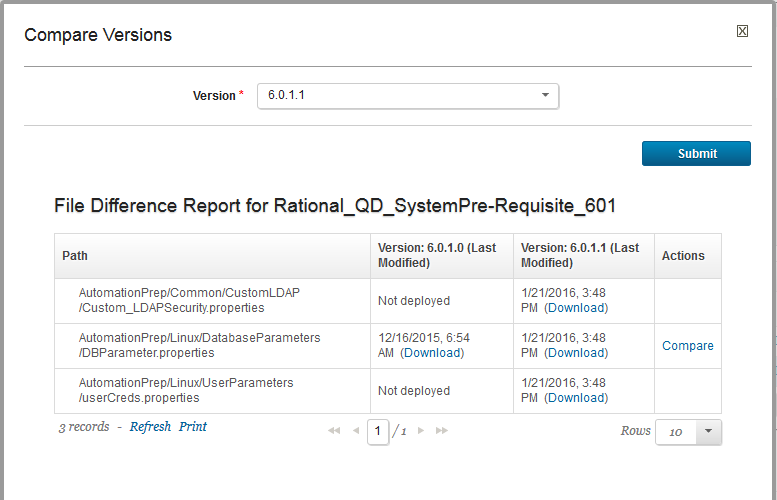
- Open the component version after the script is executed successfully, you should see the newer version is added to the component

- Click the Compare button to see the differences between the two versions
Update fixed component versions
Be aware that if you have previously fixed the Rational_QD_SystemPre-Requisite_60x component version used by the Install Applications application process you should go back and update it to this new version. You do this using - Set fixed component versionsMiscellaneous
Notes:
- Throughout the IBM Quick Deployer wiki the screen captures are for reference only.
In some cases if the functionality they display has not changed in the latest release they will be from a previous release
Related topics:
External links:
Additional contributors: MichelleCrane, NathanBak, ChristianLopez
Deployment.IBMQuickDeployerUpdatingSystemPreReqParametersOld moved from Deployment.IBMQuickDeployerUpdatingSystemPreReqParameters on 2017-07-28 - 19:44 by Main.ktessier -
 Copyright © by IBM and non-IBM contributing authors. All material on this collaboration platform is the property of the contributing authors.
 Contributions are governed by our Terms of Use. Please read the following disclaimer.
Dashboards and work items are no longer publicly available, so some links may be invalid. We now provide similar information through other means. Learn more here.