


Creating a performance simulation for Rational Team Concert using Rational Performance Tester 
Authors: VaughnRokosz Build basis: Rational Team Concert 6.0, Rational Performance Tester 8.3.0.3
I've had several recent conversations regarding customers who are doing their own performance testing with the Jazz products. This is a good idea - although IBM does its own extensive performance testing (publishing the results here), customer results may be different because of unique aspects of a customer environment. On the other hand, performance testing is hard. Building a good simulation of a user population requires expertise at many levels, including: 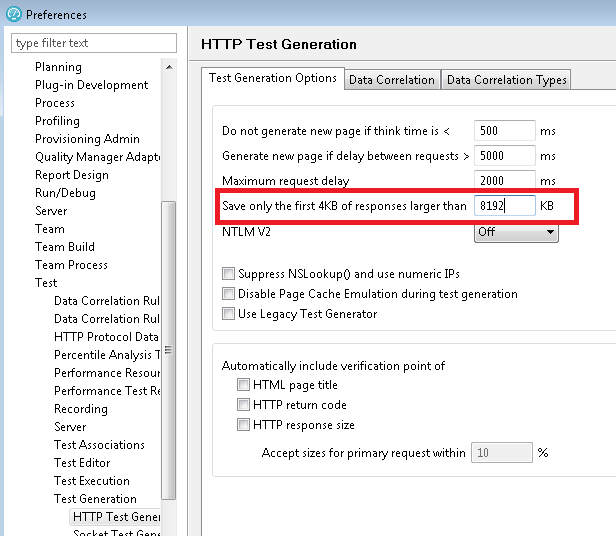 I want to automate the following steps:
 Next, I want to disable image requests. Images (like PNG or GIF files) are going to be cached by the browser, so I don't want the performance scripts to be constantly asking for things that the browser would not be asking for. You can use RPT to do this in bulk by clicking the Modify button next to "Secondary request behavior".
 The last preparation step is to enable all of the response code verification points, by right-clicking on the test script name and selecting "Verification Points -> Enable Response code VPs". I set the verification to "Exact" so that any difference between what the script observed during recording and what happens during playback will be flagged. The main problem this addresses is something that can happen during long tests, when authentication tokens expire. The server will respond with 302 requests, and while this will cause a prompt for reauthentication in the browser, RPT is not resilient enough to react to this change in protocol. With Relaxed matching, this isn't flagged as an error during performance runs.
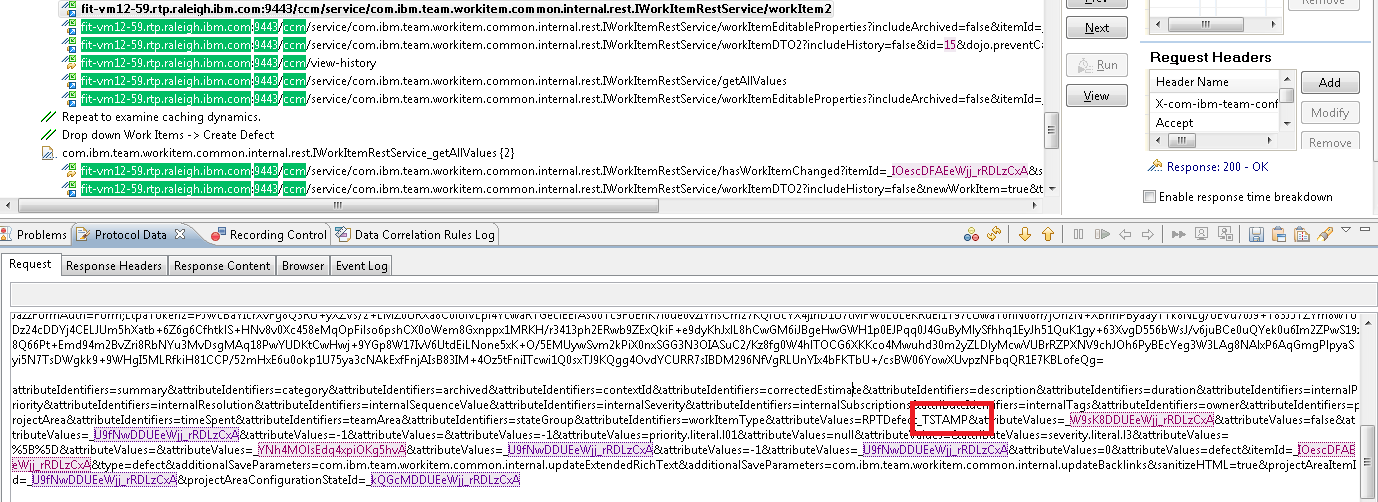
 Now I'm ready to review the script to see how well RPT did in getting the script ready to execute in a multi-user test. If I open up the CreateDefect_phase1 script, I'll see the transactions captured by RPT (see next image). Light purple shows values that RPT could correlate between requests and responses. Light green shows values that RPT could not correlate, but flagged as potential issues. There are several uncorrelated data values that are going to cause trouble during playback, and a few of these are highlighted in red:
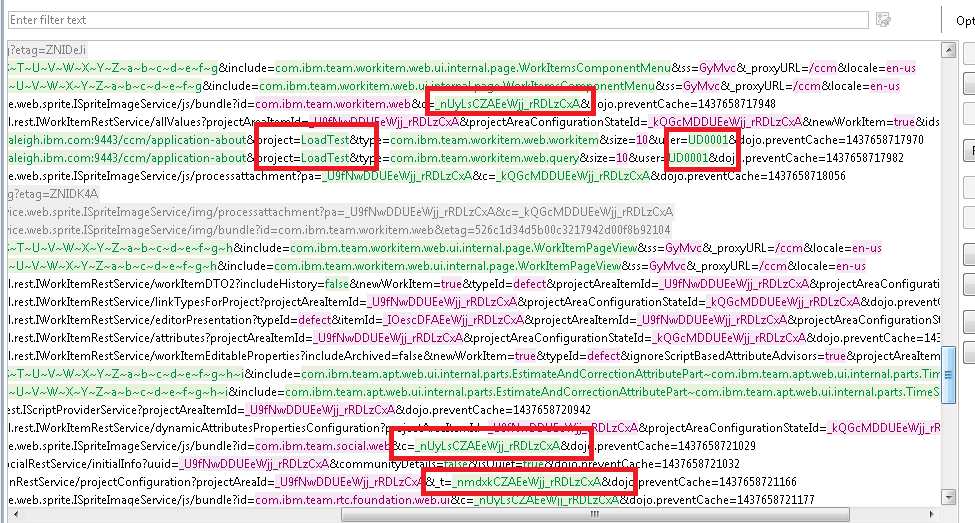 Here are a few of the problems which are easy to spot:
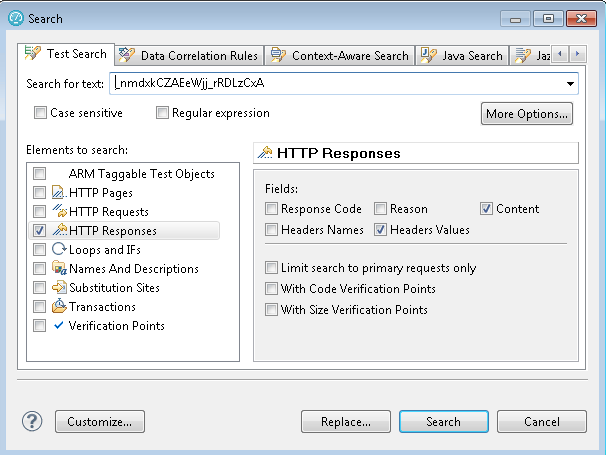 This found one match, in the return data from a call to ccm/_js. Right-click on the "Content Offset" and select "Go to":
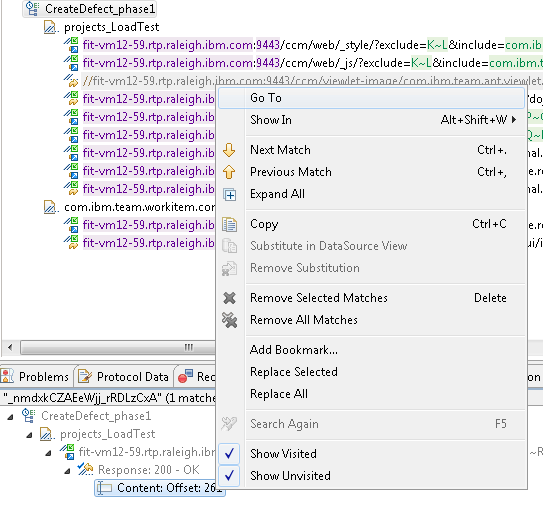 The "Go to" option takes us to the return data for the ccm/_js call, and that shows us where this value comes from. This is the "Web UI guard", which tries to prevent random clients from using the private plan REST services.
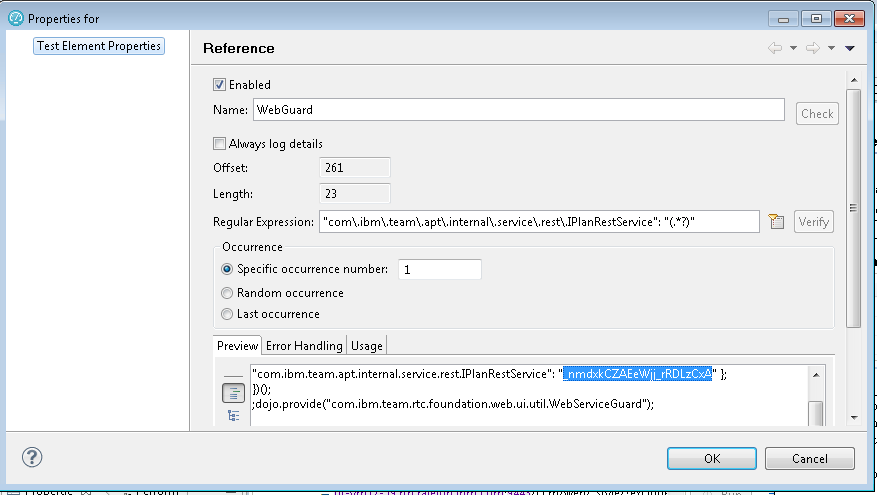
 Now, highlight the data value, right-click, and select "Create Reference". The Edit Reference dialog appears, so enter a short name for the reference field (like "WebGuard"), and select "Edit Reference Properties". (If you select OK at this point, RPT will take its best guess at a regular expression that will pull out that value, but it is better to double-check that, since you will often want to improve the extraction logic). In this case, the extraction expression is good:
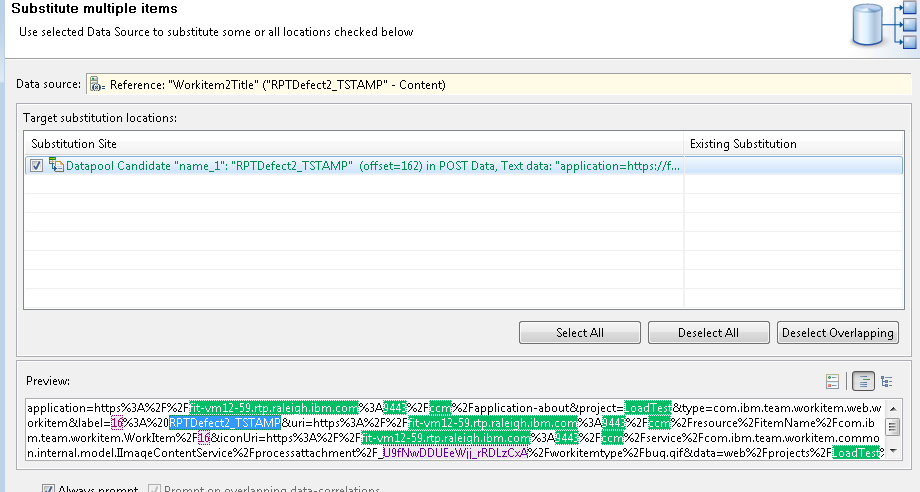
Next, RPT will ask you whether it can find places which match this data value, so it can substitute the value during test execution. Say "Yes", and you'll see something like this:
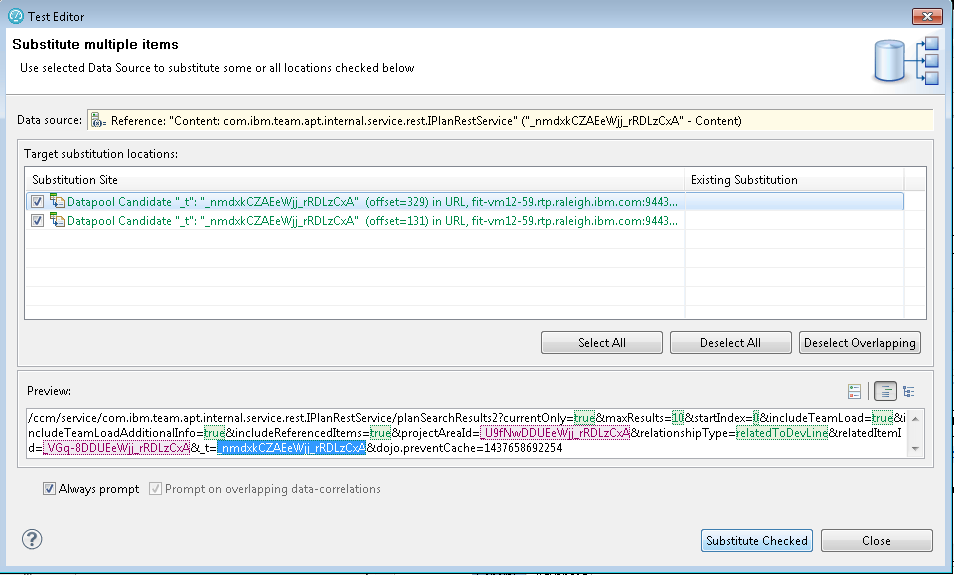 Allow RPT to substitute both occurences.
Now, repeat the process for all the rest of the uncorrelated values that you need to address. I've mentioned before that this can be time-consuming. Fortunately, RPT provides you with a way to capture the results of your manual correlations as correlation rules, so that you can apply them easily against future tests. Here at IBM, we've developed an extensive set of correlation rules which we apply to the Jazz products, and I've made those available in the sample project. Let's look at those in more detail.
- An understanding of what the user population is likely to be doing, and how often
- Experience with the performance simulation tool of choice
- Ability to reverse-engineer the protocols sent to the Jazz server to build working simulations
Overview of the process
One of the primary tools I use for doing performance testing of the Jazz products is Rational Performance Tester (RPT). I use RPT when I am creating a simulation of a user population that is using Web browsers to access a Jazz server. With RPT, you can create test scripts by recording the traffic sent by the browser to the server. Once you have a basic recording, you can then adjust it so that it can RPT can play it back as if multiple users were performing the operation at the same time. This can be tricky for complex protocols like those used by the Jazz products. A single user operation like opening a project area involves a number of exchanges between the browser and the server. Calls made early in the process often return data that is needed by calls made later, and the request data needs to be properly correlated with the response data. While RPT will do its best to automatically correlate data, it won't catch everything so you have to correlate some data by hand. Fortunately, RPT provides a way to capture correlations as "correlation rules", so that as you build up an understanding of a specific protocol, you can capture that understanding in rules files to apply later. That's what we've done for the Jazz products. A good way to think of your performance scripts is as if they are a simplified version of the browser client. As the browser interacts with the Jazz server, it pulls down code which can act on data provided by the server. The browser is capable of making decisions based on that data which impact the requests that the browser will send to the Jazz server. RPT scripts, however, do not have that logic and so they can only play back what they observed. This means that you have to be mindful of areas where the protocol is dynamic, and try to account for those areas when you develop your scripts. You especially need to watch for caching logic which the browser may apply. First-time operations can be more expensive than second-time operations, so a simulation that is based on a set of first-time operations will stress the server more than is reasonable. Let's see how this looks for a use case involving the Rational Team Concert and a web browserBasic use case: create a defect
For this article, I want to simulate a user population that creates defects in RTC. To set up for this, I deployed Rational Team Concert onto a test system, and I created a project area called "LoadTest" from the Scrum template. Then, I added 250 test users to the project area and granted them all of the roles. I use an LDAP server in my test lab which contains users named UD0001 - UD0250, so those are the users I added. I used Rational Performance Tester 8.3.0.3 for this example. Before I started, I needed to adjust one of the RPT preferences. Some of the responses (especially the code bundles) are larger than 2M, and RPT will truncate those responses unless the buffer size is increased. Since I want all the data to come back, I need to adjust this in Windows->Preferences, then select Test->Test Generation->HTTP Test Generation.
I want to automate the following steps: - Open a web browser, and enter the URL that will open the dashboard for the "LoadTest" project area
- In the menu bar, select Work Items -> Create -> Defect
- Give the defect a title, and update the "Filed against" field to be "LoadTest"
- Save the defect
- Repeat this process to create a second defect (without shutting down the browser)
The first recording - basic preparation
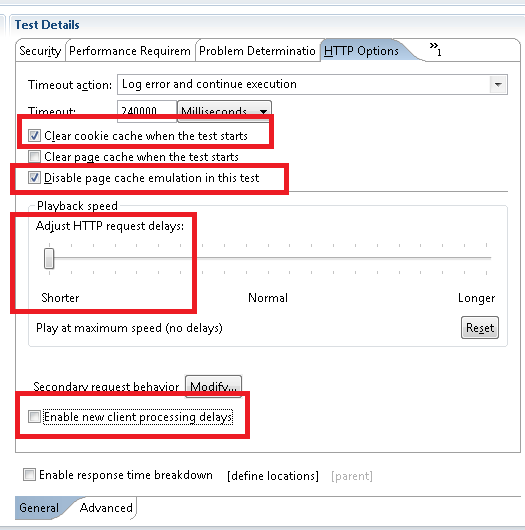
To get started, I need to use Rational Performance Tester to make a recording of my "create defect" use case. This is straightforward; You start RPT, and then select New -> Test from Recording. If you select HTTP Test, then RPT will launch the browser and you can then go through the steps I outlined above. Once you're done, close the browser and RPT will generate a test script based on its observations of how the browser and the RTC server interacted. In the sample project, you can find the recording and the associated test script in the Recordings folder (CreateDefect.rec and CreateDefect.testsuite). I've allowed RPT to apply its default correlation rules, so if you open the CreateDefect test script, you can get an idea of how well it did. Since I know I need to make a few adjustments to this script before I can use it, I created a copy of it called CreateDefect_phase1 in the Scripts folder. The first step is to adjust the HTTP options for the script. The key settings are: * Clear the cookie cache when the test starts, since this script includes a login operation. That allows each execution of the script to start fresh. (For scripts that don't simulate logins, you'd leave this unchecked).- Disable page cache emulation. I don't want RPT to try to apply caching logic to the CLM server.
- Adjust the playback speed to the minimum. I don't want RPT to inject delays because that makes it harder to interpret the results. The tradeoff is that the simulation will run a bit faster than a browser session.
- Uncheck "enable new client processing delays". This is another place where RPT can inject delays into the scripting, but since I'm interesting in the raw performance of the transactions, I don't want these delays to make it harder to interpret results.
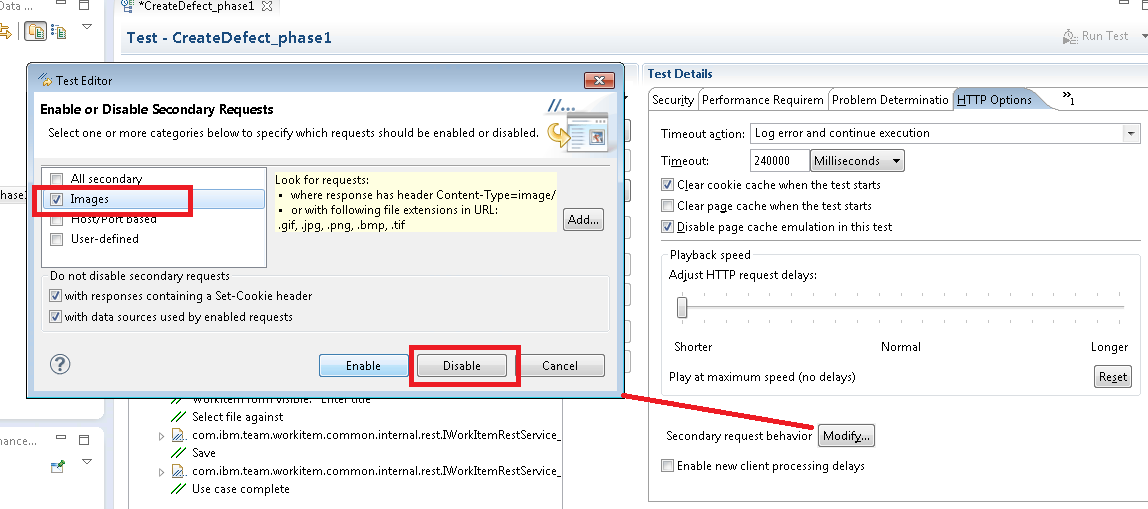
Next, I want to disable image requests. Images (like PNG or GIF files) are going to be cached by the browser, so I don't want the performance scripts to be constantly asking for things that the browser would not be asking for. You can use RPT to do this in bulk by clicking the Modify button next to "Secondary request behavior".
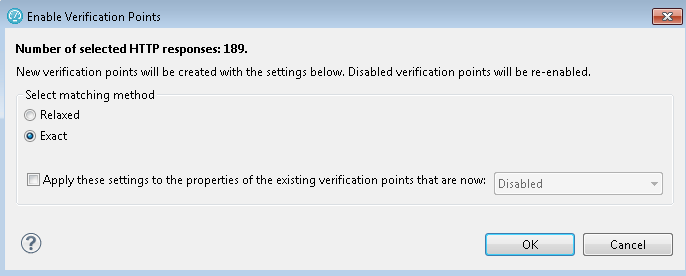
The last preparation step is to enable all of the response code verification points, by right-clicking on the test script name and selecting "Verification Points -> Enable Response code VPs". I set the verification to "Exact" so that any difference between what the script observed during recording and what happens during playback will be flagged. The main problem this addresses is something that can happen during long tests, when authentication tokens expire. The server will respond with 302 requests, and while this will cause a prompt for reauthentication in the browser, RPT is not resilient enough to react to this change in protocol. With Relaxed matching, this isn't flagged as an error during performance runs.
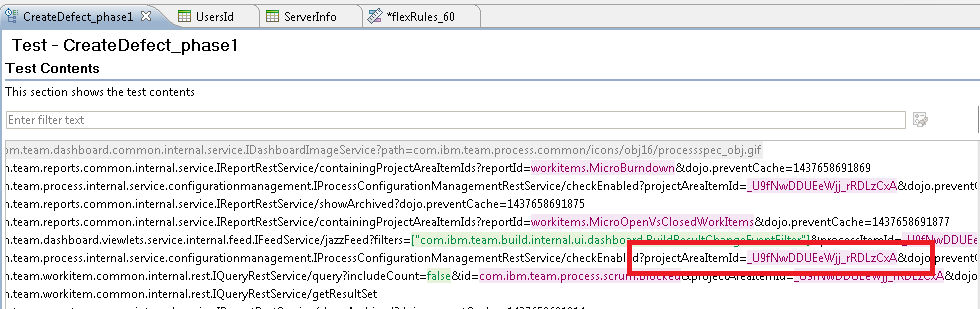
Now I'm ready to review the script to see how well RPT did in getting the script ready to execute in a multi-user test. If I open up the CreateDefect_phase1 script, I'll see the transactions captured by RPT (see next image). Light purple shows values that RPT could correlate between requests and responses. Light green shows values that RPT could not correlate, but flagged as potential issues. There are several uncorrelated data values that are going to cause trouble during playback, and a few of these are highlighted in red:
Here are a few of the problems which are easy to spot: - The name of the project area is hard-coded, so I can only use this script against projects with the name "LoadTest".
- There are places where the host name of the original server is hard-coded. That means that I can only use this test script with one server.
- The user name used during recording is hard-coded. Since I am going to be running a multi-user simulation, I'd like for each simulated user to have a different id.
- The project area id is not correlated on the ISpriteImageService (another thing that limits this script to running against one server/project)
- There are uncorrelated ids for the "c" parameter on ISpriteImageServiceand the t parameter for calls to IPlanRestService. These calls are likely to fail unless we get the values at runtime from earlier request
- The dashboard requests include a dashboard id which is not correlated.
Manual correlation of data values
The next step is to manually correlate the data values which were not picked up by RPT. The basic procedure is as follows:- Do a "Test search" to find the first transaction which returned the value you want to correlate
- Create a "Reference" field in RPT that will extract the value you need from the return data
- Substitute the reference in later requests
This found one match, in the return data from a call to ccm/_js. Right-click on the "Content Offset" and select "Go to":
The "Go to" option takes us to the return data for the ccm/_js call, and that shows us where this value comes from. This is the "Web UI guard", which tries to prevent random clients from using the private plan REST services.
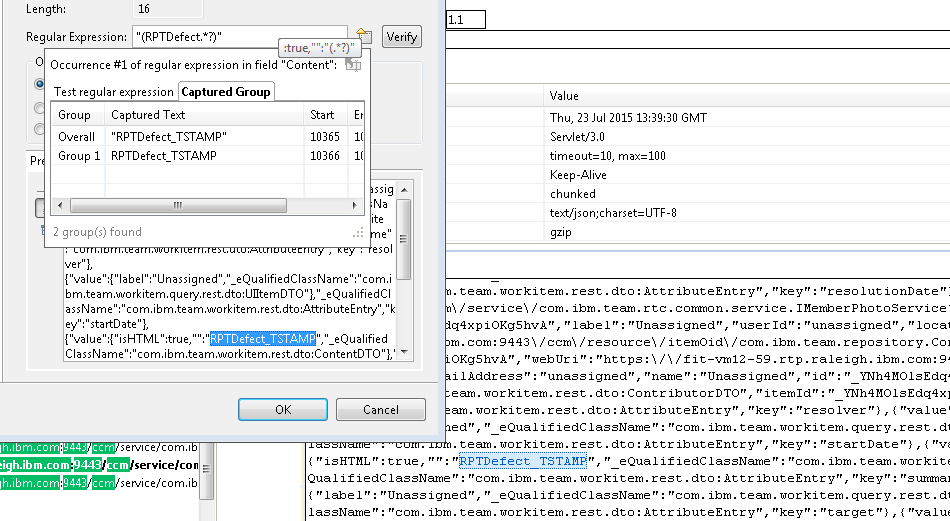
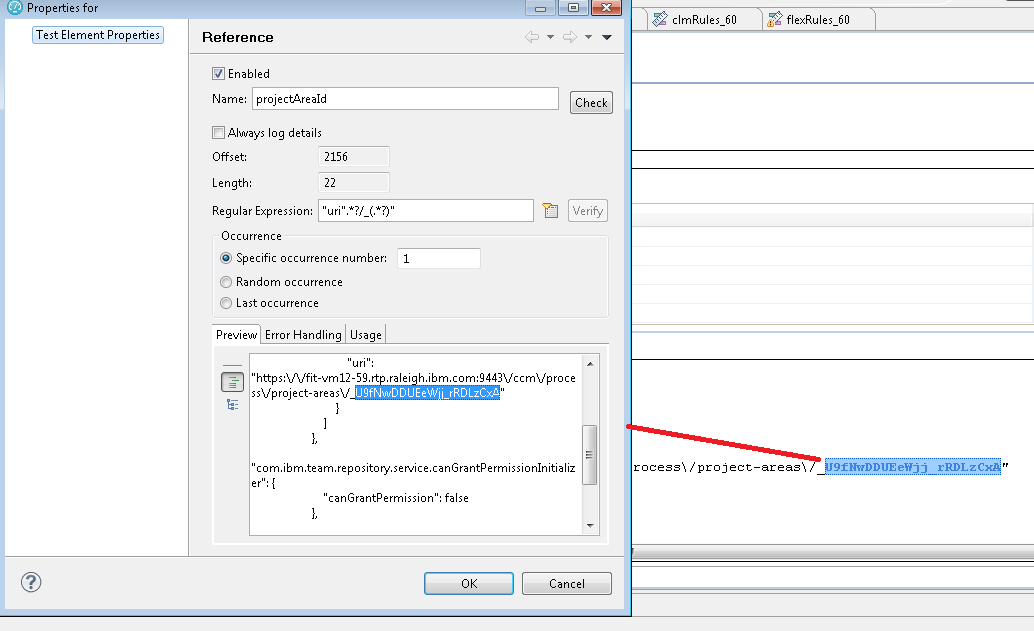
Now, highlight the data value, right-click, and select "Create Reference". The Edit Reference dialog appears, so enter a short name for the reference field (like "WebGuard"), and select "Edit Reference Properties". (If you select OK at this point, RPT will take its best guess at a regular expression that will pull out that value, but it is better to double-check that, since you will often want to improve the extraction logic). In this case, the extraction expression is good:
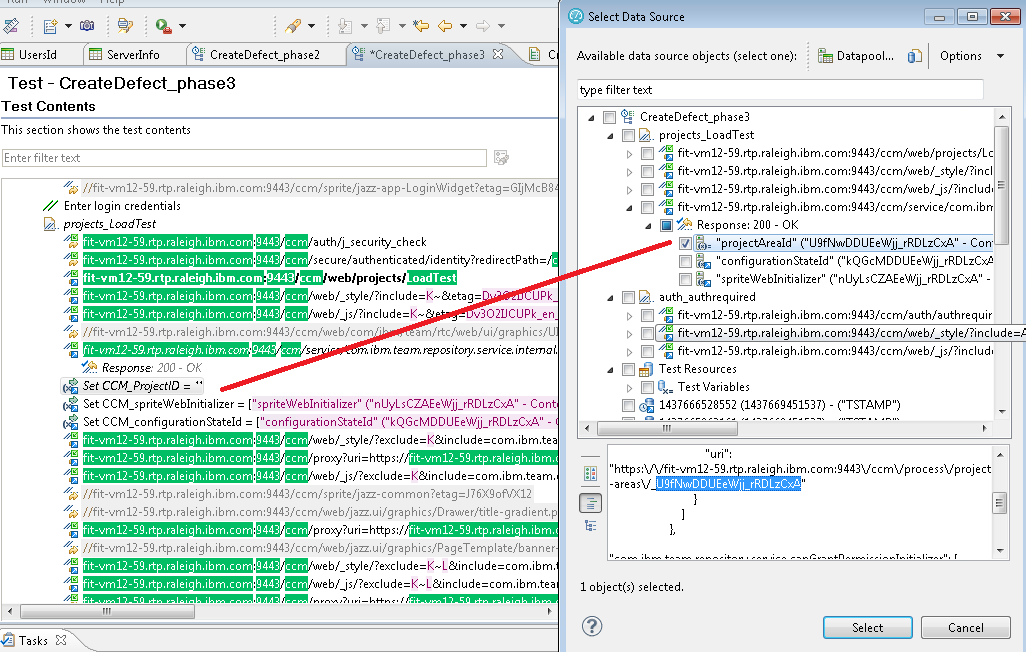
Next, RPT will ask you whether it can find places which match this data value, so it can substitute the value during test execution. Say "Yes", and you'll see something like this:
Allow RPT to substitute both occurences.
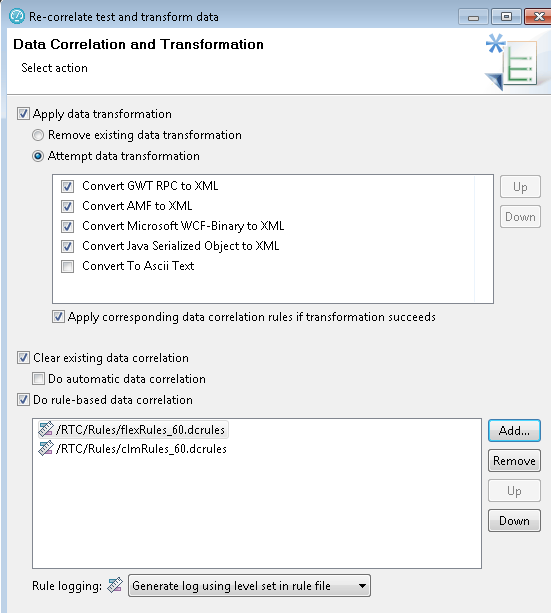
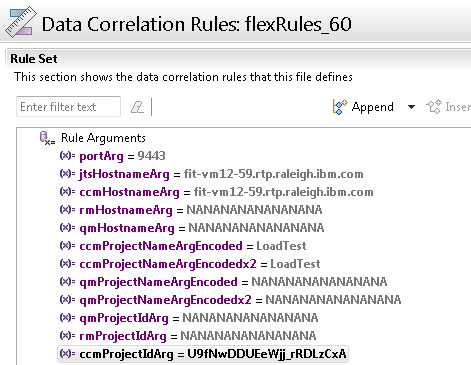
Now, repeat the process for all the rest of the uncorrelated values that you need to address. I've mentioned before that this can be time-consuming. Fortunately, RPT provides you with a way to capture the results of your manual correlations as correlation rules, so that you can apply them easily against future tests. Here at IBM, we've developed an extensive set of correlation rules which we apply to the Jazz products, and I've made those available in the sample project. Let's look at those in more detail.
Related topics: Deployment web home, Deployment web home
External links:
Additional contributors: TWikiUser, TWikiUser





















 Copyright © by IBM and non-IBM contributing authors. All material on this collaboration platform is the property of the contributing authors.
Contributions are governed by our Terms of Use. Please read the following disclaimer.
Dashboards and work items are no longer publicly available, so some links may be invalid. We now provide similar information through other means. Learn more here.