deploy the IBM® Rational® Publishing Engine Document Builder on an IBM WebSphere Application Server Liberty.

Accepted answer
server create rpe
2. Copy com.ibm.rpe.web.app.ear from %RPE_HOME%\remote-services into the apps folder of your Liberty server (C:\IBM\JazzTeamServer\server\liberty\wlp\usr\servers\rpe\apps in my machine)
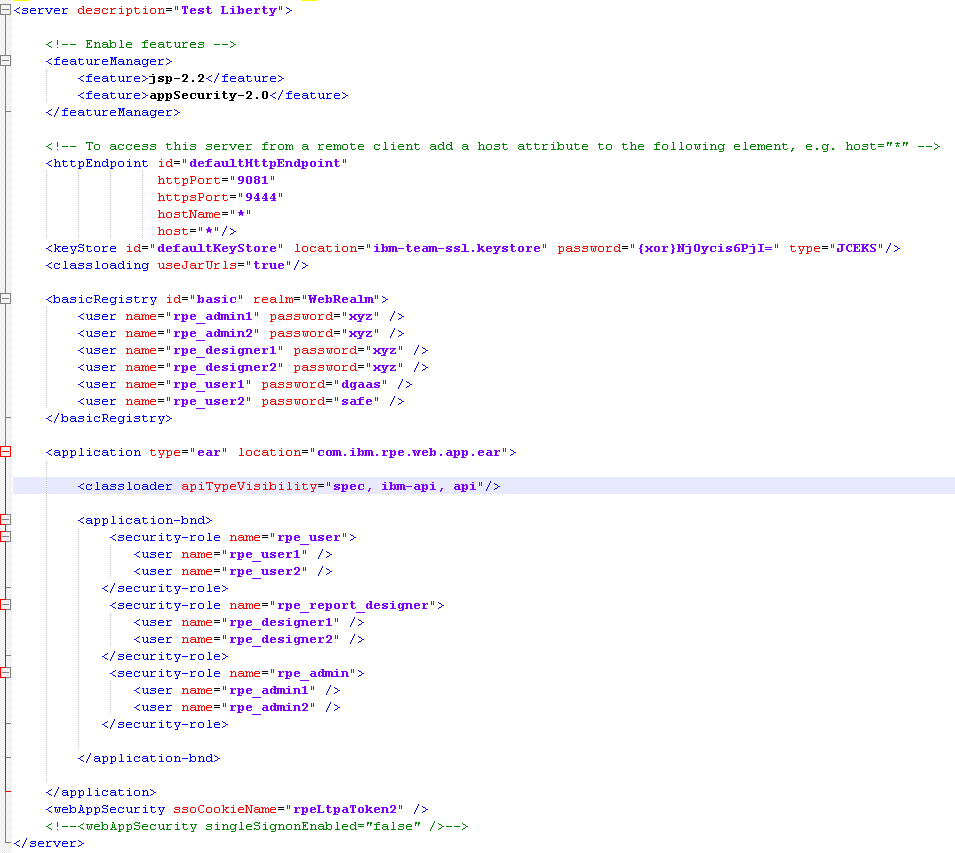
3. Ensure the JSP and Auth features are enabled for the Liberty server. Add the required users and roles for RPENG.
Comments
Subrmanya Prasad,

It should be same. The location depends on where you have installed WLP.
Followed the steps as mentioned by you, while launching the link https://<hostname>:9443/rpeng/home or http://<hostname>:9080/rpeng/home, below error is reported. Please help to resolve.
Context Root Not Found
Probably you are using incorrect port number. If CLM is already installed, these ports (9443 and 9080) are in use. You need to modify server.xml and specify a different port (ex. 9444 and 9081) and try the correct URL - https://<hostname>:9444/rpeng/home
After modifying the server.xml file with different port
Did you restart rpe server?
I started Liberty server namely <JazzTeamserver>\server\ server.startup.bat after modify the server.xml at <JazzTeamserver>\server\liberty\wlp\usr\servers\rpe
You should restart rpe server (since you have made changes to server.xml corresponding to rpe server)
unable to find the batch file to start rep server at <JazzTeamServer>\server\liberty\wlp\usr\servers\rpe.
I was able to start the RPE server
Context Root Not Found
Thanks Subramanya,