Jazz Forum Welcome to the Jazz Community Forum Connect and collaborate with IBM Engineering experts and users

Error Regarding IBM rational team concert shell

 Hello Team ,


When I Click on Start > All Programs > IBM Rational Team Concert Shell > Overview. In the Overview dialog, click on Run Self check button, then I got an error is that (Team concert shell installs icon overlay handlers to show the status of resource as an overlay icon.The overall number of icon overlay handlers registered in yoour system is more than 10.Team concert shell overlay icons may not work in this configuration )

 Then I have followed the steps from link https://jazz.net/forum/questions/202281/issue-with-installation-of-ibm-rational-team-concert-shell , but its not working for me

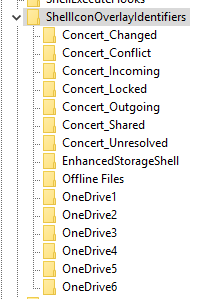
Currently I am using windows 10 OS, in registry editor default 5 drive are be there(OneDrive1,OneDrive2,OneDrive3,OneDrive4,OneDrive5)after that 7 RTC shell extensions are be there ,I have renamed it also, i.e. put no. in front of Concert word and after that restarted the system ,but it did not worked for me,Issue is still remain same.

Can anyone has any solution on it?
Please suggest me on same.

Regards,
Amruta Raut.

0 votes


2 answers

Permanent link

Amruta, when you say the issue remains, do you mean you don't see any RTC overlays against files/folders in the current work area/sandbox in Windows Explorer?

- RTC .NET Clients team

0 votes

Comments

 Hi Priyadarshini,Thanks for response, Yes I am unable to see any RTC overlays against file/folders in current sandbox.

Thanks for the confirmation. Also, can you please tell us which version of RTC Shell and Windows 10 you are on? We will test in that specific configuration in house and get back to you.
 Hello Priyadarshini, Rational team concert shell version:6.0.2 and windows edition : windows 10 Pro 

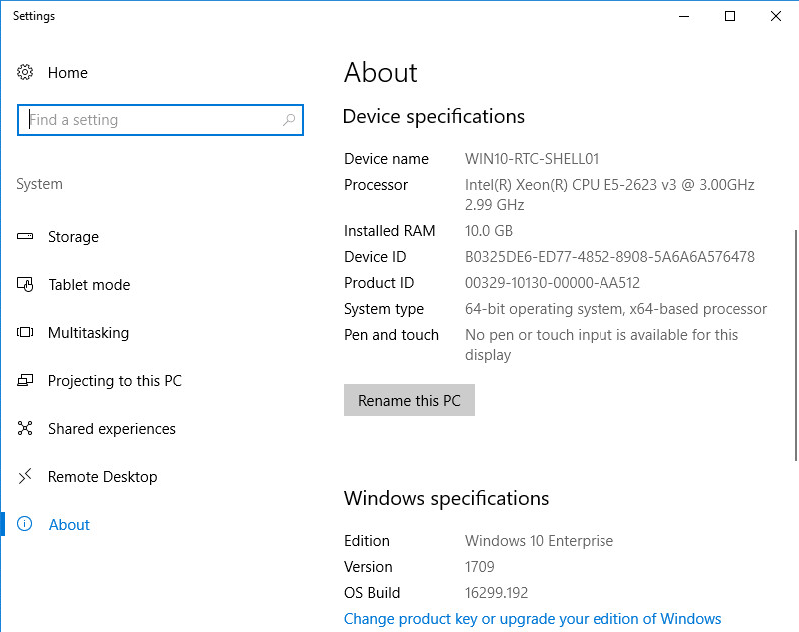
Thanks for the information, but we support Windows 10 starting RTC Shell 6.0.3 only. Do tell us which specific version of Windows 10 you are on, in my screen snapshot you can see its 1709. If we find its a LTSB version of Windows 10 (long-term servicing branch), we will test in the latest RTC Shell client and see if we can reproduce the problem.

1 vote

 Thank you Priyadarshini,


Edition-Windows 10 Pro
Version-1607
OS Build-14393.1944

 Hello Priyadarshini, Is there any update on it? kindly revert me if you have any solution regarding this issue

We tried this out in the latest Shell client on Windows 10 and noticed that there is a preceding space for the overlays corresponding to OneDrive. When we remove those, then our overlays move up in the registry and the Shell client is able to show them too. Can you try?

We have created Investigate icon overlays problem in windows shell (450684) to track the changes that might be needed in Shell as well as to the article https://jazz.net/library/article/1087 specific to Windows 10.

showing 5 of 7 show 2 more comments

Permanent link

Uninstall the Dropbox Client or other tools that add their own Overlay Icons, then reinstall the Team Concert Shell.

0 votes

Comments

Hello Ralph,others tools are not be there on my system,

Was worth a try. I had that problem.

Your answer

Register or log in to post your answer.

Dashboards and work items are no longer publicly available, so some links may be invalid. We now provide similar information through other means. Learn more here.

Search context
Follow this question

By Email: 

Once you sign in you will be able to subscribe for any updates here.

By RSS:

Answers
Answers and Comments
Question details

Question asked: Jan 12 '18, 12:05 a.m.

Question was seen: 2,850 times

Last updated: Jan 18 '18, 1:45 a.m.

Confirmation Cancel Confirm