How to restrict all deliver access to a stream except for certain roles?

I have several components in a stream. I would like to restrict deliver access to all but one component in the stream.
I can override the component I want and specify a Project role, but all the remaining components are still "<default>". I have been unable to figure out a way to change the "<default>" permissions for the components in the stream.
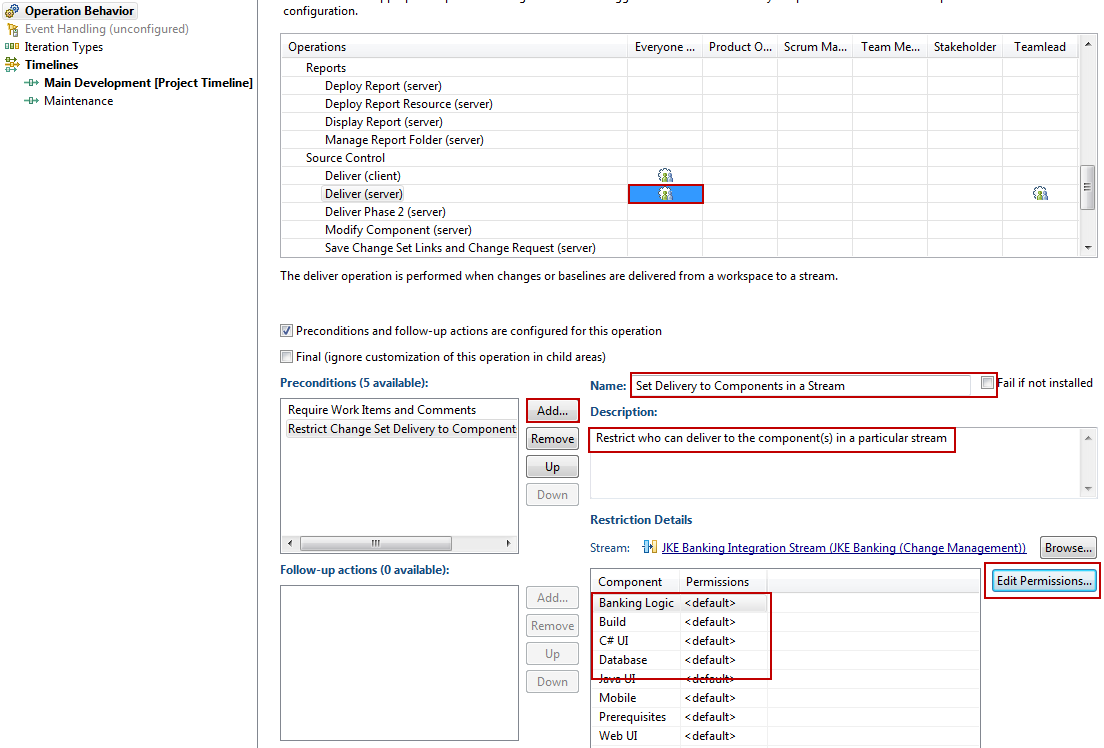
I have opened the Operation Behavious for my Project Area, and tried to configure the Operation Behaviour: Deliver (server) for the stream, however, the permissions for all components are set to "<default>".
I can override the component I want and specify a Project role, but all the remaining components are still "<default>". I have been unable to figure out a way to change the "<default>" permissions for the components in the stream.
I have tried to remove deliver permissions from all roles, hoping that my component permission would still allow me to override the behaviour, but it did not work.
My only ugly workaround to date is to create an "Empty" role and restrict the other components to anyone with "Empty". And then never assign anyone the "Empty" role. But I find that to be an ugly workaround.
Is there a better/cleaner way?
2 answers
You can use the pre-condition Restrict Change Set Delivery to Components in a Stream on Deliver (server).
Comments

There is a enhancement request which probably matches what you are looking for:
It should be much simpler to declare "the following components in the stream cannot be modified by a deliver operation" (90157)
It should be much simpler to declare "the following components in the stream cannot be modified by a deliver operation" (90157)