


 Troubleshooting Rational Lifecycle Integration Adapter for Windchill issues
Authors: IntegrationsTroubleshootingTeamBuild basis: The Rational solution for Collaborative Lifecycle Management (CLM) 4.x
This page provides resources for troubleshooting issues with the IBM Rational Lifecycle Integration Adapter (RLIA) for Windchill.
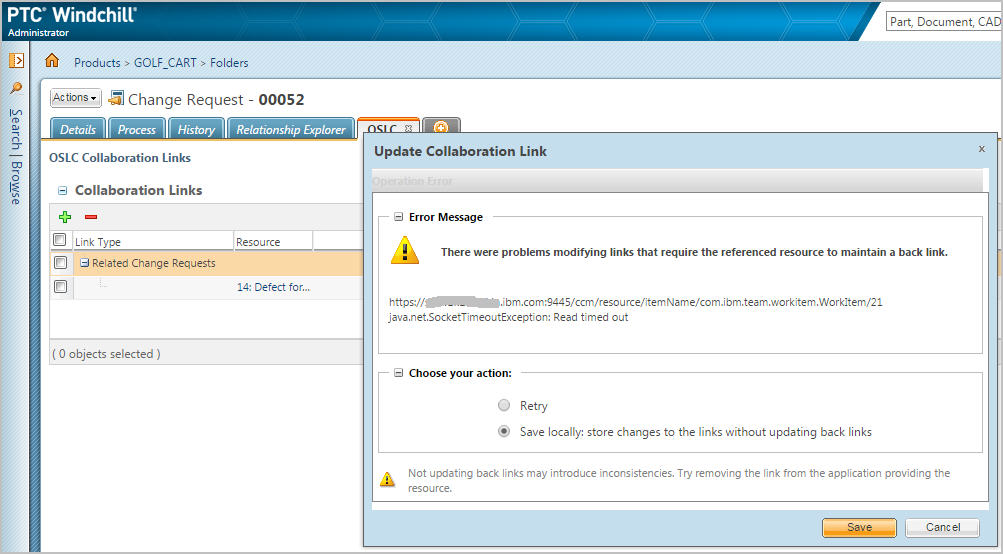
 Example of error reported if attempting to delete links when the server is down:
 Possible procedure for resolving issues caused by a CLM server rename:
Typical usage scenarios where problems can occur include the following
Windchill- Query CLM for related Work Items
- Link existing ChangeRequest to CLM Work Item
- Create new CLM Work Item
- View CLM Work Item without leaving Windchill context
- Query Windchill for related Change Requests
- Link existing CLM Work Item to existing Windchill ChangeRequests
- Create new Windchill ChangeRequest
- View Windchill ChangeRequest without leaving CLM context
Areas to focus on when troubleshooting
- Network Connectivity
- User Credentials
- Browser Incompatibilities
- Lack of Proper Friends or Consumer Coupling ---> Needs to be done in 3 places and needs to be consistent. When you go to create a new CLM WI, you may notice that the popup will not provide a choice.
- Missing Context.xml Parameters
- Error Message and RLIA Online Help --> Refer to the "Windchill adapter log messages" section of the Help documentation: https://sodiusrlia.cloudapp.net:8443/oslc-windchill/help/topic/com.sodius.windchill.server.oslc.doc/html/messages/index.html?cp=0_4_1
- Product Logs --> Look for logs in the same place as IBM WebSphere Application Server (WAS) or Apache Tomcat logs are located.
Potential Causes
- Forgot keys
- Entered wrong key
- Forgot to create friend relationships
- Forgot port number
- Got name of WAR wrong
- Server rename
Troubleshooting issues related to Server rename
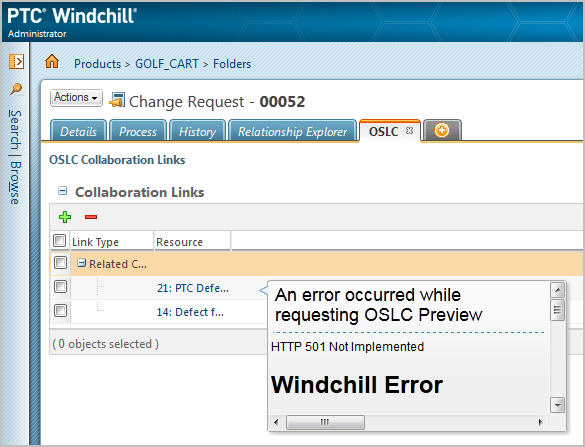
What you may see if a server rename was performed on an IBM Rational Team Concert (RTC) server that was integrated using the Windchill adapter. Observations:- All links are retained regardless of the server state.
- Links with inactive RTC servers show an error message in the hover view stating a timeout.
Example of error reported if attempting to delete links when the server is down:
Possible procedure for resolving issues caused by a CLM server rename: - Examine the URL
- Add a new link to the renamed work item
- Remove the old link.
Related topics: Deployment web home
External links:
Additional contributors: DeniseMcKinnon
Questions and comments:
Warning: Can't find topic Deployment.TroubleshootingRationalLifecycleIntegrationAdapterForWindchillComments Copyright © by IBM and non-IBM contributing authors. All material on this collaboration platform is the property of the contributing authors.
 Contributions are governed by our Terms of Use. Please read the following disclaimer.
Dashboards and work items are no longer publicly available, so some links may be invalid. We now provide similar information through other means. Learn more here.