


UNDER CONSTRUCTION : Troubleshooting DOORS Next 7.0.x to 7.1/7.2 Upgrades
Authors: WillChatham, BharathRaoThis article is to help troubleshoot ELM upgrades from V7.0.x to V7.1 or V7.2. This article can also be used to troubleshoot other applications within the Engineering Lifecycle Pre-upgrade recommendations:
Upgrade Test
It is imperative that you Test the upgrade:- Use a staging area where the hardware is comparable with your production server.
- Testing with a copy of your production data is ideal (Setting up a test staging environment with production data). If that is not possible use data as comparable to production as possible.
- This is important to detect any data issues and will also provide you with accurate upgrade times.
Use latest Ifixes
IBM recommend that you upgrade using the latest ifixes available for the release you are upgrading from/to. If this is not possible then we highly recommend that you check the list of known issues that are fixed in the later Interim fixes to see if any could affect your upgrade or affect your users using the tool post upgrade.- Interim fixes for Engineering Lifecycle Management 7.1
- Interim fixes for Engineering Lifecycle Management 7.2
Must gather information
A quick checklist of helpful data if you experience a performance problem during upgrade on your staging system is below. It is important to understand how to then use these outputs for the planning of the production upgrade, but also for comparison in case the production run shows any deviations, which could indicate a problem.- System definition for the DOORS Next application server and the DB server - how many vCPU, how much RAM is allocated, Virtualized or Physical machine? etc.
Application server
- During the test, did the DB server and DOORS Next server get their full allocation of CPU cores and RAM? Are the CPU cores and RAM resources allocated to their VMs dedicated?
- Monitor machine performance counters of DB Server and DOORS Next server during migration.
- nmon (Linux), perfmon (Windows) - in 5-minute intervals
- Collect JVM verbose GC logs on repotools-rm
Database server
- AWR report from DB server - collect hourly
- During test, was the DB server only supporting the upgrade or were their other DB activities, e.g. maintenance or other applications being serviced at that time?
- During the test, what was the CPU and Memory utilization of the DB server?
- What is the network latency between the system running repotools and the database server?
 Note: When you are ready to contact IBM Support, use the must gather tool ISADC to create a zip package to attach to your new case.
Known issues
Product ETM
OSLC Migration Task
Problem: OSLC Migration Task performance is poor, it is running for days and shows no sign of completing. What is OSLC migration: OSLC migration is a background process that runs after an upgraded Engineering Test Management (ETM) server is started. The migration manages OSLC Migrators, which run a set of tasks on specific artifact types that publishes delete and create events in the Tracked Resource Set 2 (TRS2) feed for the artifacts that require them. The execution is asynchronous and does not prevent the server from working or users from performing normal activities (for example, creating or modifying test plans, test cases, etc.) while the migration is running. Some features might not be displayed in Jazz Reporting Service until the migration is finished and LQE is up-to-date. For example, ETM 7.0.3 / 7.1 introduced the advanced property to include the archived approval groups to the REST and OSLC APIs, PDF, and JRS Reports. One of the OSLC Migrators would update the archived approval details in the existing artifacts schema post upgrade. When the mentioned advanced property is set to true, archived approval details will be available for reporting purposes post artifact migration.- ETM Advanced Property:

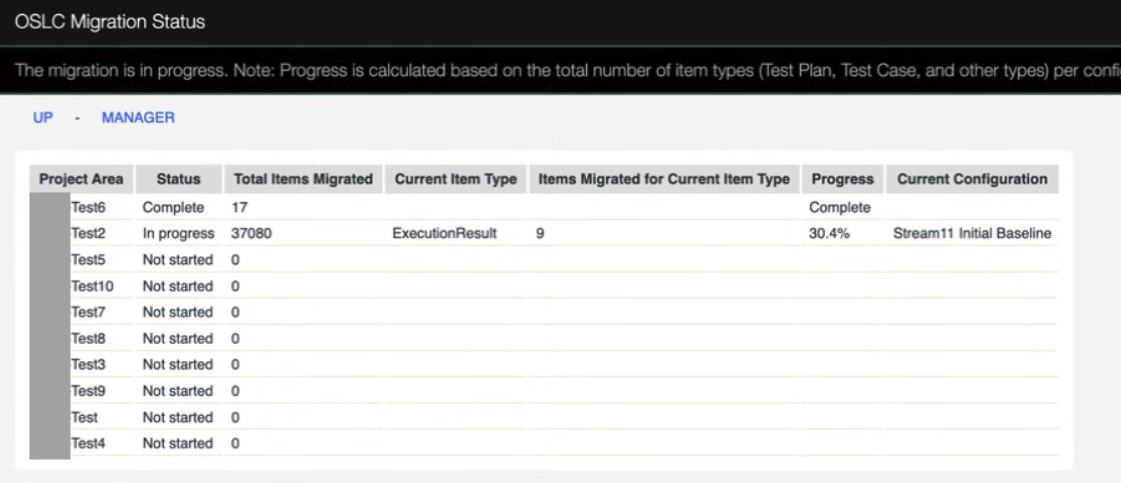
Administrators can use the OSLC Migration Status page to monitor. The status page is available at the following location: =https://elm.host.name/<qm-context>/oslcMigrationStatus
* OSLC Migration Status:
 How to resolve: This may be resource or database related and the time needed depends on the number of migrators to be executed post upgrade:
- Run the Database Must Gather: Must-gather information for diagnosing long-running SQL statements on Oracle
External links:
Additional contributors: TWikiUser, TWikiUser
 Copyright © by IBM and non-IBM contributing authors. All material on this collaboration platform is the property of the contributing authors.
 Contributions are governed by our Terms of Use. Please read the following disclaimer.
Dashboards and work items are no longer publicly available, so some links may be invalid. We now provide similar information through other means. Learn more here.