


Configure Google Social Login for ELM 
Authors: ShradhaSrivastav Build basis: Engineering Lifecycle Management and Jazz Authorization Server 7.x
Configure Google Social Login for ELM
Any application that uses OpenID Connect to access Google APIs must have authorization credentials that identify the application to Google's OIDC Provider. The following steps explain how to create credentials for your project. Your applications can then use the credentials to access APIs that you have enabled for that project.Create authorization credentials
- Go to the Credentials page.
- Click Configure Consent Screen → Select External → Click Create

- Click Create credentials > OAuth client ID.

- Select the Web application application type.

- Name your OIDC client and click Create
- The redirect URL points to the ID of your configured oidcLogin element in the following format
https://liberty_host:SSL_port/ibm/api/social-login/redirect/oidclogin_id

- After configuration is complete, take note of the client ID that was created. You will need the client ID to complete the next steps.

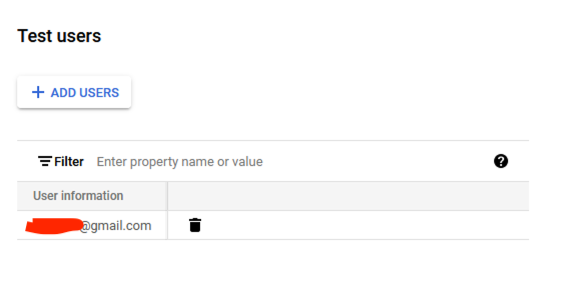
- Move to OAuth consent screen and add Users in the Test user section which will be used for login into application. (The user should exist in ELM user repository with same UserID)
Import Google Certificates
Sub-Section text Sub-Section text Sub-Section text Sub-Section text Sub-Section text Sub-Section text Sub-Section text Sub-Section text Sub-Section text Sub-Section text Sub-Section text Sub-Section text Sub-Section text Sub-Section text Sub-Section text Sub-Section text Sub-Section text Sub-Section text Sub-Section text Sub-Section text Sub-Section text Sub-Section text Sub-Section text Sub-Section text Sub-Section textConfigure Social Login in JAS to Redirect to Google Login
Sub-Section text Sub-Section text Sub-Section text Sub-Section text Sub-Section text Sub-Section text Sub-Section text Sub-Section text Sub-Section text Sub-Section text Sub-Section text Sub-Section text Sub-Section text Sub-Section text Sub-Section text Sub-Section text Sub-Section text Sub-Section text Sub-Section text Sub-Section text Sub-Section text Sub-Section text Sub-Section text Sub-Section text Sub-Section textHeading 1
Related topics: Deployment web home, Deployment web home
External links:
 Copyright © by IBM and non-IBM contributing authors. All material on this collaboration platform is the property of the contributing authors.
 Contributions are governed by our Terms of Use. Please read the following disclaimer.
Dashboards and work items are no longer publicly available, so some links may be invalid. We now provide similar information through other means. Learn more here.