Task Status dropdown shows wrong workflow in plans in web cl

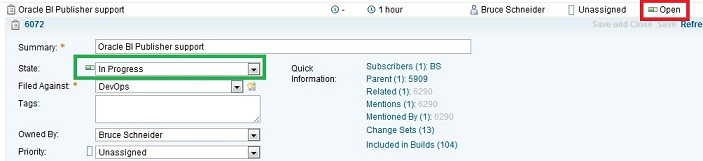
The attached image should be impossible, yet there it is. In the Work Breakdown view of Plans, you see the wrong workflow for Tasks. The dropdown shows the Defect workflow. For example, "In Progress" shows as "Open" and "Done" shows as "Fixed". If you click the dropdown it shows the options for Defect even though the work item is a Task. I edited the inline view to show the status and it appears correctly as seen in the attached image. It also appears correctly in all views of Eclipse. Clearly this is a bug, but is there some setting that will correct this? Has it been fixed in an ifix update? I tried searching for it but did not find anything with the criteria I used. 2.0.0.2 ifix5
One answer
I am pretty sure at this point what is happening is the plan view is improperly showing the "Defect" workflow for "Task" even though it shows the proper "Task" workflow inline and in Eclipse. Perhaps there is an editor presentation setting missing from the configuration? Defect is the first workflow, so it appears it's defaulting to the first workflow of Defect for Task Status based on the state group (Open, Closed, In Progress).