Excel to RQM import tool dialog doesn't come up

There have been cases where the menu for RQM importer shows in Excel but choosing an option does not show the wizard. Although this can be the result of not having followed all of the install instructions, there is a new cause that we have uncovered.
Namely there is a compatibility issue with the Microsoft Office API with locales that do not match the developer's local, in this case EN-US.
There is a work item tracking the issue at http://jazz.net/jazz02/web/projects/Rational%20Quality%20Manager#action=com.ibm.team.workitem.viewWorkItem&id=32099
.
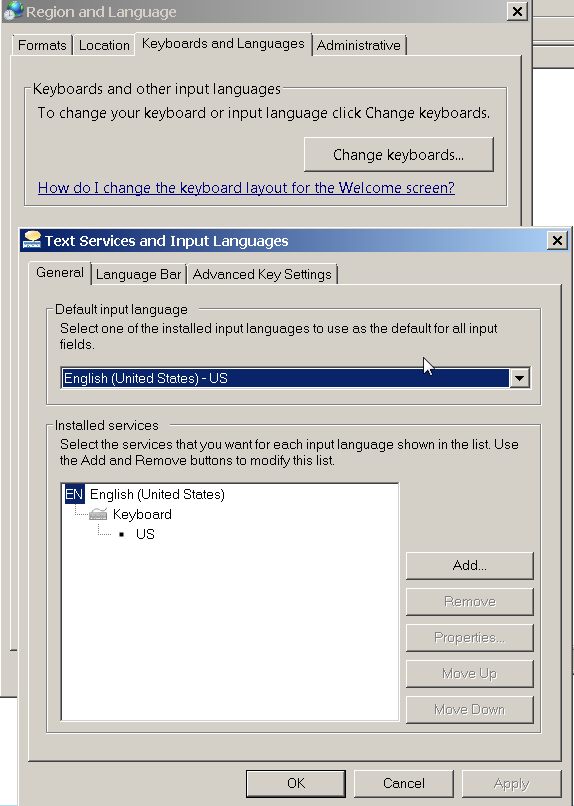
Meanwhile, setting the system locale and formats to en-us seems to work around the problem.
Namely there is a compatibility issue with the Microsoft Office API with locales that do not match the developer's local, in this case EN-US.
There is a work item tracking the issue at http://jazz.net/jazz02/web/projects/Rational%20Quality%20Manager#action=com.ibm.team.workitem.viewWorkItem&id=32099
.
Meanwhile, setting the system locale and formats to en-us seems to work around the problem.

Comments
Erica Tran
JAZZ DEVELOPER Apr 19 '13, 12:25 p.m.work item above is fixed in RQM 2.0.1 ifix02