Jazz Forum Welcome to the Jazz Community Forum Connect and collaborate with IBM Engineering experts and users

DNG "add link" does not show all link types

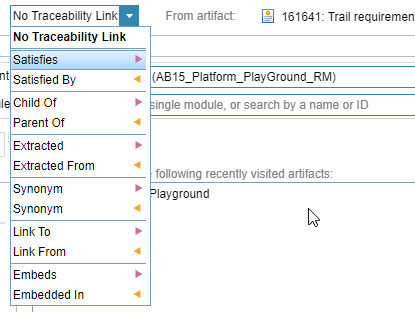
 In DNG, one can "Add link" to certain text in Content. The link types shown there is not showing all the link types available. Ex; it is not showing "Satisfied by Architecture Element" 
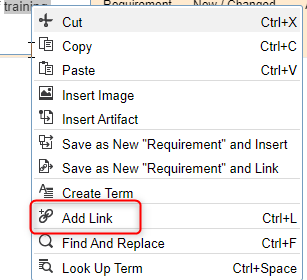

Are there any mechanism to enable additional link types to be shown in the "add link" ?

Edit 1: I can link a requirement from Rhapsody and the link is shown in "Satisfied by Architecture Element" 
Edit 2: Added pictures

0 votes


2 answers

Permanent link
Certain link types, such as the one you've mentioned above, are OSLC link types and will only appear if you have the correct OSLC project area associations.

In the case above, you would need an OSLC Architecture Management provider connected to the DNG Project before these links become visible

0 votes

Comments

I forgot to mention that we are using "AM" under CCM and not separate AM Project Area.

In this case what and where should this link type be established?

Hi Ralph, thanks for the link. We have the OSLC links established. I just cannot find he "AM Provider" link. Wondering if that is only for a AM project area 

Hi Karthik, I am not completely sure how this is done. I think the application decides what associations it provides. So the project area will have to provide AM capabilities to be able to select it.  

This is a good question - I would need to fire up my VM to check this, but if you try to add an association to your AM enabled CCM project area, and then you drop down the link of association types, what do you see?

I'd also try connecting Rhapsody to DNG directly and see what happens because that's where you'd actually make the links, but I'd assume the AM project would have to have them as well.

I already have the oslc link to the CCM project area which also hosts RMM (AM).

What I am looking at is to have the the capability during inline linking.

I have edited my original post to add some screenshots

<o:p> </o:p>

I have now fired up my VM to check this and in the CCM project area I had to add a "Uses - Requirements" association to the DNG project (which then showed up as a "Provides - Requirements" in the DNG project area) before the link was available. Is this what you have?


One other thing that strikes me is that you have no link section showing any OSLC links 
- what Role are you assigned and does it have permission to create OSLC links?
- do you have Link Constraints turned on?

Oh hang on - I've just had a good look at your picture above. Are you trying to embed a link inside the text of a requirement artefact?? I'm not even sure it's possible to embed an OSLC link like that, which is why you may not be seeing any OSLC link types, but it will definitely be affected by the target selection. I don't think you can even do cross RM project area links like this

Try to select the target project area first - if you can't select another project area at all then these links will be limited to local project only

Yes I am trying to do embed linking. In the Embed, there is no way to change the Project area.

Seem like the link types are predefined. Shows only RM related links. Not even CCM or ETM ones.

I thought that might be the case - you can't embed links to any sort of artefact that's off on another server, only artefacts on the same server.This applies to both different applications as well as other project areas in the same application.

I'm not sure if this applies to inserting, but assume it does, but why don't you try it out? Try using the "Insert Artifact" menu instead of "Add Link"

The other thing is you will be able to add a link on the artefact as a whole - it's only when you try to add a link to a sentence or paragraph inside the artefact.

showing 5 of 11 show 6 more comments

Permanent link

 As well as Davyd's excellent explanation, note that if you have link constraints active (which affect links entirely within DOORS Next) the link create dialogs will not show link types which would violate the constraints.

0 votes

Your answer

Register or log in to post your answer.

Dashboards and work items are no longer publicly available, so some links may be invalid. We now provide similar information through other means. Learn more here.

Search context
Follow this question

By Email: 

Once you sign in you will be able to subscribe for any updates here.

By RSS:

Answers
Answers and Comments
Question details

Question asked: Mar 05 '24, 11:22 a.m.

Question was seen: 1,245 times

Last updated: Mar 08 '24, 4:17 a.m.

Related questions
Confirmation Cancel Confirm