Register Git Reposotory Does Not Display
I'm trying to follow the directions at:
http://www.ibm.com/support/knowledgecenter/en/SSYMRC_6.0.2/com.ibm.team.connector.cq.doc/topics/t_git_reg_repo.html
and 'Register Git Repository is not displayed under Source Control. All I see is...
I've given myself all Git related privileges.
Any suggestions?
http://www.ibm.com/support/knowledgecenter/en/SSYMRC_6.0.2/com.ibm.team.connector.cq.doc/topics/t_git_reg_repo.html
and 'Register Git Repository is not displayed under Source Control. All I see is...
I've given myself all Git related privileges.
Any suggestions?
One answer
Hi Bradley
I am unable to see the image in the question.
However, Work with Git should be available out of the box for all users. It was introduced in version 5.0. Could you confirm the version you are working with?
Comments
Thanks for the reply. We are using 6.0.3 M6 on Jazz.net.
The image simply shows what we can see under Source Control:
Attribute Definition
New Workspace Configuration
Sandbox Subfolder
Hi Bradley
The settings you are referring to is in Administering the preject Area.
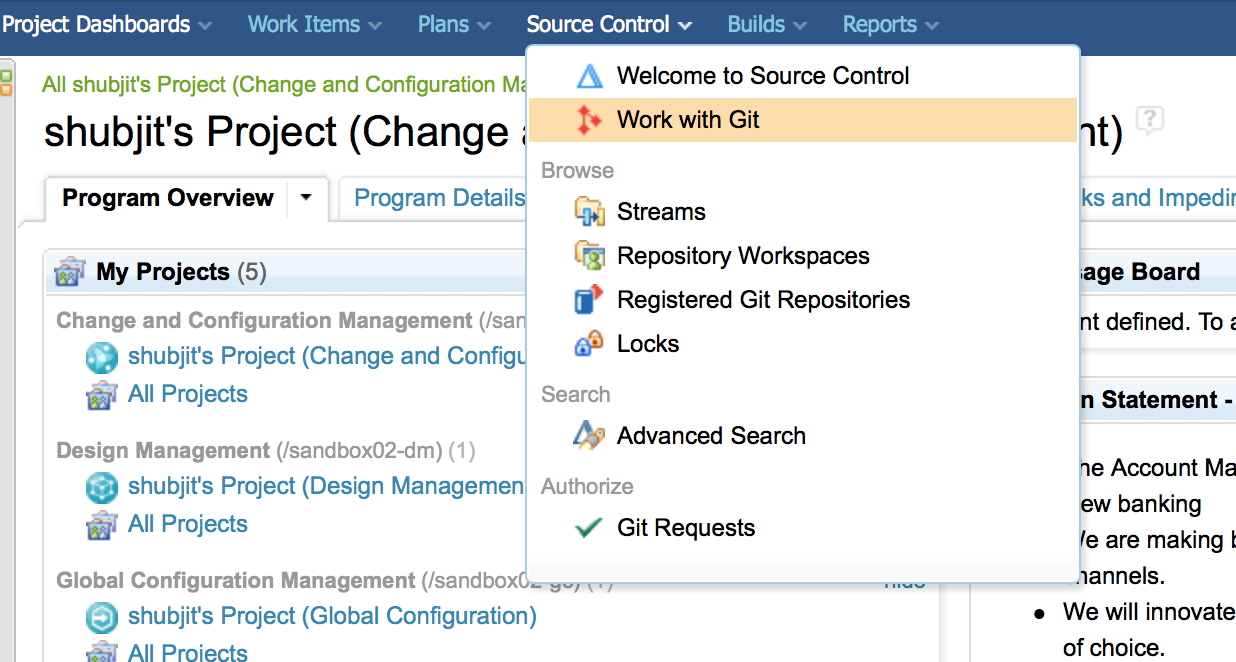
Instead click on Explore Project and Click Source Control , you would see the options.
Here is a screenshot from the project on the 6.0.3 M5 version on jazz.net.
Thank you for your reply. Unfortunately, I cannot see the Source Control menu.