Internal SCM VersionID field name needed.

Accepted answer
A human can access them at the file properties:
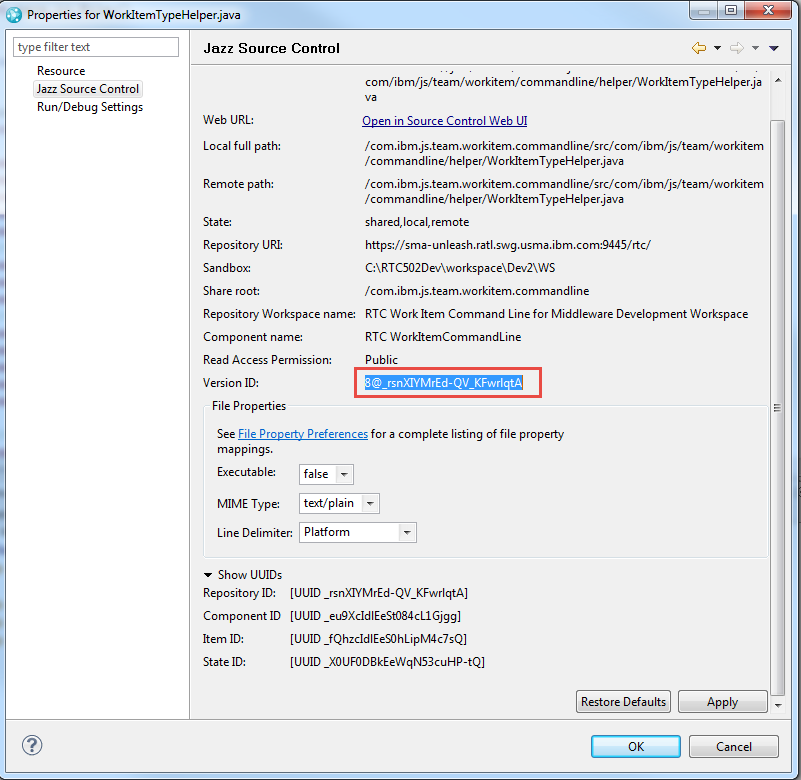
You can search for getVersionIdentifiers() in the SDK and you will find e.g.
ScmVersionableIdentifierList versionIdentifiers = com.ibm.team.filesystem.cli.core.util.RepoUtil
.getVersionIdentifiers(
scmService,
Collections.singletonList(versionable.getStateId().getUuidValue()), config);
which looks like this:
public static ScmVersionableIdentifierList getVersionIdentifiers(IScmRichClientRestService scmService, Collection<String> stateIds, IScmClientConfiguration config)
throws FileSystemException {
ParmsGetVersionableIdentifiers parms = new ParmsGetVersionableIdentifiers();
parms.versionableStateIds = stateIds.toArray(new String[stateIds.size()]);
ScmVersionableIdentifierList versionIdentifiers = null;
try {
versionIdentifiers = scmService.postGetVersionableIdentifiers(parms);
} catch (TeamRepositoryException e) {
throw StatusHelper.wrap(Messages.RepoUtil_CANNOT_DETERMINE_VERSION_IDS, e,
new IndentingPrintStream(config.getContext().stderr()));
}
return versionIdentifiers;
}
You can search for getVersionIdentifiers() in the SDK and you will find e.g.
ScmVersionableIdentifierList versionIdentifiers = com.ibm.team.filesystem.cli.core.util.RepoUtil
.getVersionIdentifiers(
scmService,
Collections.singletonList(versionable.getStateId().getUuidValue()), config);
which looks like this:
public static ScmVersionableIdentifierList getVersionIdentifiers(IScmRichClientRestService scmService, Collection<String> stateIds, IScmClientConfiguration config)
throws FileSystemException {
ParmsGetVersionableIdentifiers parms = new ParmsGetVersionableIdentifiers();
parms.versionableStateIds = stateIds.toArray(new String[stateIds.size()]);
ScmVersionableIdentifierList versionIdentifiers = null;
try {
versionIdentifiers = scmService.postGetVersionableIdentifiers(parms);
} catch (TeamRepositoryException e) {
throw StatusHelper.wrap(Messages.RepoUtil_CANNOT_DETERMINE_VERSION_IDS, e,
new IndentingPrintStream(config.getContext().stderr()));
}
return versionIdentifiers;
}
One other answer
Those numbers are the version Full Version ID's of the elements in SCM Controlled by this setting:
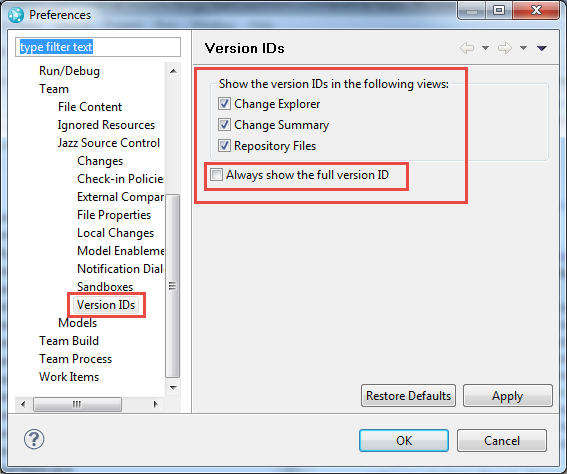
The ones above are shown if "Always show the full version ID" is checked. More human useable version numbers are presented when you uncheck the check box.
These version ID's are properties of the change set or file version and can potentially be accessed with the API. So you can access them and potentially get and store them somewhere.
The ones above are shown if "Always show the full version ID" is checked. More human useable version numbers are presented when you uncheck the check box.
These version ID's are properties of the change set or file version and can potentially be accessed with the API. So you can access them and potentially get and store them somewhere.
Comments
Ralph Schoon
FORUM ADMINISTRATOR / FORUM MODERATOR / JAZZ DEVELOPER Jul 22 '15, 3:01 a.m.Siegfried Oesterreicher
Jul 22 '15, 7:21 a.m.