How to show links between RRC projects

We have links between a project developing business requirements, and projects with development requirements derived from the business requirements.
Currently, there is no good way to show these links in a dashboard.
The Traceability widget only shows links to RQM or RTC.
The View Widget shows only the name, not links.
The tree view shows the links, but only for one artifact at a time, and not on a dashboard.
What is the best option for showing these links?
Is this a target for the new report tool in V6.0?
(We are currently JAZZ v 4.0.5)
Currently, there is no good way to show these links in a dashboard.
The Traceability widget only shows links to RQM or RTC.
The View Widget shows only the name, not links.
The tree view shows the links, but only for one artifact at a time, and not on a dashboard.
What is the best option for showing these links?
Is this a target for the new report tool in V6.0?
(We are currently JAZZ v 4.0.5)
One answer
The out of box reports in Report Builder in v6.0 does not seem to have what you want:
https://jazz.net/help-dev/clm/topic/com.ibm.team.jp.jrs.doc/topics/c_ready_to_use_reports.html
Report Builder is renamed from JRS in v5.x and it does have flexibility in creating traceability report for requirements to show links between requirements.
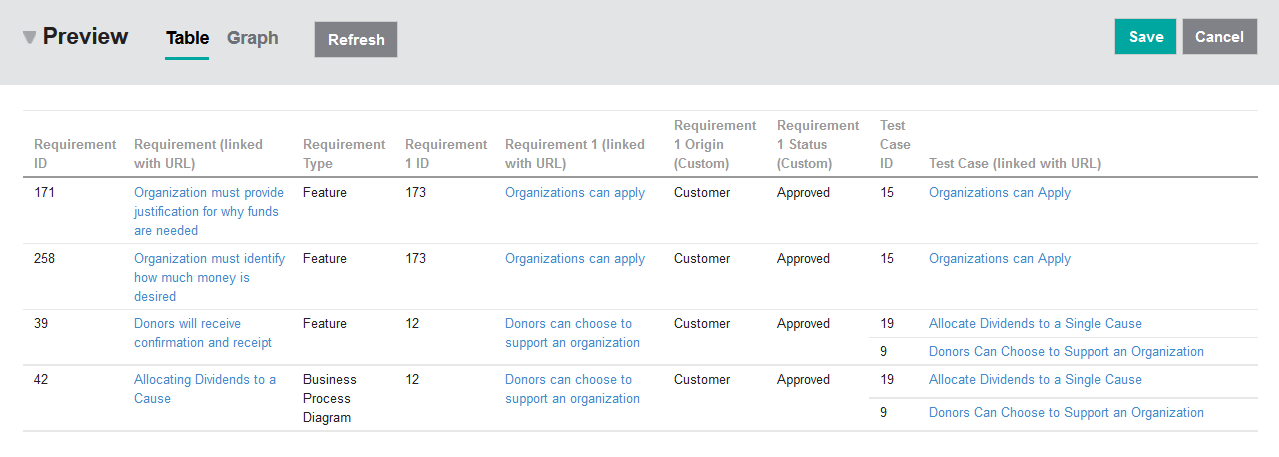
For example, I quickly created a traceability report in JKEBanking to show the [link from] and [validated by] requirements and the result is as above. Not sure though if this is what you are after.
https://jazz.net/help-dev/clm/topic/com.ibm.team.jp.jrs.doc/topics/c_ready_to_use_reports.html
Report Builder is renamed from JRS in v5.x and it does have flexibility in creating traceability report for requirements to show links between requirements.
For example, I quickly created a traceability report in JKEBanking to show the [link from] and [validated by] requirements and the result is as above. Not sure though if this is what you are after.
Comments
