Attachment Size Limit for Work Items

4 answers
this new TechNote describes how to perform this change:
http://www-01.ibm.com/support/docview.wss?uid=swg21641142
Warning: before increasing this value to a higher value, as an administrator, I recommend that you 1st evaluate the possible drawbacks of accepting such heavy attachments in the repository, especially its possible (bad) effect on the DB size and the Jazz server performance.
Regards,
Stéphane
Comments

Note that attachments are very hard to clean up. If there is any reference to the attachment it will not be actually deleted. (and there is no UI mechanism to see what is referencing a file)..
By default, the maximum size of an attachment that can be added to a Work Item in RTC is 50 MB.

TechNote is very useful. In some cases is important to be able to attach large files. A good practice through review suggest to the owner that the workitem to complete the task remove the attached file, if it is no more necessary. Cleaning is effective in the database when we exclude ?
I do not know. if there is ANY reference to the attachment (its use count is >0) , it will not actually be removed. there is currently no user/administrator method to find references, or see the reference count for an attachment.
(hm.. that would be a useful tool).
History might be a reference...

AFAIK: 3.0RC0 "What's new" states the space is freed from database. But actually, as mentioned in this forum post, it would actually depend on your client (Web vs. Eclipse). Please check this RFE.
Note that "count==0" condition (mentioned by Sam) for real deletion would worth a try too !
Hope this helps.
Regards,
Stéphane
well, I just used V4.0.1 (and 4.0.3) to 'remove' an attachment I added to a workitem.
it is no longer listed in the attachments section, BUT, it IS listed in the history, twice.
and I can view it thru the history. (via both web and eclipse UI's)
the original file is not on the system where the viewer was invoked, thus it MUST still be in the database, as this would be the only common storage facility.
so, in these two cases, the history reference keeps the attachment in the database forever.
@Sam: what you just depicted would be consistent with the RFE I pointed out previously IF you used the Web client (not the Eclipse one). Do you confirm ?
altho I am admin, and I have enabled the Delete Attachment permission on this project, I do no see 'delete' attachment as an option anywhere (or delete history) as the RFE mentions.
so, I would say, No, I cannot confirm
For clarity, let me provide this screen shot (from RTC 4.0.3) obtained by right-clicking on the Attachment itself:
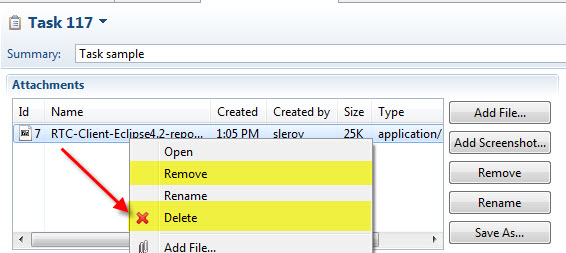
I confirm that the Delete option does NOT let you download the attachment anymore (be it from the history or not).
Hope this helps.
downloading the 4.0.3 client, do NOT see delete with the 4.0.1 client.
ok, I can now confirm, with the 4.0.3 Eclipse client you can forcibly delete attachments
Glad to hear this.
Regards,
Stéphane