Any method to list My Team Areas on the web client?

In the eclipse client, I can see My Team Areas by opening the folder of the same name. However, on the web client, there does not seem to be a way to see the list of team areas of which I am a member. There is a widget for My Project Areas, but it does not include team areas, and there is a Teams widget that includes the high level team selected and optionally all its children, but does not allow me to specify just My Team Areas. I can see the need for a new widget or an update to existing widget to provide this function. Some people in the project area may not know all of the team areas of which they are a member. We have over 100 team areas.
3 answers
Hi Nicholas,
I think you can view the team area list by following steps:
- At the admin page of your application (eg. <serverurl>/ccm/admin)
-
Click the icon
 , click Manage Project Areas
- select the project area of the Team Areas you want to check for
-
A Team Area Hierarchy view will be on the right side of the page
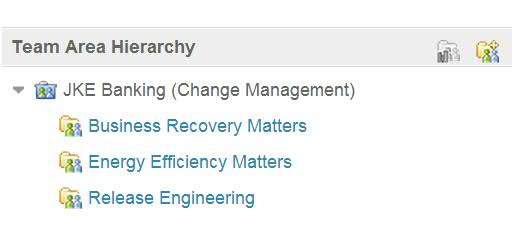
Hope this helps.
Hi Nicholas,
The 'My Projects' widget shows all the projects you are a member of. If you are not a member of that project, you should see some messages like these:
Change and Configuration Management (/ccm) (0)
The function that you are going after is very close to existing 'My Projects' widget. Some of your users might still able to see all 100 team areas, but they can only access to their own team areas from the list.
If you have other great ideas to improve the widget, I would suggest you to submit a new enhancement request.
Cheers,
Will
The 'My Projects' widget shows all the projects you are a member of. If you are not a member of that project, you should see some messages like these:
Change and Configuration Management (/ccm) (0)
You are not a member of any projects in this application.
The function that you are going after is very close to existing 'My Projects' widget. Some of your users might still able to see all 100 team areas, but they can only access to their own team areas from the list.
If you have other great ideas to improve the widget, I would suggest you to submit a new enhancement request.
Cheers,
Will
Maybe look at your User Profile / Work Environment in the Web UI. Pull down the menu next to your name, View My profile and license. Then click on Work Environment. That will shorten the list, but may not really depict membership if there are multiple time lines...
Comments
Kevin, Good reminder that I can see all the teams I belong to here so I can dole out my time. In the absence of a widget, this will work should someone really need to know, but I think I'll follow Will's suggestion and submit a requirement for something a bit more usable and specific to a single project area.