


WebSEAL is a high performance, multi-threaded reverse proxy that is a component of IBM Tivoli Access Manager for e-business. It applies fine-grained security policy to the Tivoli Access Manager protected Web object space and can provide single sign-on to back-end web servers. It can be used to provide an extra layer of security in front of a CLM application.
The product documentation on IBM Tivoli Access Manager for e-business Version 6.1.1 can be found here.
The product documentation on the successor product, IBM Security Access Manager for Web, can be found here.
Setting up WebSEAL in a CLM environment
Refer to the formal IBM Tivoli Access Manager for e-business/IBM Security Access Manager for Web documentation for how to configure WebSEAL as the reverse proxy in front of CLM.Known issues when using WebSEAL in a CLM environment
Managing RTC cookies in WebSEAL
A ‘Junction’ is the definition of a connection between WebSEAL and a back-end web server. By default, WebSEAL modifies the name of cookies returned in responses from back-end applications across certain junctions - thus it creates unique cookie names in order to prevent possible naming conflicts with cookies returned across other junctions. It prepends the name attribute of a Set-Cookie header with a special string: the string contains the identifier AMWEBJCT, plus the name of the specific junction responsible for delivering the response (with cookie). When the cookies are sent back from the browser to the server WebSEAL will remove the junction name and identifier so the server receives the original cookie name that it sent. This would not normally be a problem - however from version 5.0 onwards there is a new cookie sent from the CLM server to the web browser and there is new JavaScript code that reads the value of this cookie. As WebSEAL has renamed the cookie this JavaScript raises an exception that prevents the CLM application from being displayed in the browser. The symptoms are:- The web pages shows a message "Loading..." that never finishes
- CLM in the web browser does not work but CLM in the Eclipse client does.
- x-com-ibm-team-scenario
- LtpaToken
- redirectURL
- JSESSIONID
- JSESSIONIDjazz
- X-com-ibm-team-foundation-auth-loop-avoidance
- JAZZ_AUTH_TOKEN
[preserve-cookie-names] stanza of the WebSEAL configuration file would be edited as follows:
[preserve-cookie-names]
name = x-com-ibm-team-scenario
If necessary, the names of other cookies can be added to the list, by adding other lines with the format
name = cookie-name.
Managing Doors Next Generation cookies in WebSEAL
By default WebSEAL will add JavaScript code to force the setting of a cookie on all HTML requests. Doors Next generation (formerly Rational Requirements Composer) requests HTML from the server via JavaScript and parses the results. The JavaScript added by WebSEAL causes Doors NG to error when parsing the results. The symptoms are:- A popup window with an error "Invalid template ..." message, see below.
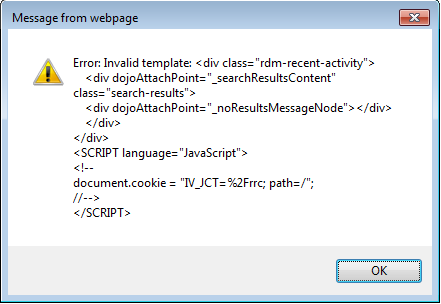
Note the name of the cookie on the line "document.cookie = " contains "IV_JCT" which is a sign that the cookie has been renamed as well.
Further Information
Related topics: Deployment web home,
External links:
- Tivoli Access Manager introduction
- Formal product documentation for IBM Tivoli Access Manager for e-business Version 6.1.1
- The product documentation on the successor product, IBM Security Access Manager for Web
Additional contributors: SimonWashbrook VaughanHarper


| I | Attachment | Action | Size | Date |
Who | Comment |
|---|---|---|---|---|---|---|
 png png |
cookie_renamed_by_webseal_in_doors_ng.png | manage | 15.1 K | 2015-04-20 - 09:39 | UnknownUser | Error message showing that a cookie has been renamed by WebSeal |

 Copyright © by IBM and non-IBM contributing authors. All material on this collaboration platform is the property of the contributing authors.
 Contributions are governed by our Terms of Use. Please read the following disclaimer.
Dashboards and work items are no longer publicly available, so some links may be invalid. We now provide similar information through other means. Learn more here.