


ERM Doors Next Module Structure Integrity Check during change set delivery
Authors: DianaKraaijeveldBuild basis: ERM Doors Next, version 7.0.3, 7.1 and up
Information on the ERM Doors Next 'Module integrity check during change set delivery' feature.
Enabling this feature will enforce a data consistency check on module structures for modules that get updated by an explicit changeset delivery.
 Activating this feature does not require a server restart.
Note Before enabling this feature, we strongly recommend to check your modules in your active streams. See this technote for more details
Activating this feature does not require a server restart.
Note Before enabling this feature, we strongly recommend to check your modules in your active streams. See this technote for more details
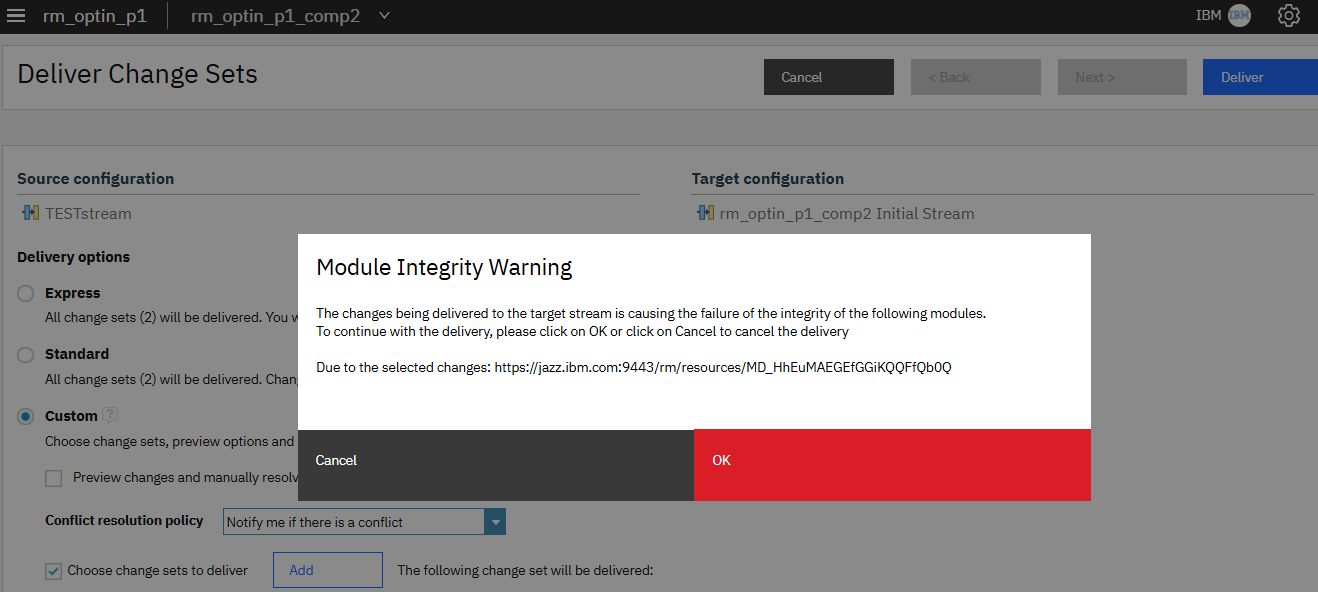
Example where a module structure inconsistency is caused by a problem in the source configuration:
A module structure check is run as part of the API delivery. If a structure issue is detected, the delivery will fail with information on the relevant module(s). -If it’s set to false:
A module structure check is not run as part of the API delivery. -If it is not set at all:
The default is False, so a module structure check is not run as part of the API delivery. Note that this property can only be used when the rm advanced property Module integrity check during change set delivery is also set to True. When this property is set to true and the rm advanced property "Enable module integrity check during change set delivery" is set to true:
The PUT header returns the Task Track URL. For example: 'https://jazz.ibm.com:9443/rm/taskTracker/3cebf215-607a-4df8-ae36-770ae27e364d'.
Example GET result on this taskTracker returns the status of the delivery:
For example:
This can be done directly on the file system by modifying /server/conf/rm/log4j.xml
- or -
Modify the log4j2.xml file in the GUI on the/rm/admin >Debug >Logging >Configure Loggers page.
At the bottom of the screen you'll find: RM Log4j2 Text-based log configuration.
When making the modification here, make sure to click on 'Submit' when done, to save the changes.
Modify the log4j2.xml file to enable the Delivery Audit Logging
Make sure to backup your current log4j2.xml file before making any changes.
File system Location of the audit logs: yourJazzTeamServer/liberty/servers/clm/audit
Enabling module integrity check during change set delivery
In Doors Next v7.0.3-Ifix015 and v7.1-Ifix004, an advanced property was introduced, called Enable module integrity check during change set delivery. It can be set to true by a Jazz Admin in the /rm/admin >Advanced Properties, under 'RM Delivery component':
Activating this feature does not require a server restart.
Note Before enabling this feature, we strongly recommend to check your modules in your active streams. See this technote for more details
Deliveries through the RM UI:
If the is property is enabled, the module structure of modules updated by an explicit delivery are checked for inconsistencies. This check occurs in the background by the Module Analyser. It checks these modules for structure inconsistencies after the delivery. If it finds any, it will check these modules in the source configuration, the current target stream and the future target stream.- This check happens after clicking the 'Deliver' button.
- This check happens for all types of deliveries.
- Clicking on Cancel will cancel the delivery.
- The delivery will proceed when clicking on OK.
Example where a module structure inconsistency is caused by a problem in the source configuration:
Deliveries through the API:
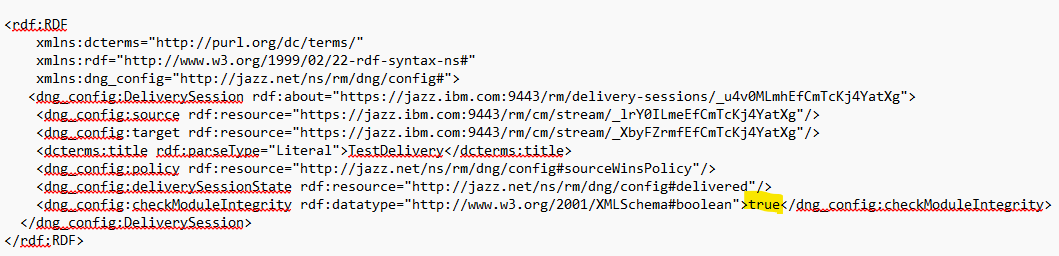
The property dng_config:checkModuleIntegrity was introduced to control the integrity check from the client’s side as part of the API call: -If set to true:A module structure check is run as part of the API delivery. If a structure issue is detected, the delivery will fail with information on the relevant module(s). -If it’s set to false:
A module structure check is not run as part of the API delivery. -If it is not set at all:
The default is False, so a module structure check is not run as part of the API delivery. Note that this property can only be used when the rm advanced property Module integrity check during change set delivery is also set to True. When this property is set to true and the rm advanced property "Enable module integrity check during change set delivery" is set to true:
- A Module Analysis check, for the module(s) being updated, is run as part of the API delivery.
- If a structure issue is detected, the delivery will fail returning the modules that caused the issue
- Information is written to the rm.log and the rm-DeliveryAudit.log, if the Delivery audit logging is enabled.
<rdf:RDF
    xmlns:dcterms="http://purl.org/dc/terms/"
    xmlns:rdf="http://www.w3.org/1999/02/22-rdf-syntax-ns#"
    xmlns:dng_config="http://jazz.net/ns/rm/dng/config#">
    <dng_config:DeliverySession rdf:about="https://jazz.ibm.com:9443/rm/delivery-sessions/_gyVU4EfEEfGLXawzIvCirA">
        <dng_config:deliverySessionState rdf:resource="http://jazz.net/ns/rm/dng/config#delivered"/>
        <dng_config:policy rdf:resource="http://jazz.net/ns/rm/dng/config#sourceWinsPolicy"/>
        <dcterms:title rdf:parseType="Literal">Delivery1</dcterms:title>
        <dng_config:target rdf:resource="https://jazz.ibm.com:9443/rm/cm/stream/_T_IQwSw8EfGrFYW9Terujw"/>
        <dng_config:source rdf:resource="https://jazz.ibm.com:9443/rm/cm/stream/_8r4zwSw7EfGrFYW9Terujw"/>
        <dng_config:checkModuleIntegrity rdf:datatype="http://www.w3.org/2001/XMLSchema#boolean">true</dng_config:checkModuleIntegrity>
    </dng_config:DeliverySession>
</rdf:RDF>
The PUT header returns the Task Track URL. For example: 'https://jazz.ibm.com:9443/rm/taskTracker/3cebf215-607a-4df8-ae36-770ae27e364d'.
Example GET result on this taskTracker returns the status of the delivery:
<dng_task:Task rdf:about="https://jazz.ibm.com:9443/rm/taskTracker/4012b5e3-7f42-4f8d-8d79-b4211e2a9695">
        <dcterms:title rdf:datatype="http://www.w3.org/2001/XMLSchema#string">Commit delivery session</dcterms:title>
        <oslc_auto:state rdf:resource="http://open-services.net/ns/auto#complete"/>
        <dcterms:references rdf:parseType="Resource">
            <dng_config:deliveryFailure rdf:parseType="Resource">
                <dng_config:sourceIntegrityCheckReport rdf:parseType="Resource">
                    <dng_config:failure rdf:resource="https://jazz.ibm.com:9443/rm/resources/MD_Jv_XQUebEfGLXawzIvCirA"/>
                </dng_config:sourceIntegrityCheckReport>
            </dng_config:deliveryFailure>
            <rm:code rdf:datatype="http://www.w3.org/2001/XMLSchema#int">7</rm:code>
        </dcterms:references>
        <oslc_auto:verdict rdf:resource="http://open-services.net/ns/auto#failed"/>
    </dng_task:Task>
</rdf:RDF>
For more info about the delivery process using the API see this technote.
- Example entry from the rm-DeliveryAudit log for the failed API delivery:
2026-05-04T10:29:48,205-0400 [][ RM-Task-Executor-1933]  INFO rmDeliveryAuditLogger - {deliveryStatus=failed - Module integrity check failed.
One or more modules are inconsistent., sessionId=_gyVU4EfEEfGLXawzIvCirA, deliveryType=API,
 selectedDeliveryPolicy=SOURCE_WINS, loggedInUserForDelivery=ibm, deliveryStartDtTime=Mon May 04 10:29:46 EDT 2026,
 deliveryEndDtTime=Mon May 04 10:29:48 EDT 2026, moduleIntegrityFailedModules=The changes being delivered to the target
 stream is causing the failure of the integrity of the following modules. In the context of source configuration:
https://jazz.ibm.com:9443/rm/resources/MD_Jv_XQUebEfGLXawzIvCirA}
What to do when a warning shows for one or more modules:
You can capture the relevant information listed below, when the warning pops up. When proceeding with the delivery, information will also be captured in the audit log if that has been enabled (see topic below).- Copy the URL(s) of the module(s) reported by the warning.
- In a new tab, browse to the URL(s). The module will open.
- Make a note of the module ID and also make a note (or screenshot) of the project, component and local source and target configurations.
For example:
- If the warning shows that module structure inconsistency is caused by a problem in the source configuration, you may want to Cancel the delivery and first repair the module in the source configuration. And then run the delivery again.
- If the warning shows that the module will be affected in the future target only, you may want to continue with the delivery and repair the module afterwards.
- Module structure inconsistencies can be repaired by a Jazz Admin user, using the Module Analyses Tool. This tool can be found in /rm/admin >Debug >L3 Tools. See this Video on How to run the Module Analyses Tool
- In the Module Analyses Tool, the admin can select the relevant project, component and configuration, select 'List Modules', find the relevant module, and run the Module Analyse tool for the module.
- First perform the repair action(s) that seem most relevant, in a fresh changeset created from the problem stream.
- Then ask the users/module owners for their opinion of the result. They can then compare the repaired module in the changeset with the problem module in the stream, for example.
- When comparing the module in the problem stream with the repaired module in the changeset, keep in mind that:
- In the problem stream: The artifacts with the MAT issue will usually not show in the module structure.
- In the repaired module in the changeset: When an artifact that was previously missing from the structure gets restored, it sometimes gets restored to the bottom of the module structure (if the MAT tool can not finds its structure-parent artifact).
- Once you agreed that the selected repair option provides the desired result, you can discard the changeset and perform the same repair actions on the stream.
- Note: If the configuration where the repair needs to be done, is a Baseline: Follow the steps from this technote to repair the module(s).
- If any doubt on which repair option to choose: Open a support ticket and provide the full module analyze output + a screenshot of the warning msg + the relevant source and target configuration names and URL's, along with the relevant audit log.
Audit logging:
To enable the delivery audit logging you must modify the log4j.xml file.This can be done directly on the file system by modifying /server/conf/rm/log4j.xml
- or -
Modify the log4j2.xml file in the GUI on the
Make sure to backup your current log4j2.xml file before making any changes.
- In the Appenders section, add the following:
   <RollingFile name="rmDeliveryAuditLogFile" fileName="audit/${app}-DeliveryAudit.log" filePattern="audit/${app}-DeliveryAudit.%d{yyyy-MM-dd}-%i.log">
        <PatternLayout>
            <pattern>${pattern}</pattern>
            <charset>UTF-8</charset>
        </PatternLayout>
        <Policies>
            <TimeBasedTriggeringPolicy interval="1"/>
            <SizeBasedTriggeringPolicy size="10 MB"/>
        </Policies>
        <DefaultRolloverStrategy max="5"/>
   </RollingFile>
- In the Loggers section, add the following:
   <!-- Delivery Logger -->
      <Logger name="rmDeliveryAuditLogger" additivity="false" level="INFO">
      <AppenderRef ref="rmDeliveryAuditLogFile"/>
   </Logger>
- Delivery audit log file: rm-DeliveryAudit.log. Delivery audit logging is written to this file.
- Size Trigger: When file reaches 10 MB, it rolls to rm-DeliveryAudit.2026-04-01-1.log
- New active file created: rm-DeliveryAudit.log
- Index %i increments: 1, 2, 3...
- Time Trigger: At midnight → date changes in pattern %d{yyyy-MM-dd}
- Next rollover: rm-DeliveryAudit.2026-04-02-1.log
- Index %i resets to 1 for the new day
- max="5": Keeps a maximum of 5 rolled files per day; oldest deleted when limit reached
- Example Sequence:
- rm-DeliveryAudit.2026-04-01-1.log (first 10 MB)
- rm-DeliveryAudit.2026-04-01-2.log (second 10 MB)
- rm-DeliveryAudit.2026-04-02-1.log (new day, index resets)
File system Location of the audit logs: yourJazzTeamServer/liberty/servers/clm/audit
- Example entry from the rm-DeliveryAudit log for a changeset delivery without a problem
2026-04-17T10:55:44,172-0400 [TID: dw8d6813c1][fred][Default Executor-thread-162 @@ 10:55 fred
<Mozilla/5.0 (Windows NT 10.0; Win64; x64) AppleWebKit/537.36 (KHTML, like Gecko) Chrome/147.0.0.0 Safari/537.36@9.111.33.94> /rm/deliveryAuditlog/]
 INFO rmDeliveryAuditLogger  - {artifactMergeOption=[{}], deliveryType=[standard],
 selectedChangesets=[Fred-CS1, https://jazz.ibm.com:9443/rm/cm/changeset/_DmO94DptEfG0B8RtiNKWMw],
 moduleIntegrityFailedModules=[], sessionId=[_dOl4IDptEfG0B8RtiNKWMw], deliveryEndDtTime=[Fri Apr 17 2026 16:55:44 GMT 0200 (Central European Summer Time)],
 loggedInUserForDelivery=[fred], deliveryStartDtTime=[Fri Apr 17 2026 16:55:42 GMT 0200 (Central European Summer Time)],
 deliveryStatus=[passed], selectedDeliveryPolicy=[abortOnConflictPolicy]}
- Example entry from the rm-DeliveryAudit log for a changeset delivery with a problem
2026-04-17T11:12:42,434-0400 [TID: dwa0aeb2ca][fred][Default Executor-thread-134 @@ 11:12 fred
 <Mozilla/5.0 (Windows NT 10.0; Win64; x64) AppleWebKit/537.36 (KHTML, like Gecko) Chrome/147.0.0.0 Safari/537.36@9.111.33.94> /rm/deliveryAuditlog/]
INFO rmDeliveryAuditLogger  - {artifactMergeOption=[{}], deliveryType=[custom],
selectedChangesets=[cs2, https://jazz.ibm.com:9443/rm/cm/changeset/_M5Ae4TpvEfG0B8RtiNKWMw],
 moduleIntegrityFailedModules=[The changes being delivered to the target stream is causing the failure of the integrity of the following modules.
 Due to the selected changes: https://jazz.ibm.com:9443/rm/resources/MD_zP1XMDpsEfG0B8RtiNKWMw?oslc_config.context=https://jazz.ibm.com:9443/rm/cm/changeset/_yCLw8TpvEfG0B8RtiNKWMw],
sessionId=[_yCLw8DpvEfG0B8RtiNKWMw], deliveryEndDtTime=[Fri Apr 17 2026 17:12:42 GMT 0200 (Central European Summer Time)],
loggedInUserForDelivery=[fred], deliveryStartDtTime=[Fri Apr 17 2026 17:12:40 GMT 0200 (Central European Summer Time)],
deliveryStatus=[passed], selectedDeliveryPolicy=[abortOnConflictPolicy]}
Related topics: Deployment web home
External links:
Additional contributors: WillChatham


| I | Attachment | Action | Size | Date | Who | Comment |
|---|---|---|---|---|---|---|
 png png |
APIdeliverySetting.png | manage | 33.9 K | 2026-02-09 - 15:13 | DianaKraaijeveld | |
| png |
EnableProperty.png | manage | 16.0 K | 2026-02-06 - 10:36 | DianaKraaijeveld | Enable Advanced Property |
| png |
WarningDeliveryCausesFailureOnTarget.png | manage | 63.2 K | 2026-02-06 - 14:52 | DianaKraaijeveld | |
| png |
WarningInContextOfSourceConfig.png | manage | 20.2 K | 2026-02-06 - 14:52 | DianaKraaijeveld |


 Copyright © by IBM and non-IBM contributing authors. All material on this collaboration platform is the property of the contributing authors.
 Contributions are governed by our Terms of Use. Please read the following disclaimer.
Dashboards and work items are no longer publicly available, so some links may be invalid. We now provide similar information through other means. Learn more here.