Jazz Forum Welcome to the Jazz Community Forum Connect and collaborate with IBM Engineering experts and users

My users are getting the attached error when trying to run a report on RQM (v6.0.6.1)


The Public URL does not include an ip address, so I'm not sure why it's trying to use that URI instead of one based off of the actual base URI - which is in the friends list.  How would I go about troubleshooting this?  They have been able to run this report in the past but the only change I'm aware of is our Licensing Manager server address has changed.  However that should be invisible to CLM as we use a load balance.  Also, we are able to get in to RQM so that can't be the issue at least directly.

0 votes

Comments

Is this a custom report or one that comes with the toolset? How do you select and run it? Is it an RQM report or cross tool?


3 answers

Permanent link

It looks to me that whoever wrote that report hardcoded it to the IP address.


Do you still have the original dta file? That's what's needed to fix this.

0 votes

Comments

I'm not sure but it doesn't look like it.  I searched the installation directory for a dta file that could possibly be it and was unable to find anything.  Any way to create one from the report?

Depending on the answer to my question above the location will be different: 
 - If this is a cross tool report that is started from inside DNG then the location of the DTA files will be <CLM installation directory>\server\conf\rm\reporting\initialization\templates
 - if this is a custom RQM report then it could have been built using BIRT or RPE, and you'll find it under the Reports|Report Resource menu inside RQM
 - if it's an out of the box stock report then it's not a hard coded IP address that's your problem


Permanent link
As you were able to run this report in the past, it's less likely it's a hard coded IP and more likely a possible configuration error in your proxy, or potentially an issue in your config files. If the URL is being rewritten and the host name is getting replaced with an IP address, then that definitely sounds proxy related. Did you do an upgrade recently or change the proxy in any way?

I would raise a ticket with IBM Support for this, as it's going to need more troubleshooting than you can do in a public forum but in the interim you could try adding the URL with the IP in it as a friend - this is a workaround to get your report working again, not a solution, and you should remove it once the problem is fixed properly

0 votes

Comments

I respectfully disagree with Davyd. Two key points:


  • An IP address changing could break this report if the report is hard-coded to look there (I've seen this before)

  • 6061 is out of support. IBM Support will not help.

It's also frustrating that this forum has icons for things like numbered and bulleted lists and they don't work. I can't get this to format correctly using the icons included.

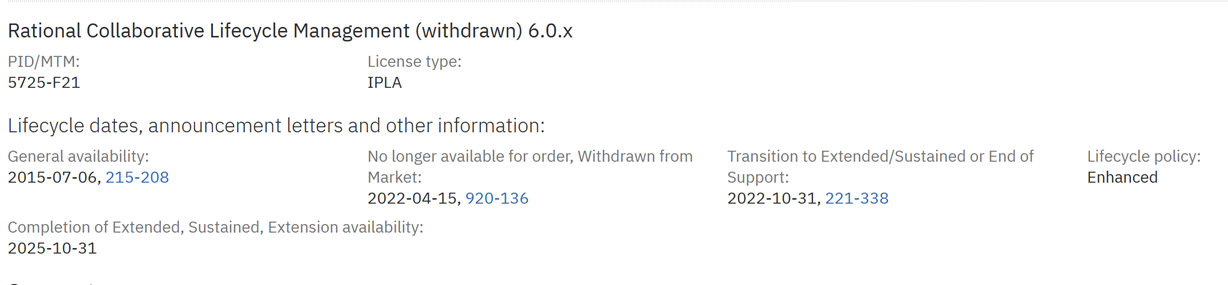
Support for 6.x was at the end of October last year so you may get lucky with an IBM Support ticket as it's only two months - worth a try, especially if you're up to date on your support subscription.

Permanent link

Davyd: Support for 7.0.2 was at the end of October last year. 6.0.6.1 has been out of support for a few years now.


The currently supported versions are 7.0.3, 7.1, and 7.2. I believe 7.0.3 is good until this October.

Hope this helps someone -- if you're on 7.0.2 you need to upgrade.

0 votes

Comments
6.0.6.1 was on Extended/Enhanced Support, which expired October last year. If the OP was still paying S&S then they would have had access to it.

Your answer

Register or log in to post your answer.

Dashboards and work items are no longer publicly available, so some links may be invalid. We now provide similar information through other means. Learn more here.

Search context
Follow this question

By Email: 

Once you sign in you will be able to subscribe for any updates here.

By RSS:

Answers
Answers and Comments
Question details
× 7,604
× 1,433

Question asked: Jan 07, 6:39 p.m.

Question was seen: 748 times

Last updated: Jan 22, 4:57 p.m.

Confirmation Cancel Confirm