How to correct my Script Based Validator?

I'm Trying to write a script based validator but it didn't work out.
here is my code
dojo.provide("com.bay.ExemptionReasonValidator");
dojo.require("com.ibm.team.workitem.api.common.Severity");dojo.require("com.ibm.team.workitem.api.common.Status");dojo.require("com.ibm.team.workitem.api.common.WorkItemAttributes")(function () {var Severity = com.ibm.team.workitem.api.common.Severity;var Status = com.ibm.team.workitem.api.common.Status;var WorkItemAttributes = com.ibm.team.workitem.api.common.WorkItemAttributes;dojo.declare("com.bay.ExemptionReasonValidator", null, {validate: function (attributeId, workItem, configuration) {if ((workItem.getValue("com.bay.task.attribute.sit_exempt02") === "com.bay.task.enumeration.sit_exempt01.literal.l2") && (workItem.getValue("com.bay.task.attribute.exemption_reason02") === "")) {return new Status(Severity["ERROR"], "Validation failed");} else {return Status.OK_STATUS;}}});})
I want to validate when workItem.getValue("com.bay.task.attribute.sit_exempt02" === "com.bay.task.enumeration.sit_exempt01.literal.l2") >>> literal.l2 is YES
this attribute must not be empty (workItem.getValue("com.bay.task.attribute.exemption_reason02") === ""))
if it empty it shouldn't be able to save and show error.
Please help me with this code.
Regards,
Derm Phongninlaarphon
One answer
- I would suggest you look at https://jazz.net/library/article/1093 for some inspiration. Since you have your unique process configuration, I do not see what the forum could do.
- Keep in mind that the validation requires the operation behavior configured
- I have never had the self-confidence to create an if statement like you do, without using intermediate variables. If you use intermediate variables continue to the next step.
-
Use Chrome and inject ?debug=true into the work item URI before the first # e.g. https://elm.example.com:9443/ccm/web/projects/ACME%20Development%20%28Change%20Management%29?debug=true#action=com.ibm.team.workitem.newWorkItem&type=com.acme.wi.type.custrequest&ts=16615010758610 then open the Developer Tools open your script under Sources, no domain and use the debugger.
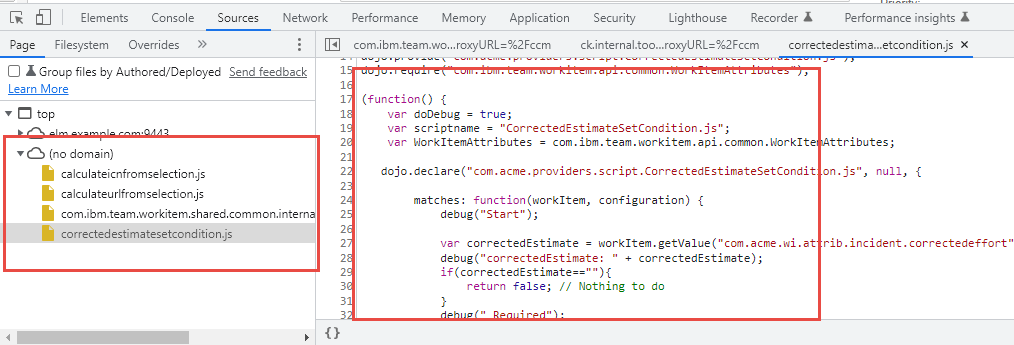
PS: This should work with other browsers, but I always struggle to find my scripts in Firefox for example. Chrome works best for me.