Jazz Forum Welcome to the Jazz Community Forum Connect and collaborate with IBM Engineering experts and users

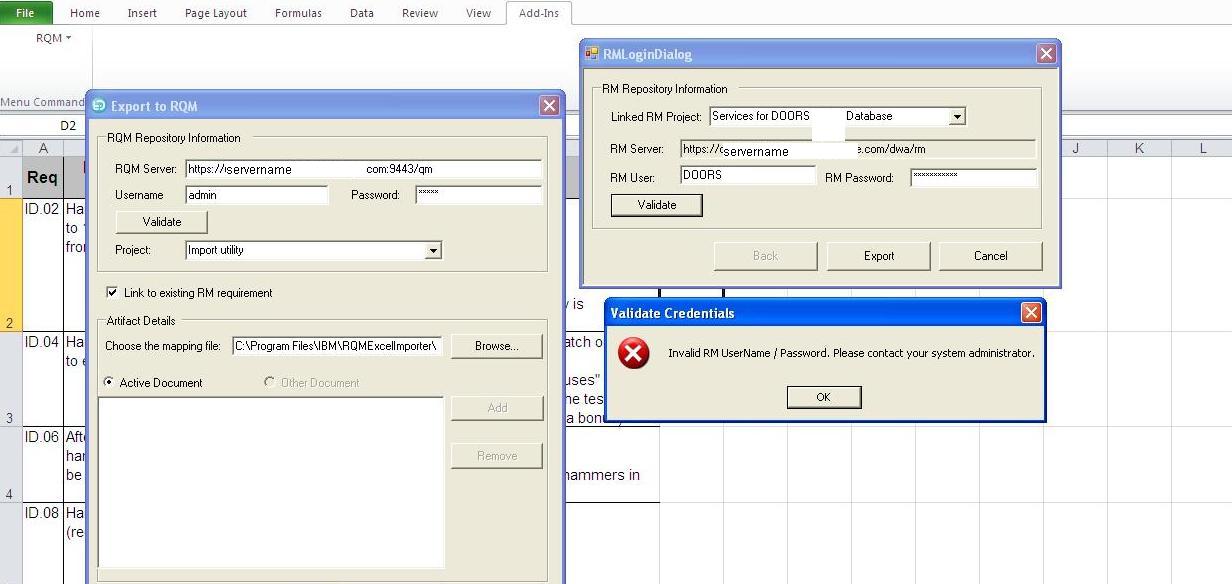
Why I am unable to login to Requirement Manager (invalid user name and password) while trying to do export of requirements using RQMExcelImporter utility?

I tried to do export for an excel file for requirement import to RQM 4.0.2 RC1 using DOORS 9.4 as Requirement Manager. The Username and Password which I am providing at the authentication window "RMLoginDialog" works correctly with the DOORS web Access.

Furthermore I would like to know how is this RM server URL fetched in the RMLoginDialog window.

following is the screen shot depicting the error.
0 votes


Accepted answer

Permanent link

Hi Sarvendra,

Exporting requirement to DOORS is not supported by Excel Importer currently, FYI.

Sarvendra Kumar selected this answer as the correct answer

0 votes


5 other answers

Permanent link
Regarding to your first question, does the failure only happen to DOORS 9.4? Could you help me do one thing to narrow down the problem. Access to your RQM->Create a test plan (or use an existing one)->go to requirement collection link view->Create New Requirement Collection (with the account you used in your question)->Add the new requirement to the test plan. Please let me know any error you may have during the process.

Regarding to your second question, RM server URL is fetched from the RQM server.  To change the configuration of your RM server URL on RQM server, please go to Server Administration->Friends(Outbound)

0 votes


Permanent link

Hi Chenyue Gao

As you have mentioned to "Access to your RQM->Create a test plan (or use an existing one)->go to requirement collection link view->Create New Requirement Collection (with the account you used in your question)->Add the new requirement to the test plan"

I did that and was able to link the Requirement Module to a Test Plan and individual Requirements to Test Case from inside RQM.

0 votes

Comments

Hi sarvendra kumar, thanks for helping me investigate this issue. It looks that the DOORS OSLC connection works properly. Also your DOORS account has the right permission for this purpose. I will forward this question to the developer of the import tool. We will be back with you ASAP. Thanks.


Permanent link

Hi Hao Wan

is there any upcoming support for DOORS in near future?

0 votes


Permanent link
Hi  sarvendra,
I'm afraid there's no plan to support DOORS yet, exporting requirement to DOORs is not likely a RQM feature, anyway you can raise an enhancement to request this function.

0 votes


Permanent link
Hi sarvendra,
there has been already an enhancement opened on exporting Doors requirement, FYI.
Provide option to import DOORS requirement links via RQMExcelWordImporter (80615)

0 votes

Your answer

Register or log in to post your answer.

Dashboards and work items are no longer publicly available, so some links may be invalid. We now provide similar information through other means. Learn more here.

Search context
Follow this question

By Email: 

Once you sign in you will be able to subscribe for any updates here.

By RSS:

Answers
Answers and Comments
Question details

Question asked: Feb 25 '13, 9:42 a.m.

Question was seen: 11,925 times

Last updated: Mar 06 '13, 1:45 a.m.

Confirmation Cancel Confirm