My builds are slow, how can I speed them up?
Authors: LaraZiosi Last updated: 28 Feb 2013 Build Basis: RTC, 4.0.1
This topic relates to improving the performance of builds launched by the Jazz Build Engine (JBE).

 Note: if you do not delete the Load directory, your build script will be responsible for cleaning up any build output files created by the previous build, that should not be present in the current build (such as any .class files, for which the corresponding .java files were deleted from the repository).
Initial Assessment
Symptoms
The execution of the build takes too long.Recommended data gathering and subsequent analysis steps
You need to determine which part of the build takes the majority of the time.Understanding Build Phases
When you create a new Build Definition, you first choose a Build template, and then you typically choose Pre-Build and Post-Build options. Generally, among the Pre-Build options you select "Jazz Source Control" (or similar, depending on the selected Build Template). This Pre-Build option allows you to fetch sources from the RTC repository to a local directory, where these sources will be built. The build itself could use a variety of tools (ANT, Maven, Command Line etc.). Post-Build activities include publishing results and automatically delivering components to a stream based on build results. To start the investigation of which part of the build is slow, open the Build Results and look at the Activities section. You will see the start time and the Activity duration for each Activity. For example, this is what you see if you selected "Jazz Source Control" as Pre-Build option:
Separating the Build script in Activities
You can split your own build script in Activities, which will help you identifying which parts of your own build are slow. To do this, see the ANT Tasks startBuildActivity and completeBuildActivity in Enabling progress monitoring.Possible causes and solutions
Here are some possible ways of improving build performance by looking at the various phases.Pre-Build: Using "Incremental" Builds instead of "Clean" Builds for Continuous Integration
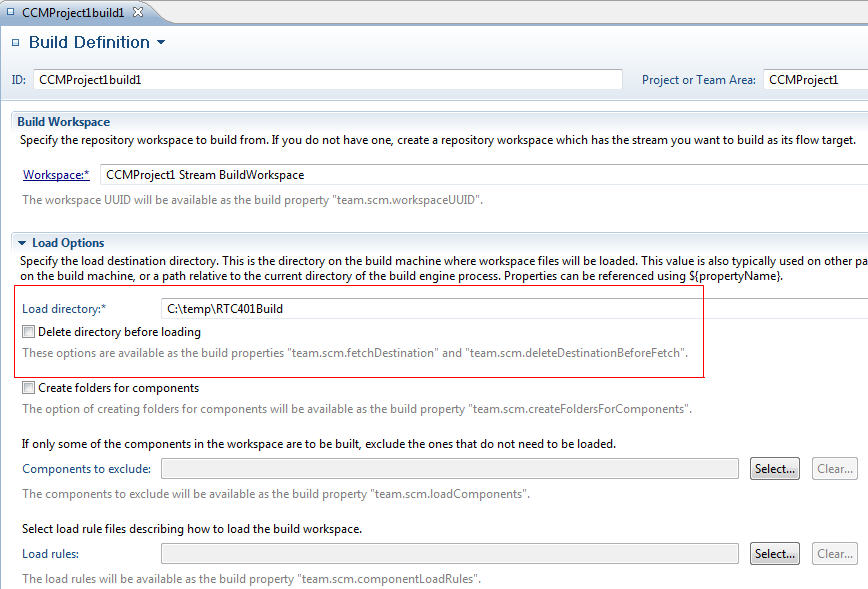
In Eclipse, you can perform Clean or Incremental builds. The difference is that in a Clean build all build outputs are deleted and recreated, while in an Incremental build only the sources that have change are re-built. The RTC documentation does not refer to these terms, because RTC does not directly create the build output. However, in the "Jazz Source Control" tab of the Build Definition, you can specify the Load directory, and whether this directory should be deleted before a new build is executed. If you choose to delete the Load directory, or if you delete the entire Build Workspace, you will perform what you could call a "Clean" build. If you are doing Continuous Integration, you will get better performance by preserving the Build Workspace, and by not deleting the Load directory. This way, only source files that have changed will be fetched from the repository. This constitutes what you could call an "Incremental" build (this actually only means that the fetching of the sources is done incrementally by RTC. Whether the actual build executes incrementally depends entirely on your build script). At any rate, "Incremental" builds will be faster, but "Clean" builds are certainly needed in some situations.
Note: if you do not delete the Load directory, your build script will be responsible for cleaning up any build output files created by the previous build, that should not be present in the current build (such as any .class files, for which the corresponding .java files were deleted from the repository).
Pre-Build: Caching proxy
To speed up fetching the sources from the repository, you can use a caching proxy, which ensures that only sources that have changed will be fetched from the repository, while unchanged sources will be fetched from the caching proxy itself. This is the recommended solution to adopt between a build site and the build engines, if they are not co-located. Even if build site and build engines are close, if you have large builds a caching proxy can help to reduce network and database traffic.Build execution: split builds in smaller parts
Speeding up the actual build execution depends critically on the build script being used. Some suggestions that apply in general can be found in section 6 of the article Continuous Integration Best Practices with Rational Team Concert (Keep the Build Fast).Build execution: Load tools and artifacts only when needed
It is very common to have the build tools load the Eclipse Compiler for Java (ECJ) in a component and load them during the build: this is a time-consuming operation if it is done every time in a "Clean" build. It is advisable to have these tools in a special separate stream and have a separate build definition that loads them to a relative location on the build machine. You would run this build only once for each build engine and then, only when the build tools versions change. The same considerations apply to any artifacts that are unlikely to change frequently.Post-Build: managing the publication of large logs
As an alternative to publishing large logs to the repository, you can post links to artifacts on a HTTP server (see Build Artifacts Publishing Using HTTP Servers). Note however that using the recommendations in this article implies that you run a "Clean" build every time since the output directory changes for each build in order to preserve the build output.Related Topics: Performance Troubleshooting, Deployment Web Home
External Links:
- Tutorial: Building with Jazz Team Build
- Enabling progress monitoring
- Using content caching proxies for Jazz Source Control
- Continuous integration using Rational Team Concert
- Continuous Integration Best Practices with Rational Team Concert
- Build Artifacts Publishing Using HTTP Servers
- Automated Build Output Management Using the Plain Java Client Libraries
- Rational Build Forge Performance test results: Evaluating the improved performance in 7.1.2 relative to 7.1.1.4
Additional Contributors: TWikiUser, TWikiUser


| I | Attachment | Action | Size | Date | Who | Comment |
|---|---|---|---|---|---|---|
 jpg jpg |
BuildActivities.jpg | manage | 30.0 K | 2013-02-28 - 14:30 | UnknownUser | |
| jpg |
BuildIncremental.jpg | manage | 119.6 K | 2013-02-27 - 21:45 | UnknownUser |




 Copyright © by IBM and non-IBM contributing authors. All material on this collaboration platform is the property of the contributing authors.
 Contributions are governed by our Terms of Use. Please read the following disclaimer.
Dashboards and work items are no longer publicly available, so some links may be invalid. We now provide similar information through other means. Learn more here.