Attachment to defect

We have integrated RQM and RTC and defects created in RQM can be found and processed in RTC.
We can also attach files /snapshot to the defectafter the defect has been created and saved.
What I would like to know is how to attach files/snapshots to the defect when I create a defect.
It seems to me that the create defect template is missing the tab 'Links' .
Can somebody tell if this can be fixed in some way or do we have to wait with attachments until after the defect has been created?
We can also attach files /snapshot to the defect
What I would like to know is how to attach files/snapshots to the defect when I create a defect.
It seems to me that the create defect template is missing the tab 'Links' .
Can somebody tell if this can be fixed in some way or do we have to wait with attachments until after the defect has been created?
Accepted answer
Hello,
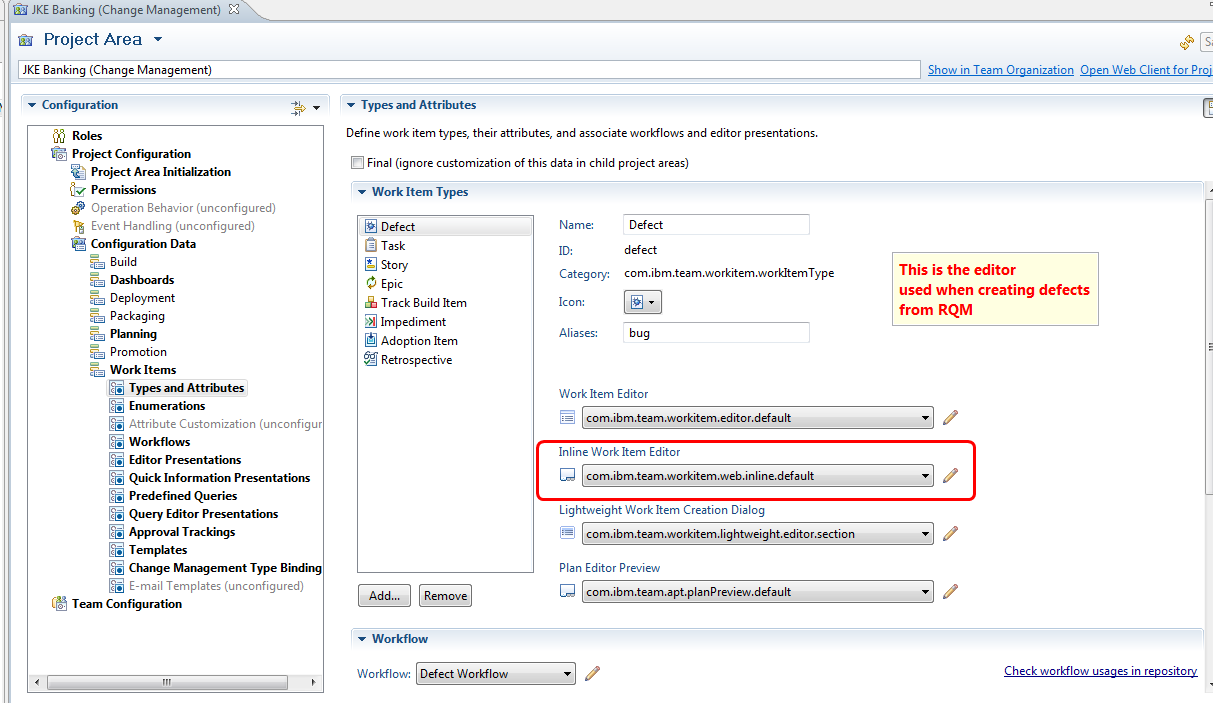
this is due to the fact that when creating a RTC defect from RQM - in the WebUI - you are using
a different editor - called the "Inline Work Item Editor", for which attachments are not available by default.
To overcome this:
Edit your RTC Project Area - Project configuration - Work Items - Editor Presentations
select the Web Inline Editor
Add the attachments presentation (non-attribute based)

Save your changes
Create a new defect from RQM. Observe: attachment can be added

this is due to the fact that when creating a RTC defect from RQM - in the WebUI - you are using
a different editor - called the "Inline Work Item Editor", for which attachments are not available by default.
To overcome this:
Edit your RTC Project Area - Project configuration - Work Items - Editor Presentations
select the Web Inline Editor
Add the attachments presentation (non-attribute based)
Save your changes
Create a new defect from RQM. Observe: attachment can be added
6 other answers
I would like to extend the question and understand how can we force the defect creator to attach files/snapshots and not leave it to his/her discretion.
Comments

Hello Shimon,
as I can understand it, it's currently not possible, as attachment is not an attribute, so we can not enforce any value to be set.
This will be addressed with enhancement Allow to configure links as required properties (93796)

Hi Rajat
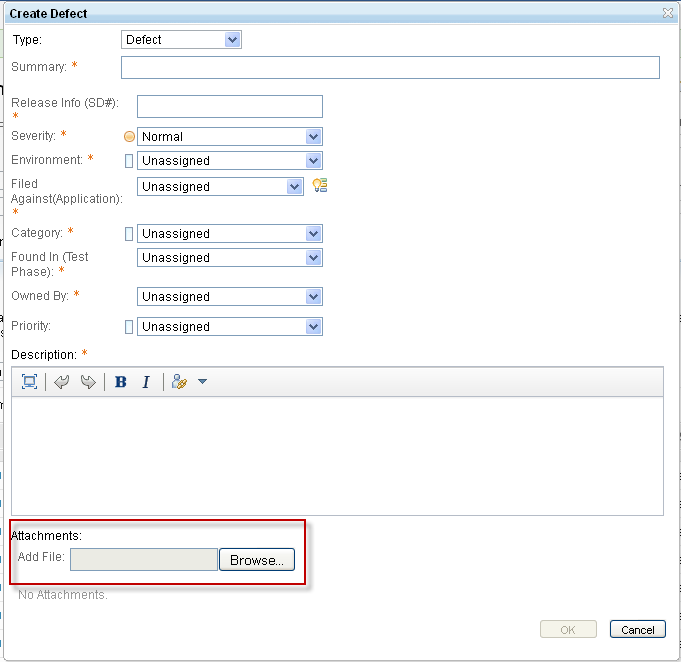
I think that the problem is that there are two different create defect dialogs.
When you create a defect directly in RTC it is possible to add attachments as you describe.
However when you create a defect during test execution in RQM the defect dialog is different as shown below.
In this situation attachments can not not be added.

I think that the problem is that there are two different create defect dialogs.
When you create a defect directly in RTC it is possible to add attachments as you describe.
However when you create a defect during test execution in RQM the defect dialog is different as shown below.
In this situation attachments can not not be added.
Hi Eric Jodet, I have followed the steps as you are describing, as I also wanted to have the Attachments section on the defect editor from RQM. I successfully was able to make the attachment section to show, but I am experiencing the following issue:
When I press browse button and select the file to attach, it shows is is uploading but after some seconds when it finishes it doesnt attach anything, and "No attachments" is still shown as if nothing would have been added.
I tested in different project areas, and getting same result: nothing is shown nor attached after selecting a file.
Please I would like to know how to solve this problem, I tested different browsers but no changes.
Thanks
When I press browse button and select the file to attach, it shows is is uploading but after some seconds when it finishes it doesnt attach anything, and "No attachments" is still shown as if nothing would have been added.
I tested in different project areas, and getting same result: nothing is shown nor attached after selecting a file.
Please I would like to know how to solve this problem, I tested different browsers but no changes.
Thanks
Eric Jodet: After some time I got back into this issue and try your suggestion, this is the error I am getting in the console:

Can you think why I am getting this error in the console and how to possibly solve it so I am able to put some attachment in the defect.
Thanks!
This is part of the error I am getting in the console, for some reason it was not included in the previous post:
Problems executing condition {0}:: Cannot read property 'TYPE' of undefined. TypeError: Cannot read property 'TYPE' of undefined
at dojo.declare.matches (WPSizeUnitOfMeasure.js:15:51)
at dojo.declare.matches (https://ratsuite188.sby.ibm.com:9444/ccm/web/_js/?include=Bm~&etag=DV0CIYNitug_en_US&_proxyURL=%2Fccm&ss=FuSX0&locale=en-us:48659:12)
Thanks
Problems executing condition {0}:: Cannot read property 'TYPE' of undefined. TypeError: Cannot read property 'TYPE' of undefined
at dojo.declare.matches (WPSizeUnitOfMeasure.js:15:51)
at dojo.declare.matches (https://ratsuite188.sby.ibm.com:9444/ccm/web/_js/?include=Bm~&etag=DV0CIYNitug_en_US&_proxyURL=%2Fccm&ss=FuSX0&locale=en-us:48659:12)
Thanks
Comments
Hello,
this would require some debugging.
Refer to our Wiki page - https://jazz.net/wiki/bin/view/Main/L3WIDebugging?topicparent=Main.RTCL3#Web_UI_JavaScript
Install Chromium, add ?debug=true to your URL,
and have Chromium break on all exceptions.
You should stop at the error.
If the code is ours, please open a PMR.
Thanks,
Eric