Displaying Traceability Between an ERM Artifact and a File Managed in EWM Source Control

Jazz Version: 7.0.3
- In ERM, I have a module containing artifacts.
- In EWM Source Control, I have various files.
- In GC, I have a global configuration that combines the ERM stream containing the artifacts and the EWM stream containing the files.
I want to create traceability between my ERM artifacts and my files managed in EWM.
To do this, I'm using the EWM Eclipse client to create the "Implements Requirement" link.
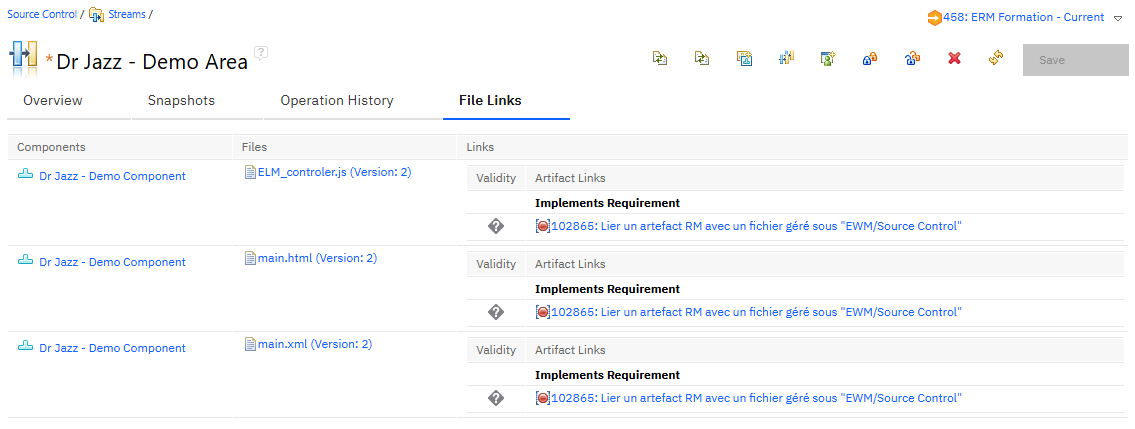
In EWM, I can see the files and the links to the ERM artifacts (see screenshot).
But in ERM, I see nothing... Is there a way to view the links created to these files from ERM? (The ERM Link Explorer doesn't display anything, and there's no indicator highlighting these links.)
I'm not even convinced it's possible to highlight these links with Report Builder.
3 answers
If you create the same type of link from the EWM file to the ERM module artifact from within the GUI: Does the link show in ERM?
If not:, you may not have set it up correctly on the EWM side. In EWM you also need to associate the Global Configuration to the relevant releases.
See this jazz.net article: Work item linking in a global configuration
Diana,
From the EWM interface (using Edge or Chrome), it's not possible to directly create a link from a file to an ERM artifact, or perhaps I'm missing something ?
To create this type of link, I have no other option than to use the Eclipse EWM client (Team / Add Related Artifacts...).
Indeed, I had forgotten to associate the global configuration with an EWM release: I corrected this, and I created another link that is clearly visible in EWM, but still nothing appears in ERM...
I think there are several things going on here:
- this link type is an OSLC spec defined link used to associate a Requirement to a Change Management Provider and so it has a pretty narrow usage
- in ELM the normal use for the Implements Requirement link type based on the above is to associate Requirements artefacts with Implementation Tasks or Stories or some form of Work Item that follows the Change Management OSLC form
- linking to a file in the CM side means that, even if the CCM application understands how to display the Requirement through the RM Provider OSLC spec, the RM side will not understand the file because it's not part of the Change Management spec
So, given the above, my suggestion is to link your Requirement artefacts to some form of Task work item, and then use the Task to link to Change Sets that show all the files touched in the process of delivering the change. This is the standard approach that most people use. This will also mean you can use the web client, Eclipse client, native Windows client etc.