Jazz Forum Welcome to the Jazz Community Forum Connect and collaborate with IBM Engineering experts and users

Asterisk doesn't appear when an attribute is made mandatory through condition script

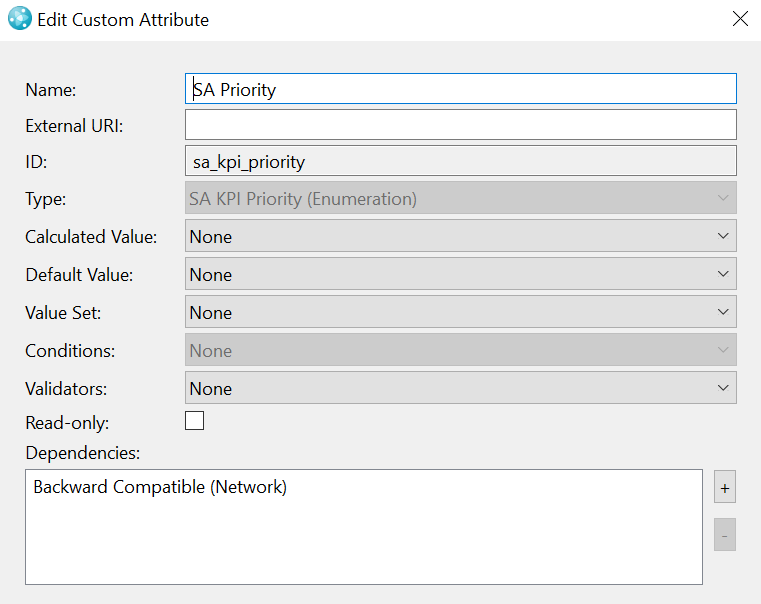
I want to make my custom made "SA Priority"(labelled as Priority) attribute mandatory , if the "backward_compatible_network is set to "Incompatible Value". For this, I have created javascript condition as below.

dojo.provide("org.example.workitems.providers.Test_SA_Priority_Mandatory");
dojo.require("com.ibm.team.workitem.api.common.WorkItemAttributes");
(function() {
   dojo.declare("org.example.workitems.providers.Test_SA_Priority_Mandatory", null, {
     matches: function(workItem, configuration) {
 
      var WorkItemAttributes= com.ibm.team.workitem.api.common.WorkItemAttributes;
      var sa_backward_compatible_network = workItem.getValue("backward_compatible_network");
      var sa_priority = workItem.getValue("sa_kpi_priority");
       
  if ((sa_backward_compatible_network === "SA_KPI_Backward_Compatible_Network.literal.l4")
           ) {
   return true;
      }
 }
   });
 })();

The script is working fine. I am getting a  validation error if the condition is not met(I have attached the error screenshot).  But I am not getting the asterisk on the attribute. Is there any way to get that asterisk sign on Priority attribute.

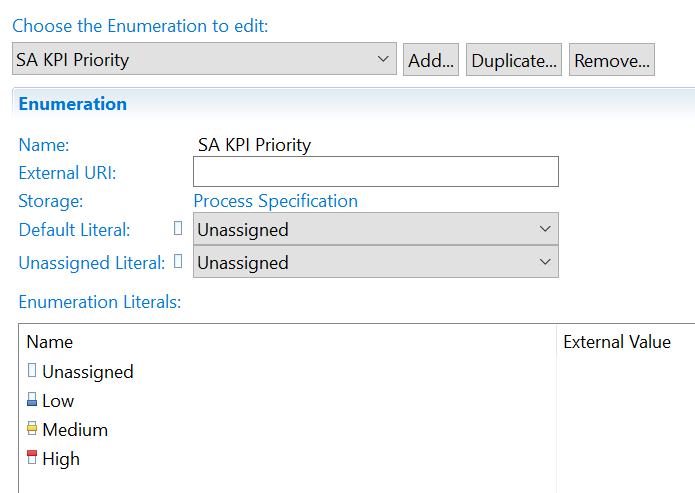
The enumeration created for priority attribute is given below.

Any help would be appreciated.


0 votes


3 answers

Permanent link
Can you show screen shots of how you have used the condition? If you use it on Validation it will only check at save time but if you use it on Mandatory fields for Condition it will check while entering data.

The other thing you need to do is indicate there is a dependency between the priority and the backward compatible field. If you don't do that then the mandatory condition won't fire when that field is changed - that may be the problem during editing

0 votes


Permanent link

I have used the script as a condition. And I have added it to the below precondition.

Also, I have added the dependency for the backward compatible network attribute.
Is there any thing I need to configure?

0 votes

Comments
This all looks absolutely correct - can you show screen shots of the Required attributes for Condition right hand panel with the condition set up and the attributes selected?

I have done the same thing, and these are three screen shots I took during editing - the asterisks appear the moment I change the two impact drop downs


Permanent link

Please find the screenshot.

0 votes

Comments
OK that all looks fine too - although the condition above it looks like the function is missing. That shouldn't cause issues though.

The one thing I did just notice is that your function returns true but it doesn't explicitly return false. Try adding in a return false at the end and see if explicitly saying the condition is false makes a difference.

Also are you checking this field in any of the other actions above the condition? Are you positive it's firing and it's not one of the others?

Your answer

Register or log in to post your answer.

Dashboards and work items are no longer publicly available, so some links may be invalid. We now provide similar information through other means. Learn more here.

Search context
Follow this question

By Email: 

Once you sign in you will be able to subscribe for any updates here.

By RSS:

Answers
Answers and Comments
Question details

Question asked: May 22 '25, 10:18 a.m.

Question was seen: 1,841 times

Last updated: May 23 '25, 8:34 a.m.

Confirmation Cancel Confirm