Why do I have 6 Instant Messaging icons in my toolbar?

I seem to have a corrupted configuration file somewhere. I have six Instant Messaging buttons or icons in my
workspace. The pulldown gives me "configure" and "close" for each one. Selecting close has no effect.

I don't use IM in eclipse at all, and would love to get rid of them. I move it to other window sides, but I can't move it off entirely.
I'm running Mars eclipse on 64 bit Linux.
Thanks!
workspace. The pulldown gives me "configure" and "close" for each one. Selecting close has no effect.
I don't use IM in eclipse at all, and would love to get rid of them. I move it to other window sides, but I can't move it off entirely.
I'm running Mars eclipse on 64 bit Linux.
Thanks!
2 answers
This question doesn't sound like it has anything to do with RTC or the Jazz tooling, in which case unless you can clarify where/how RTC is involved, it would be better to post it to an Eclipse forum.
Comments
I believe that it is RTC's collaboration feature documented here
https://jazz.net/help-dev/clm/topic/com.ibm.team.collaboration.doc/topics/t_instantmessaging.htmlIn my install details plugins tab, it lists IBM as the provider for about a dozen plugins all starting with Synchronous Collaboration, eg Synchronous Collaboration Jabber RCP Core and Synchronous Collaboration Sametime RCP Core (i'm trying to provide a screenshot but the insert image link doesn't work for me). These names all appear in the Eclipse Preferences Instant Messaging configuration.
Craig
Craig, you would by default, if you installed RTC into your Eclipse, see one very small status in the lower right.
I have never seen more than one. In any case, you should be able to disable this here in the preferences
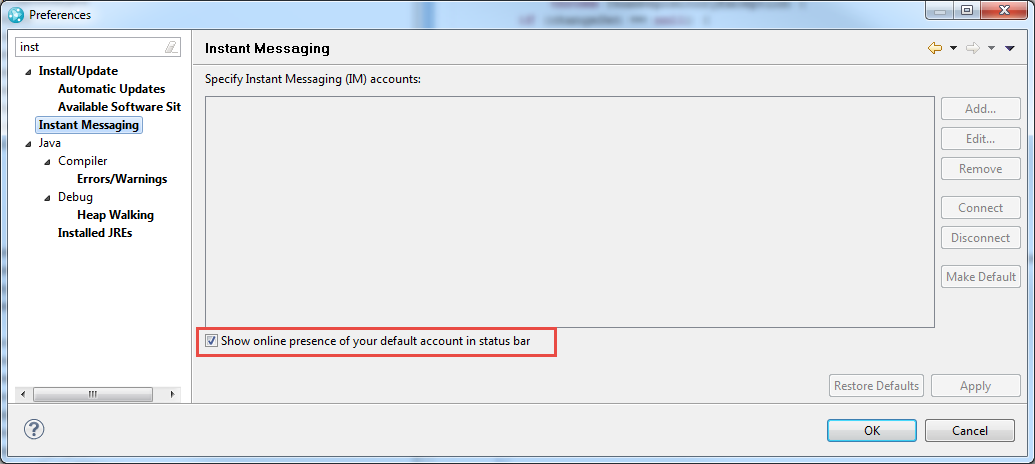
If that does not work, I am unsure what could be wrong. I would suggest to look into the Eclipse and workspace logs and try if a fresh workspace shows the same.
I have never seen more than one. In any case, you should be able to disable this here in the preferences
If that does not work, I am unsure what could be wrong. I would suggest to look into the Eclipse and workspace logs and try if a fresh workspace shows the same.