RTC(DW) connect with IBM Cognos 10.2

Hello everyone.
RTC saves activity data in the (DW), once by day.
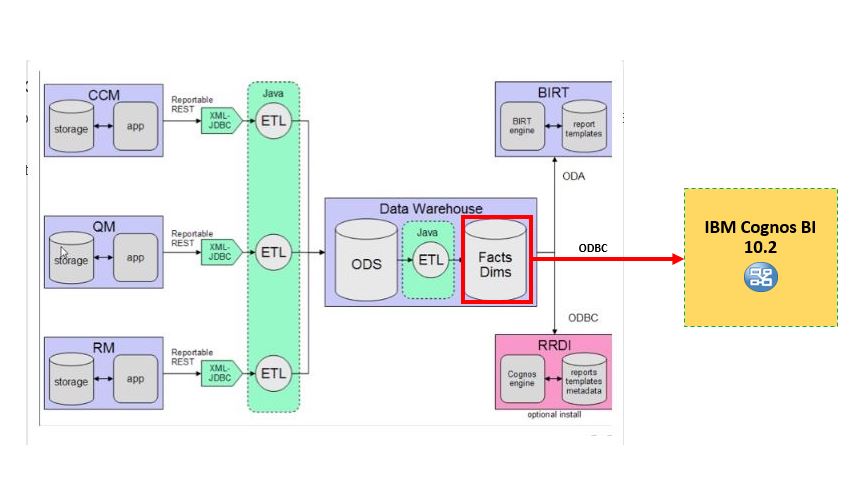
We want to exploit and use this information with IBM Cognos BI 10.2. Connect RTC (DW) and IBM Cognos through an ODBC (DB2). We have some questions about this.
Which tables are exactly the Fact tables, and which tables are exactly the Dimension Tables in this RTC(DW)?
How the information is organized?, Fact and Dims normalized?
Anyone who has done this before and can help us?
Many thanks.
 Is possible to extract data with Jazz Report and export them to a file format (csv, xls, table, txt)?
Accepted answer
Hello Fran,
You can have a base idea of the base structure of the data warehouse by looking at the following section of the Insight documentation:
Rational Insight Data warehouse
http://www-01.ibm.com/support/knowledgecenter/SSRL5J_1.1.1/com.ibm.rational.raer.models.doc/topics/ModelReport111/index.html
If you have Cognos expertise, you can also download the cpf file of the Framework Manager Data Model from CLM and analyze it.
You can get it from JTS Admin > Reports > Downloads > Archive Files for Rational Reporting
If your CLM is in version 6, you should consider using the ALM Cognos Connector, that is providing connectivity between the CLM data warehouse and authentication system and a standard Cognos installation.
Please note that it only supports Cognos Business Intelligence 10.2.1 Fix Pack 2.
For more details see:
Migrating Rational Reporting for Development Intelligence reports to Cognos Business Intelligence using the ALM Cognos Connector
http://www-01.ibm.com/support/knowledgecenter/SSYMRC_6.0.0/com.ibm.rational.rrdi.admin.doc/topics/t_migrate_cognos_ov.html
Best Regards,
Francesco Chiossi
You can have a base idea of the base structure of the data warehouse by looking at the following section of the Insight documentation:
Rational Insight Data warehouse
http://www-01.ibm.com/support/knowledgecenter/SSRL5J_1.1.1/com.ibm.rational.raer.models.doc/topics/ModelReport111/index.html
If you have Cognos expertise, you can also download the cpf file of the Framework Manager Data Model from CLM and analyze it.
You can get it from JTS Admin > Reports > Downloads > Archive Files for Rational Reporting
If your CLM is in version 6, you should consider using the ALM Cognos Connector, that is providing connectivity between the CLM data warehouse and authentication system and a standard Cognos installation.
Please note that it only supports Cognos Business Intelligence 10.2.1 Fix Pack 2.
For more details see:
Migrating Rational Reporting for Development Intelligence reports to Cognos Business Intelligence using the ALM Cognos Connector
http://www-01.ibm.com/support/knowledgecenter/SSYMRC_6.0.0/com.ibm.rational.rrdi.admin.doc/topics/t_migrate_cognos_ov.html
Best Regards,
Francesco Chiossi