Error instantiating plugin class : is not a kind of "com.ibm.team.repository.service.AbstractService"

So, I managed to successfully deploy a plugin to RTC v4.0.0 and I added the pre-condition and post-condition handlers to the WorkItem save operation.
When I create a workitem and try to save it, I get the following message when RTC tries to instantiate the advisor and later on the participant:
2013-04-23 12:38:04,213 [ http-bio-9443-exec-39] ERROR t.internal.registry.AbstractActivationManagerOwner - CRJAZ1093I The following service class was not activated: "itsm2.rtcext.workitem.extensions.service.advisors.AddSubscribersOnWorkitemSaveAdvi
sor" com.ibm.team.repository.common.transport.TeamServiceRegistryException: CRJAZ1108I The implementation class "itsm2.rtcext.workitem.extensions.service.advisors.AddSubscribersOnWorkitemSaveAdvisor", in the bundle "itsm2.rtcext.workitem.extensions.service.advisors", is not a kind of "com.ibm.team.repository.service.AbstractService".
Please mind that the plugins' code was created using the tools provided by the Eclipse platform in which I have added the RTC SDK. I have not created the classed manually, nor have I written code other than the content of the run method.
Question 1 : If RTC expects the class to be of the AbstractService type, why is Eclipse not extending it by default when creating the class code?
Question 2 : How do I fix this so I can move forward? Is it enough to go inside the code and modify the class declaration to extend the missing class?
When I create a workitem and try to save it, I get the following message when RTC tries to instantiate the advisor and later on the participant:
2013-04-23 12:38:04,213 [ http-bio-9443-exec-39] ERROR t.internal.registry.AbstractActivationManagerOwner - CRJAZ1093I The following service class was not activated: "itsm2.rtcext.workitem.extensions.service.advisors.AddSubscribersOnWorkitemSaveAdvi
sor" com.ibm.team.repository.common.transport.TeamServiceRegistryException: CRJAZ1108I The implementation class "itsm2.rtcext.workitem.extensions.service.advisors.AddSubscribersOnWorkitemSaveAdvisor", in the bundle "itsm2.rtcext.workitem.extensions.service.advisors", is not a kind of "com.ibm.team.repository.service.AbstractService".
Please mind that the plugins' code was created using the tools provided by the Eclipse platform in which I have added the RTC SDK. I have not created the classed manually, nor have I written code other than the content of the run method.
Question 1 : If RTC expects the class to be of the AbstractService type, why is Eclipse not extending it by default when creating the class code?
Question 2 : How do I fix this so I can move forward? Is it enough to go inside the code and modify the class declaration to extend the missing class?
Accepted answer
I test-deployed against an arbitrary test tomcat.
https://localhost:9443/jazz/admin?internal=true#action=com.ibm.team.repository.admin.componentStatus did not show the components.
I imported the components and ran them with Jetty. They worked.
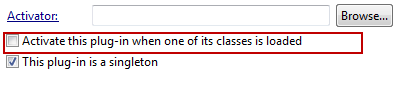
I went through the plugin-xml's ans unchecked the Activate this Plugin..... since there is no activator.
I made the component names (not ID's) distinguishable.
I deleted all files in the update site, except .project and site.xml and rebuilt the update site.
I copied Site.xml and the Features, Plugins folder from the update site into the update site and it deploys now and shows up in the component status.
Please be aware this was 4.0.1 and my workspace settings are UTF-8

As described in the Extensions Workshop. I am not sure why that should matter, but it did for me in the past.
Would be interesting if that was the case here, but iguess it rather was an issue with rebuilding the update site.
https://localhost:9443/jazz/admin?internal=true#action=com.ibm.team.repository.admin.componentStatus did not show the components.
I imported the components and ran them with Jetty. They worked.
I went through the plugin-xml's ans unchecked the Activate this Plugin..... since there is no activator.
I made the component names (not ID's) distinguishable.
I deleted all files in the update site, except .project and site.xml and rebuilt the update site.
I copied Site.xml and the Features, Plugins folder from the update site into the update site and it deploys now and shows up in the component status.
Please be aware this was 4.0.1 and my workspace settings are UTF-8
As described in the Extensions Workshop. I am not sure why that should matter, but it did for me in the past.
Would be interesting if that was the case here, but iguess it rather was an issue with rebuilding the update site.
Comments


5 other answers
Did you create the plugin on a different architecture? It appears that the unzip operation already fails - line 1 inthe errors.
Comments
showing 5 of 6
show 1 more comments
There are many examples out there that you could have stated with. Just my blog for example and the Extension Workshop also mentions the fact.
That an extension point expects a specific type extending it, is quite normal and described in many Eclipse extension books. Since writing Eclipse extensions is complex it is a good idea to buy one of the many books available or look at tutorials on Eclipse.org. The extension point actually also mentions that.

And you can browse the extension point schema to learn more. What Eclipse does if you hit the shortcut above, I am not sure. However there are so many ways to create the class, that it would probably be pointless to have one path that automates everything. You can file a request on eclipse.org however.
If your extension works with Jetty, but dies with tomcat, that hints to deployment issues. Wrong .ini pointing to somewhere with no site (typo), wrong dependencies e.g. to client API, missing files in the created Jar files. I'd suggest looking into the ccm.log.
That an extension point expects a specific type extending it, is quite normal and described in many Eclipse extension books. Since writing Eclipse extensions is complex it is a good idea to buy one of the many books available or look at tutorials on Eclipse.org. The extension point actually also mentions that.
And you can browse the extension point schema to learn more. What Eclipse does if you hit the shortcut above, I am not sure. However there are so many ways to create the class, that it would probably be pointless to have one path that automates everything. You can file a request on eclipse.org however.
If your extension works with Jetty, but dies with tomcat, that hints to deployment issues. Wrong .ini pointing to somewhere with no site (typo), wrong dependencies e.g. to client API, missing files in the created Jar files. I'd suggest looking into the ccm.log.
Comments
I can't remember I ever created a constructor. My code typically only overwrites the run operation. like this

also see the many examples beginning with this one: http://rsjazz.wordpress.com/2012/07/31/rtc-update-parent-duration-estimation-and-effort-participant/
When I deploy, I typically have only issues with typos. Once a typo led to my Tomcat dying during startup - because I had missed to copy the site.xml over.....
also see the many examples beginning with this one: http://rsjazz.wordpress.com/2012/07/31/rtc-update-parent-duration-estimation-and-effort-participant/
When I deploy, I typically have only issues with typos. Once a typo led to my Tomcat dying during startup - because I had missed to copy the site.xml over.....
Comments
showing 5 of 6
show 1 more comments
Here is the stack trace of the error for the deployment on WAS:
[4/24/13 1:18:45:461 CEST] 00000011 SystemErr R java.util.zip.ZipException: error in opening zip file
[4/24/13 1:18:45:462 CEST] 00000011 SystemErr R at java.util.zip.ZipFile.open(Native Method)
[4/24/13 1:18:45:462 CEST] 00000011 SystemErr R at java.util.zip.ZipFile.<init>(ZipFile.java:150)
[4/24/13 1:18:45:462 CEST] 00000011 SystemErr R at java.util.jar.JarFile.<init>(JarFile.java:149)
[4/24/13 1:18:45:463 CEST] 00000011 SystemErr R at java.util.jar.JarFile.<init>(JarFile.java:86)
[4/24/13 1:18:45:463 CEST] 00000011 SystemErr R at sun.net.www.protocol.jar.URLJarFile.<init>(URLJarFile.java:84)
[4/24/13 1:18:45:463 CEST] 00000011 SystemErr R at sun.net.www.protocol.jar.URLJarFile.getJarFile(URLJarFile.java:60)
[4/24/13 1:18:45:463 CEST] 00000011 SystemErr R at sun.net.www.protocol.jar.JarFileFactory.get(JarFileFactory.java:80)
[4/24/13 1:18:45:463 CEST] 00000011 SystemErr R at sun.net.www.protocol.jar.JarURLConnection.connect(JarURLConnection.java:119)
[4/24/13 1:18:45:464 CEST] 00000011 SystemErr R at sun.net.www.protocol.jar.JarURLConnection.getInputStream(JarURLConnection.java:147)
[4/24/13 1:18:45:464 CEST] 00000011 SystemErr R at java.net.URL.openStream(URL.java:1022)
[4/24/13 1:18:45:464 CEST] 00000011 SystemErr R at com.ibm.team.repository.provision.internal.xml.AbstractXMLParser.invokeParser(AbstractXMLParser.java:40)
[4/24/13 1:18:45:464 CEST] 00000011 SystemErr R at com.ibm.team.repository.provision.internal.xml.FeatureXMLParser.parse(FeatureXMLParser.java:46)
[4/24/13 1:18:45:464 CEST] 00000011 SystemErr R at com.ibm.team.repository.provision.model.Feature.parseFeature(Feature.java:105)
[4/24/13 1:18:45:465 CEST] 00000011 SystemErr R at com.ibm.team.repository.provision.model.Feature.getPluginDependencies(Feature.java:81)
[4/24/13 1:18:45:465 CEST] 00000011 SystemErr R at com.ibm.team.repository.provision.internal.ProvisionService.installFeature(ProvisionService.java:387)
[4/24/13 1:18:45:465 CEST] 00000011 SystemErr R at com.ibm.team.repository.provision.internal.ProvisionService.installFromProfileProperties(ProvisionService.java:948)
[4/24/13 1:18:45:465 CEST] 00000011 SystemErr R at com.ibm.team.repository.provision.internal.ProvisionService.installFromProfiles(ProvisionService.java:1005)
[4/24/13 1:18:45:466 CEST] 00000011 SystemErr R at com.ibm.team.repository.provision.internal.ProvisionService.installFromProfileNoWait(ProvisionService.java:1139)
[4/24/13 1:18:45:466 CEST] 00000011 SystemErr R at com.ibm.team.repository.provision.internal.ProvisionService.installFromProfile(ProvisionService.java:1077)
[4/24/13 1:18:45:466 CEST] 00000011 SystemErr R at com.ibm.team.repository.provision.internal.ProvisionService.installFromContextConfigurationUrl(ProvisionService.java:1156)
[4/24/13 1:18:45:466 CEST] 00000011 SystemErr R at com.ibm.team.jfs.app.install.Activator$1.run(Activator.java:172)
[4/24/13 1:18:45:467 CEST] 00000011 SystemErr R at java.lang.Thread.run(Thread.java:738)
[4/24/13 1:18:45:467 CEST] 00000011 SystemErr R Exception in thread "Launch callback handler" java.lang.NullPointerException
[4/24/13 1:18:45:468 CEST] 00000011 SystemErr R at com.ibm.team.repository.provision.internal.ProvisionService.installFeature(ProvisionService.java:388)
[4/24/13 1:18:45:468 CEST] 00000011 SystemErr R at com.ibm.team.repository.provision.internal.ProvisionService.installFromProfileProperties(ProvisionService.java:948)
[4/24/13 1:18:45:468 CEST] 00000011 SystemErr R at com.ibm.team.repository.provision.internal.ProvisionService.installFromProfiles(ProvisionService.java:1005)
[4/24/13 1:18:45:469 CEST] 00000011 SystemErr R at com.ibm.team.repository.provision.internal.ProvisionService.installFromProfileNoWait(ProvisionService.java:1139)
[4/24/13 1:18:45:469 CEST] 00000011 SystemErr R at com.ibm.team.repository.provision.internal.ProvisionService.installFromProfile(ProvisionService.java:1077)
[4/24/13 1:18:45:469 CEST] 00000011 SystemErr R at com.ibm.team.repository.provision.internal.ProvisionService.installFromContextConfigurationUrl(ProvisionService.java:1156)
[4/24/13 1:18:45:469 CEST] 00000011 SystemErr R at com.ibm.team.jfs.app.install.Activator$1.run(Activator.java:172)
[4/24/13 1:18:45:470 CEST] 00000011 SystemErr R at java.lang.Thread.run(Thread.java:738)
[4/24/13 1:18:45:461 CEST] 00000011 SystemErr R java.util.zip.ZipException: error in opening zip file
[4/24/13 1:18:45:462 CEST] 00000011 SystemErr R at java.util.zip.ZipFile.open(Native Method)
[4/24/13 1:18:45:462 CEST] 00000011 SystemErr R at java.util.zip.ZipFile.<init>(ZipFile.java:150)
[4/24/13 1:18:45:462 CEST] 00000011 SystemErr R at java.util.jar.JarFile.<init>(JarFile.java:149)
[4/24/13 1:18:45:463 CEST] 00000011 SystemErr R at java.util.jar.JarFile.<init>(JarFile.java:86)
[4/24/13 1:18:45:463 CEST] 00000011 SystemErr R at sun.net.www.protocol.jar.URLJarFile.<init>(URLJarFile.java:84)
[4/24/13 1:18:45:463 CEST] 00000011 SystemErr R at sun.net.www.protocol.jar.URLJarFile.getJarFile(URLJarFile.java:60)
[4/24/13 1:18:45:463 CEST] 00000011 SystemErr R at sun.net.www.protocol.jar.JarFileFactory.get(JarFileFactory.java:80)
[4/24/13 1:18:45:463 CEST] 00000011 SystemErr R at sun.net.www.protocol.jar.JarURLConnection.connect(JarURLConnection.java:119)
[4/24/13 1:18:45:464 CEST] 00000011 SystemErr R at sun.net.www.protocol.jar.JarURLConnection.getInputStream(JarURLConnection.java:147)
[4/24/13 1:18:45:464 CEST] 00000011 SystemErr R at java.net.URL.openStream(URL.java:1022)
[4/24/13 1:18:45:464 CEST] 00000011 SystemErr R at com.ibm.team.repository.provision.internal.xml.AbstractXMLParser.invokeParser(AbstractXMLParser.java:40)
[4/24/13 1:18:45:464 CEST] 00000011 SystemErr R at com.ibm.team.repository.provision.internal.xml.FeatureXMLParser.parse(FeatureXMLParser.java:46)
[4/24/13 1:18:45:464 CEST] 00000011 SystemErr R at com.ibm.team.repository.provision.model.Feature.parseFeature(Feature.java:105)
[4/24/13 1:18:45:465 CEST] 00000011 SystemErr R at com.ibm.team.repository.provision.model.Feature.getPluginDependencies(Feature.java:81)
[4/24/13 1:18:45:465 CEST] 00000011 SystemErr R at com.ibm.team.repository.provision.internal.ProvisionService.installFeature(ProvisionService.java:387)
[4/24/13 1:18:45:465 CEST] 00000011 SystemErr R at com.ibm.team.repository.provision.internal.ProvisionService.installFromProfileProperties(ProvisionService.java:948)
[4/24/13 1:18:45:465 CEST] 00000011 SystemErr R at com.ibm.team.repository.provision.internal.ProvisionService.installFromProfiles(ProvisionService.java:1005)
[4/24/13 1:18:45:466 CEST] 00000011 SystemErr R at com.ibm.team.repository.provision.internal.ProvisionService.installFromProfileNoWait(ProvisionService.java:1139)
[4/24/13 1:18:45:466 CEST] 00000011 SystemErr R at com.ibm.team.repository.provision.internal.ProvisionService.installFromProfile(ProvisionService.java:1077)
[4/24/13 1:18:45:466 CEST] 00000011 SystemErr R at com.ibm.team.repository.provision.internal.ProvisionService.installFromContextConfigurationUrl(ProvisionService.java:1156)
[4/24/13 1:18:45:466 CEST] 00000011 SystemErr R at com.ibm.team.jfs.app.install.Activator$1.run(Activator.java:172)
[4/24/13 1:18:45:467 CEST] 00000011 SystemErr R at java.lang.Thread.run(Thread.java:738)
[4/24/13 1:18:45:467 CEST] 00000011 SystemErr R Exception in thread "Launch callback handler" java.lang.NullPointerException
[4/24/13 1:18:45:468 CEST] 00000011 SystemErr R at com.ibm.team.repository.provision.internal.ProvisionService.installFeature(ProvisionService.java:388)
[4/24/13 1:18:45:468 CEST] 00000011 SystemErr R at com.ibm.team.repository.provision.internal.ProvisionService.installFromProfileProperties(ProvisionService.java:948)
[4/24/13 1:18:45:468 CEST] 00000011 SystemErr R at com.ibm.team.repository.provision.internal.ProvisionService.installFromProfiles(ProvisionService.java:1005)
[4/24/13 1:18:45:469 CEST] 00000011 SystemErr R at com.ibm.team.repository.provision.internal.ProvisionService.installFromProfileNoWait(ProvisionService.java:1139)
[4/24/13 1:18:45:469 CEST] 00000011 SystemErr R at com.ibm.team.repository.provision.internal.ProvisionService.installFromProfile(ProvisionService.java:1077)
[4/24/13 1:18:45:469 CEST] 00000011 SystemErr R at com.ibm.team.repository.provision.internal.ProvisionService.installFromContextConfigurationUrl(ProvisionService.java:1156)
[4/24/13 1:18:45:469 CEST] 00000011 SystemErr R at com.ibm.team.jfs.app.install.Activator$1.run(Activator.java:172)
[4/24/13 1:18:45:470 CEST] 00000011 SystemErr R at java.lang.Thread.run(Thread.java:738)
Hello Ralph,
I did remove the activator from the plugin and tried again. No luck :( Here is the server log generated by Tomcat:
INFO: Deploying web application archive /opt/IBM/JazzTeamServer/server/tomcat/webapps/ccm.war
Attempting to delete [/opt/IBM/JazzTeamServer/server/tomcat/work/Catalina/localhost/ccm/eclipse]
java.util.zip.ZipException: error in opening zip file
at java.util.zip.ZipFile.open(Native Method)
at java.util.zip.ZipFile.<init>(ZipFile.java:139)
at java.util.jar.JarFile.<init>(JarFile.java:138)
at java.util.jar.JarFile.<init>(JarFile.java:75)
at sun.net.www.protocol.jar.URLJarFile.<init>(URLJarFile.java:72)
at sun.net.www.protocol.jar.URLJarFile.getJarFile(URLJarFile.java:48)
at sun.net.www.protocol.jar.JarFileFactory.get(JarFileFactory.java:83)
at sun.net.www.protocol.jar.JarURLConnection.connect(JarURLConnection.java:107)
at sun.net.www.protocol.jar.JarURLConnection.getInputStream(JarURLConnection.java:135)
at java.net.URL.openStream(URL.java:1011)
at com.ibm.team.repository.provision.internal.xml.AbstractXMLParser.invokeParser(AbstractXMLParser.java:40)
at com.ibm.team.repository.provision.internal.xml.FeatureXMLParser.parse(FeatureXMLParser.java:46)
at com.ibm.team.repository.provision.model.Feature.parseFeature(Feature.java:105)
at com.ibm.team.repository.provision.model.Feature.getPluginDependencies(Feature.java:81)
at com.ibm.team.repository.provision.internal.ProvisionService.installFeature(ProvisionService.java:387)
at com.ibm.team.repository.provision.internal.ProvisionService.installFromProfileProperties(ProvisionService.java:948)
at com.ibm.team.repository.provision.internal.ProvisionService.installFromProfiles(ProvisionService.java:1005)
at com.ibm.team.repository.provision.internal.ProvisionService.installFromProfileNoWait(ProvisionService.java:1139)
at com.ibm.team.repository.provision.internal.ProvisionService.installFromProfile(ProvisionService.java:1077)
at com.ibm.team.repository.provision.internal.ProvisionService.installFromContextConfigurationUrl(ProvisionService.java:1156)
at com.ibm.team.jfs.app.install.Activator$1.run(Activator.java:172)
at java.lang.Thread.run(Thread.java:736)
Exception in thread "Launch callback handler" Apr 24, 2013 9:36:03 AM org.apache.catalina.startup.HostConfig deployDirectory
INFO: Deploying web application directory /opt/IBM/JazzTeamServer/server/tomcat/webapps/ROOT
java.lang.NullPointerException
at com.ibm.team.repository.provision.internal.ProvisionService.installFeature(ProvisionService.java:388)
at com.ibm.team.repository.provision.internal.ProvisionService.installFromProfileProperties(ProvisionService.java:948)
at com.ibm.team.repository.provision.internal.ProvisionService.installFromProfiles(ProvisionService.java:1005)
at com.ibm.team.repository.provision.internal.ProvisionService.installFromProfileNoWait(ProvisionService.java:1139)
at com.ibm.team.repository.provision.internal.ProvisionService.installFromProfile(ProvisionService.java:1077)
at com.ibm.team.repository.provision.internal.ProvisionService.installFromContextConfigurationUrl(ProvisionService.java:1156)
at com.ibm.team.jfs.app.install.Activator$1.run(Activator.java:172)
at java.lang.Thread.run(Thread.java:736)
The CCM application log is empty.
Invoking "https://localhost:9443/ccm/admin#action=com.ibm.team.repository.admin.componentStatus" give the following result:
What now?
I did remove the activator from the plugin and tried again. No luck :( Here is the server log generated by Tomcat:
INFO: Deploying web application archive /opt/IBM/JazzTeamServer/server/tomcat/webapps/ccm.war
Attempting to delete [/opt/IBM/JazzTeamServer/server/tomcat/work/Catalina/localhost/ccm/eclipse]
java.util.zip.ZipException: error in opening zip file
at java.util.zip.ZipFile.open(Native Method)
at java.util.zip.ZipFile.<init>(ZipFile.java:139)
at java.util.jar.JarFile.<init>(JarFile.java:138)
at java.util.jar.JarFile.<init>(JarFile.java:75)
at sun.net.www.protocol.jar.URLJarFile.<init>(URLJarFile.java:72)
at sun.net.www.protocol.jar.URLJarFile.getJarFile(URLJarFile.java:48)
at sun.net.www.protocol.jar.JarFileFactory.get(JarFileFactory.java:83)
at sun.net.www.protocol.jar.JarURLConnection.connect(JarURLConnection.java:107)
at sun.net.www.protocol.jar.JarURLConnection.getInputStream(JarURLConnection.java:135)
at java.net.URL.openStream(URL.java:1011)
at com.ibm.team.repository.provision.internal.xml.AbstractXMLParser.invokeParser(AbstractXMLParser.java:40)
at com.ibm.team.repository.provision.internal.xml.FeatureXMLParser.parse(FeatureXMLParser.java:46)
at com.ibm.team.repository.provision.model.Feature.parseFeature(Feature.java:105)
at com.ibm.team.repository.provision.model.Feature.getPluginDependencies(Feature.java:81)
at com.ibm.team.repository.provision.internal.ProvisionService.installFeature(ProvisionService.java:387)
at com.ibm.team.repository.provision.internal.ProvisionService.installFromProfileProperties(ProvisionService.java:948)
at com.ibm.team.repository.provision.internal.ProvisionService.installFromProfiles(ProvisionService.java:1005)
at com.ibm.team.repository.provision.internal.ProvisionService.installFromProfileNoWait(ProvisionService.java:1139)
at com.ibm.team.repository.provision.internal.ProvisionService.installFromProfile(ProvisionService.java:1077)
at com.ibm.team.repository.provision.internal.ProvisionService.installFromContextConfigurationUrl(ProvisionService.java:1156)
at com.ibm.team.jfs.app.install.Activator$1.run(Activator.java:172)
at java.lang.Thread.run(Thread.java:736)
Exception in thread "Launch callback handler" Apr 24, 2013 9:36:03 AM org.apache.catalina.startup.HostConfig deployDirectory
INFO: Deploying web application directory /opt/IBM/JazzTeamServer/server/tomcat/webapps/ROOT
java.lang.NullPointerException
at com.ibm.team.repository.provision.internal.ProvisionService.installFeature(ProvisionService.java:388)
at com.ibm.team.repository.provision.internal.ProvisionService.installFromProfileProperties(ProvisionService.java:948)
at com.ibm.team.repository.provision.internal.ProvisionService.installFromProfiles(ProvisionService.java:1005)
at com.ibm.team.repository.provision.internal.ProvisionService.installFromProfileNoWait(ProvisionService.java:1139)
at com.ibm.team.repository.provision.internal.ProvisionService.installFromProfile(ProvisionService.java:1077)
at com.ibm.team.repository.provision.internal.ProvisionService.installFromContextConfigurationUrl(ProvisionService.java:1156)
at com.ibm.team.jfs.app.install.Activator$1.run(Activator.java:172)
at java.lang.Thread.run(Thread.java:736)
The CCM application log is empty.
Invoking "https://localhost:9443/ccm/admin#action=com.ibm.team.repository.admin.componentStatus" give the following result:
HTTP Status 404 - ProxyServlet: /ccm/admin
type Status report
message ProxyServlet: /ccm/admin
description The requested resource (ProxyServlet: /ccm/admin) is not available.
Apache Tomcat/7.0.25
What now?
Comments
Comments
Dan Sevcenco
Apr 23 '13, 7:13 a.m.