


From Requirements to Engineering Insight: AI-assisted Requirements Management with Engineering AI Hub 1.3 MCP Tools
Introduction
Requirements define what systems must do and provide the foundation for implementation, validation, and compliance. As products evolve, requirements become distributed across modules, streams, baselines, change sets, test artifacts, and implementation work items, making it increasingly difficult to understand their full context and impact.
Requirements engineers, business analysts, architects, compliance teams, and release managers frequently need to answer questions such as: What changed between releases? Which artifacts will be affected by a proposed change? How is a requirement implemented and validated? Are there existing requirements that can be reused? Answering these questions often requires manually searching, tracing, and correlating information across multiple Engineering Lifecycle Management applications.
Engineering AI Hub 1.3 changes this experience. Through Model Context Protocol (MCP) tools, AI assistants gain governed access to requirements data and lifecycle relationships, enabling natural-language interactions with trusted engineering information. Rather than simply retrieving artifacts, AI assistants can discover context, analyze changes, understand traceability, and execute multi-step workflows, helping teams make better-informed engineering decisions.
Note: The examples in this article use IBM Bob as the AI assistant. However, the workflows and capabilities described here are enabled by the IBM Engineering AI Hub 1.3 MCP tools and can be used from any MCP-compatible AI assistant or AI-enabled IDE.
What you’ll learn
The scenarios in this article demonstrate how Engineering AI Hub MCP tools enable AI assistants to:
- Discover and understand requirements context across projects, components, modules, and configurations.
- Compare requirements across streams and explain meaningful differences.
- Analyze change sets and summarize engineering impact.
- Trace relationships between requirements, validation artifacts, and implementation work.
- Assess downstream impact before changes are introduced.
- Generate new requirements based on existing engineering knowledge.
- Establish lifecycle traceability across engineering disciplines.
- Execute multi-step requirements workflows through a single conversational request.
Prerequisites
Before you begin, ensure you have:
- IBM Engineering DOORS Next Requirements Management 7.0.3 or later with access to project areas, modules, and requirement artifacts.
- IBM Engineering AI Hub 1.3
- An MCP-compatible AI assistant like IBM Bob, MS Co-pilot is configured with the ELM AI Hub MCP server. Refer to Setting up MCP server in AI assistants and Manage Personal Access token
- Appropriate permissions to access test artifacts and related engineering artifacts.
- Basic familiarity with your project’s type system and configuration.
Note: The examples shown in this article illustrate typical interactions between an AI assistant and the DOORS Next MCP tools. The exact prompts and responses may vary depending on the AI assistant being used, your project configuration, available test data, and user input.
Scenario 1: Comparing Requirements Across Streams
As requirements evolve between releases, stakeholders need to understand what changed and assess the impact of those changes before approving delivery. While configuration management provides access to different streams, manually comparing requirements across configurations can be time-consuming and may require reviewing multiple artifacts individually.
Using Engineering AI Hub MCP tools, an AI assistant can compare requirements across streams, identify modifications, highlight differences, and summarize the impact of those changes.
Ask
“Compare requirements 21411 and 21412 between the Release 1.a and Release 2.a streams in the Test1 Banking (Requirements Management) component.
Identify any differences in requirement content, attributes, and versions.
For each requirement:
- Show the Release 1.a version.
- Show the Release 2.a version.
- Highlight the specific changes.
- Explain the impact of the changes.
Provide a summary of the changes introduced in Release 2.a.”
What happens
Using the DOORS Next MCP tools, the requirements engineer:
- Retrieves requirement versions from both streams.
- Compares content, attributes, and lifecycle metadata.
- Identifies additions, removals, and modifications.
- Explains the engineering significance of each change.
- Produces a release-oriented summary rather than a simple difference report.
Example output
A typical response combines several layers of analysis, including:
- A summary of requirement changes between the selected streams.
- Identification of modified, added, and removed requirements.
- Side-by-side comparisons of requirement content, attributes, and versions.
- Explanations of the engineering significance of key changes.
- Identification of newly introduced capabilities and affected functional areas.
- An overall assessment of the release-level impact of the requirement changes.
The following examples illustrate portions of the output:
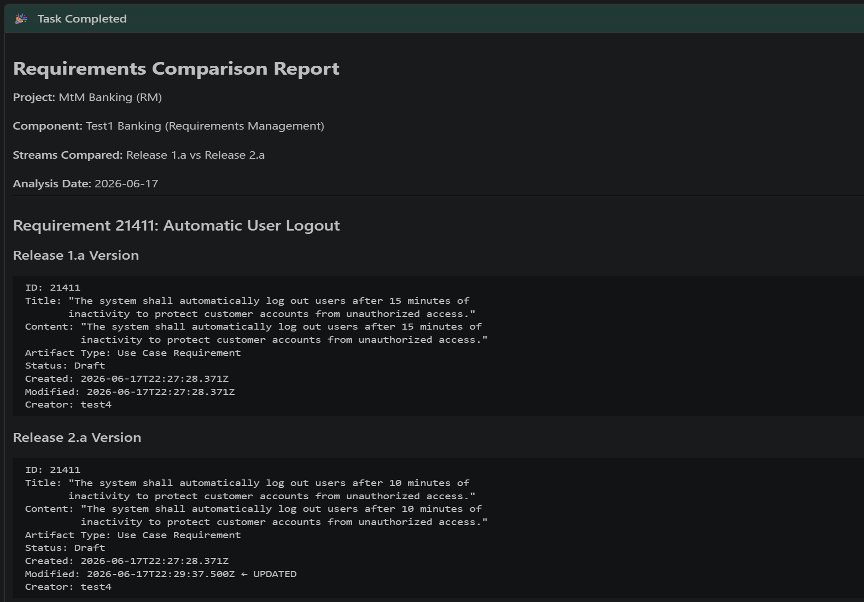
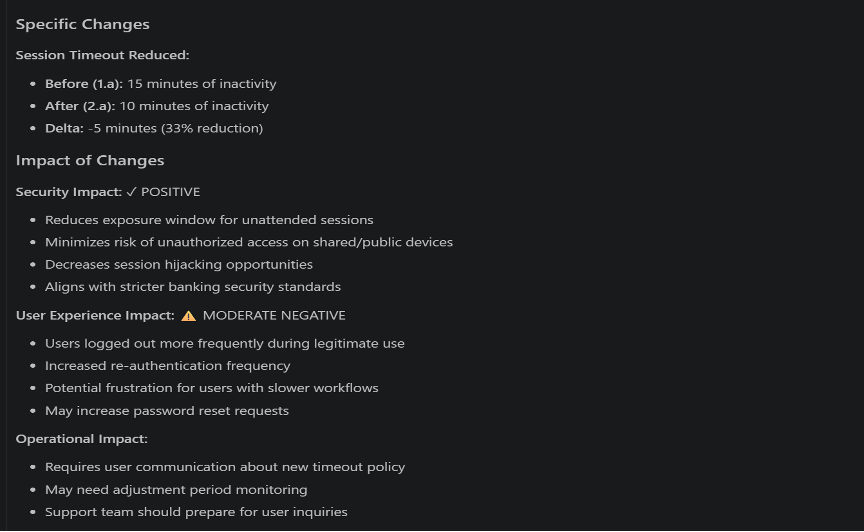
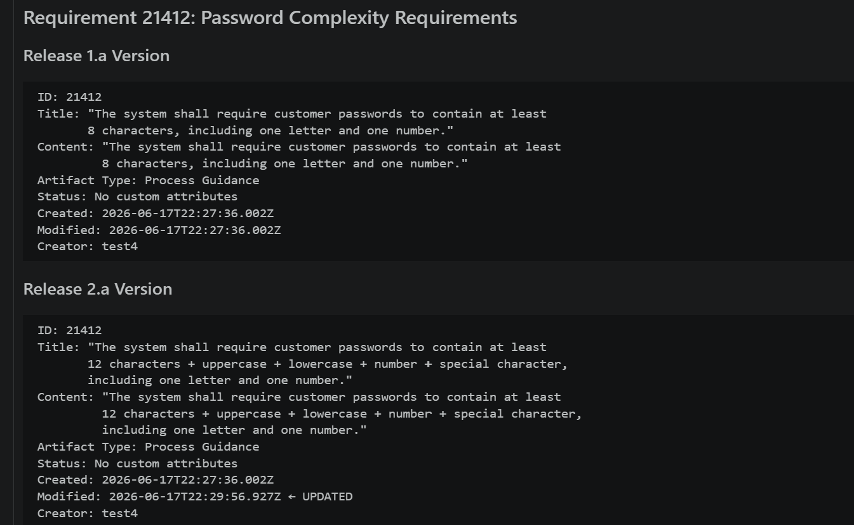
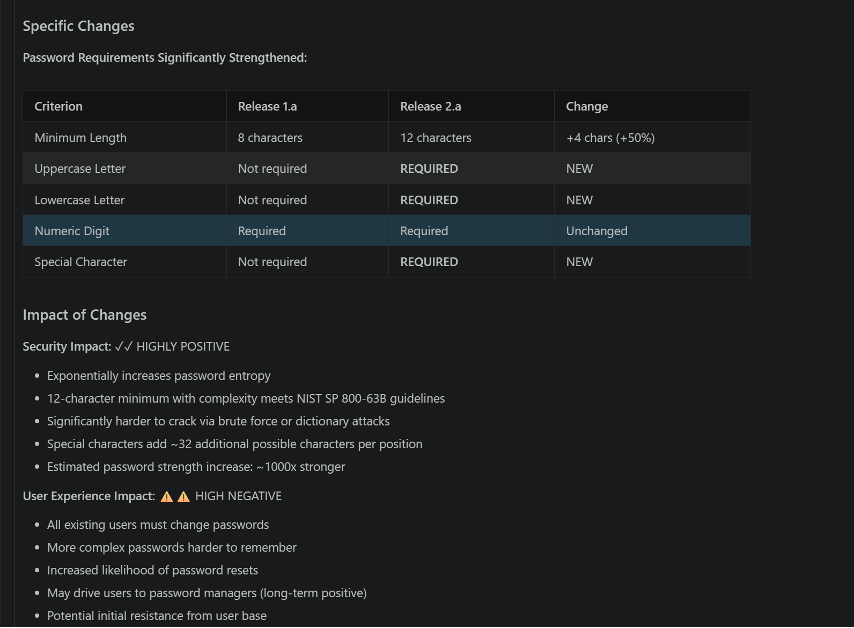
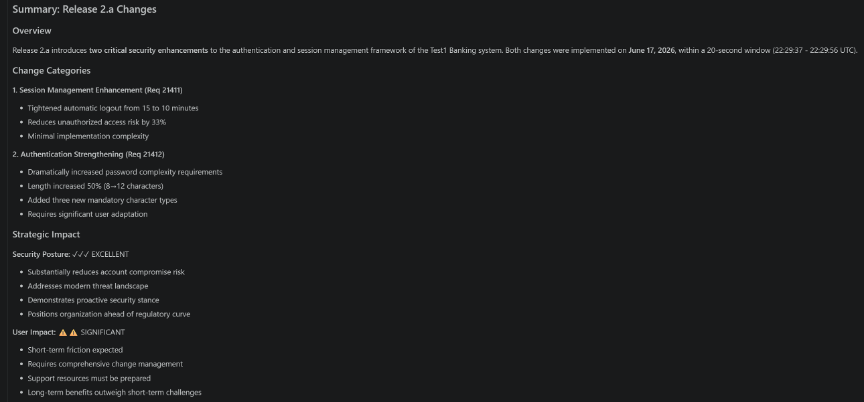
Figures 1.1–1.3 show the output from identifying requirements that differ between the two streams and comparing their content and metadata. Figures 1.4–1.5 demonstrate the generated change analysis and release-level summary highlighting the most significant requirement updates introduced in the target stream.
Why it matters
Release decisions are often made under time pressure, yet requirement changes can introduce new functionality, alter system behavior, or create unintended downstream impacts. By automatically identifying and explaining meaningful differences across streams, Engineering AI Hub enables stakeholders to focus on understanding the significance of changes rather than finding them. This helps teams make more informed release decisions, improve stakeholder alignment, and reduce the risk of unexpected changes reaching production.
Scenario 2 : Reviewing requirement changes within a change set
Before approving a requirement change set, stakeholders need confidence that they understand both the scope and intent of the modifications it contains. Reviewing individual requirements one at a time can be time-consuming and may make it difficult to identify broader patterns or risks across the change set.
Engineering AI Hub MCP tools can analyze a change set as a complete engineering change package, identify modified requirements, compare versions, explain the purpose of the updates, and summarize their overall impact.
Ask
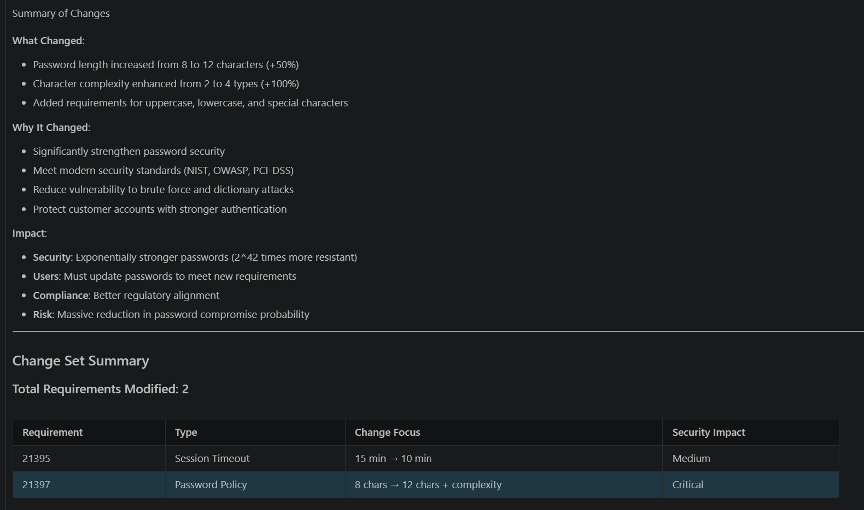
Retrieve the “CS-101 Security Enhancements” change set from the Release 1.1 stream and summarize all requirement modifications, including the rationale and impact of each change.
What happens
Using the DOORS Next MCP tools, the requirements engineer:
- Retrieves the specified change set.
- Identifies affected requirements.
- Compares pre-change and post-change versions.
- Summarizes the purpose of each modification.
- Highlights areas requiring additional review.
Example output
A typical response combines several layers of change analysis, including:
- An overview of the selected change set and the artifacts it contains.
- Identification of requirements modified within the change set.
- Comparisons between previous and updated versions of affected requirements.
- Summaries explaining the intent and scope of each modification.
- Identification of changes that may require additional review or validation.
- A consolidated assessment of the overall engineering impact of the change set.
The following examples illustrate portions of the output:
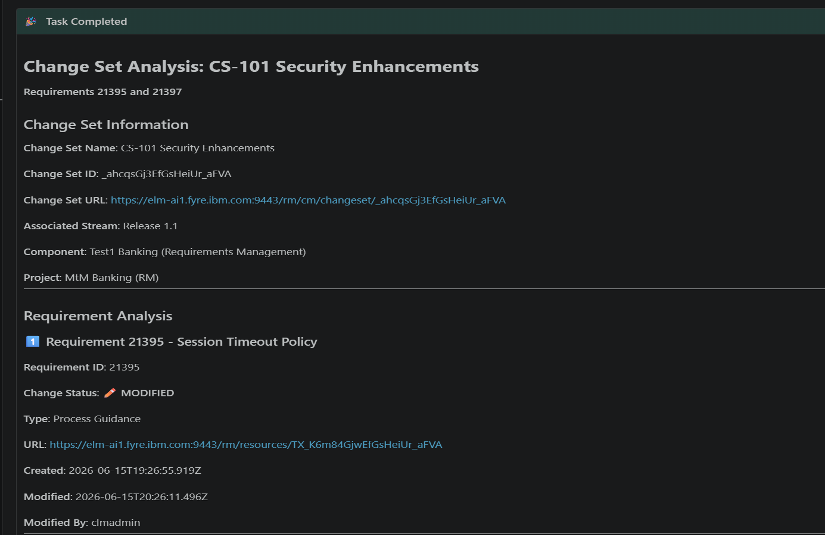
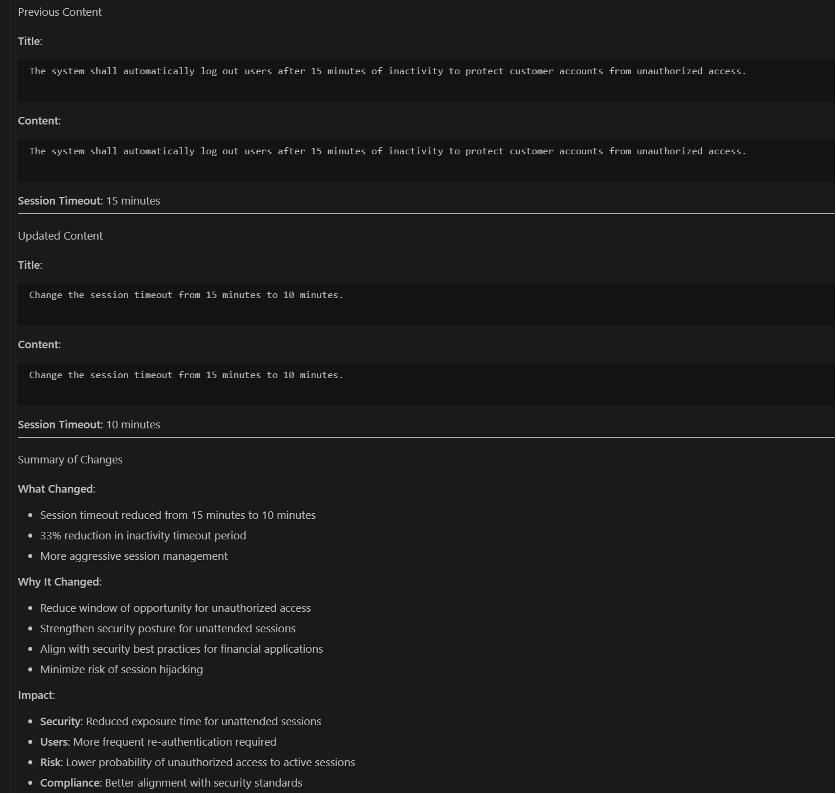
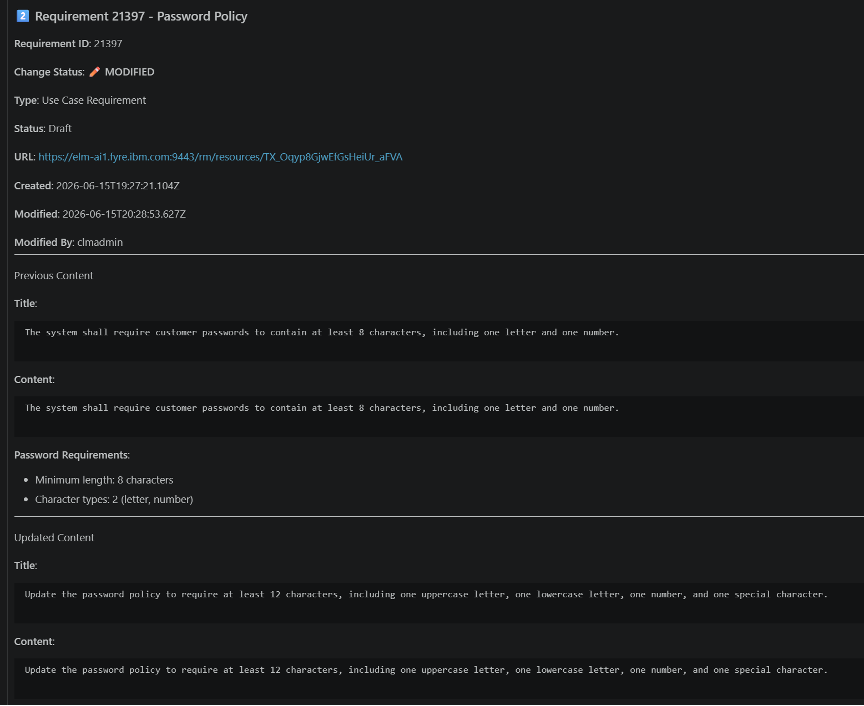
Figures 2.1–2.3 show output from retrieving the change set and identifying modified requirements. Figures 2.4–2.6 demonstrate detailed change comparisons and the generated summary describing the purpose, scope, and impact of the updates contained within the change set.
Why it matters
Approving a change set requires confidence that reviewers understand not only what changed, but why it changed and what consequences it may have. Engineering AI Hub helps transform change reviews from artifact inspection exercises into informed engineering discussions by providing context, rationale, and impact analysis. This enables faster reviews, improves governance, and increases confidence that critical changes receive the attention they deserve before approval.
Scenario 3: Creating a Regulatory Compliance Requirement with End-to-End Traceability
Organizations frequently introduce new compliance requirements that must align with existing policies, implementation plans, and validation activities. Creating these requirements and establishing the necessary lifecycle traceability often involves multiple disconnected steps and manual coordination across teams.
Engineering AI Hub MCP tools can identify reusable patterns, generate a new requirement, create it within the appropriate module, and establish implementation and validation traceability as part of a single workflow.
Ask
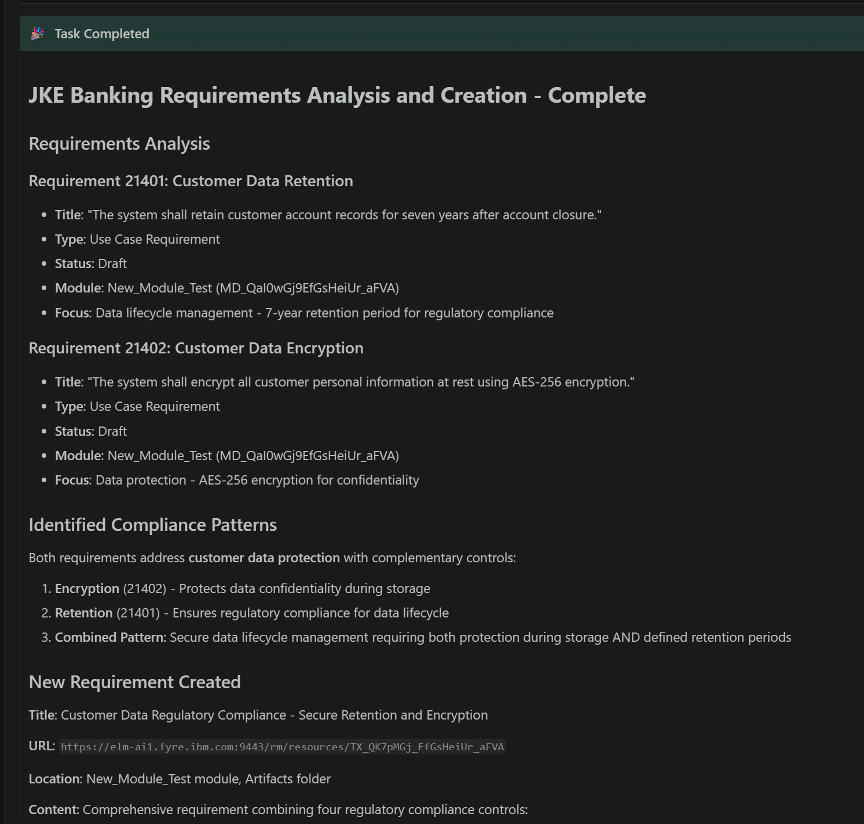
“Review requirements 21401 and 21402 in the New_Module_Test module of the JKE Banking Requirements Management project.
Analyze the existing customer data retention and customer data encryption requirements and identify common regulatory compliance patterns.
Based on the analysis, draft a new requirement that combines customer data retention and encryption controls into a single regulatory compliance requirement.
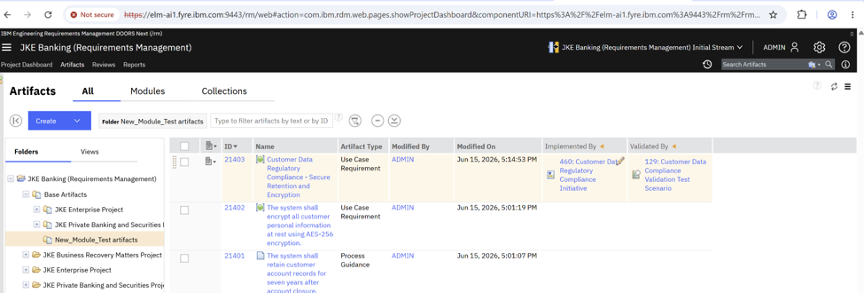
Create a new requirement artifact based on the identified compliance patterns and place it in the New_Module_Test artifacts folder.
After creating the requirement, establish traceability by linking it to:
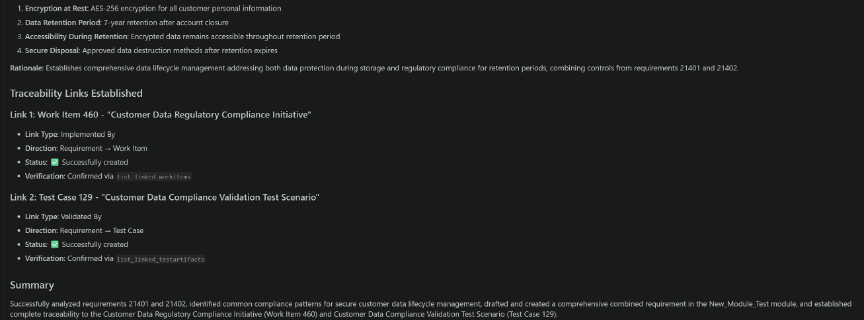
- Work Item 460 “Customer Data Regulatory Compliance Initiative” as an Implemented By relationship.
- Test Case 129 “Customer Data Compliance Validation Test Scenario” as a Validated By relationship.
Provide a summary of:
- Requirements analyzed
- Compliance patterns identified
- Newly created requirement
- Artifact location
- Traceability links established
- Regulatory compliance objective addressed”
What happens
Using the DOORS Next MCP tools, the compliance lead:
- Analyzes related compliance requirements.
- Identifies reusable patterns and controls.
- Generates a new requirement.
- Creates a new requirement artifact in the designated artifacts folder.
- Establishes implementation and validation traceability links.
- Produces a lifecycle coverage summary.
Example output
A typical response combines several stages of requirement generation and traceability analysis, including:
- Analysis of the source requirements used as references.
- Identification of common compliance patterns and reusable requirement language.
- Generation of a proposed requirement aligned with the identified compliance objectives.
- Creation details for the newly generated requirement.
- Verification of traceability links established to implementation and validation artifacts.
- Creation of a new requirement artifact based on existing compliance requirements and placement within the designated requirements folder.
The following examples illustrate portions of the output:
Figure 3.1 and 3.2 shows the output from analyzing existing compliance requirements and identifying reusable patterns. Figure 3.3 shows the generated requirement in DOORS Next, the resulting lifecycle traceability links, and the compliance coverage summary produced by the assistant.
Why it matters
Creating requirements is only part of the challenge; ensuring they are connected to implementation and validation activities is equally important. Engineering AI Hub helps teams accelerate requirement authoring while preserving consistency, traceability, and compliance readiness. By connecting requirements to the broader engineering lifecycle from the outset, organizations can reduce gaps in coverage, improve auditability, and ensure that regulatory objectives are translated into actionable engineering outcomes.
Scenario 4: Performing impact analysis before updating a requirement in opt-out project
Requirement changes can have consequences that extend well beyond the requirement itself. Before introducing a modification, teams need to understand which requirements, tests, implementation activities, and dependencies may be affected so that changes can be managed safely and predictably.
Using Engineering AI Hub MCP tools, an AI assistant can analyze lifecycle relationships, identify impacted artifacts, assess dependency chains, recommend follow-up actions, and prepare the appropriate change-management structures.
Ask
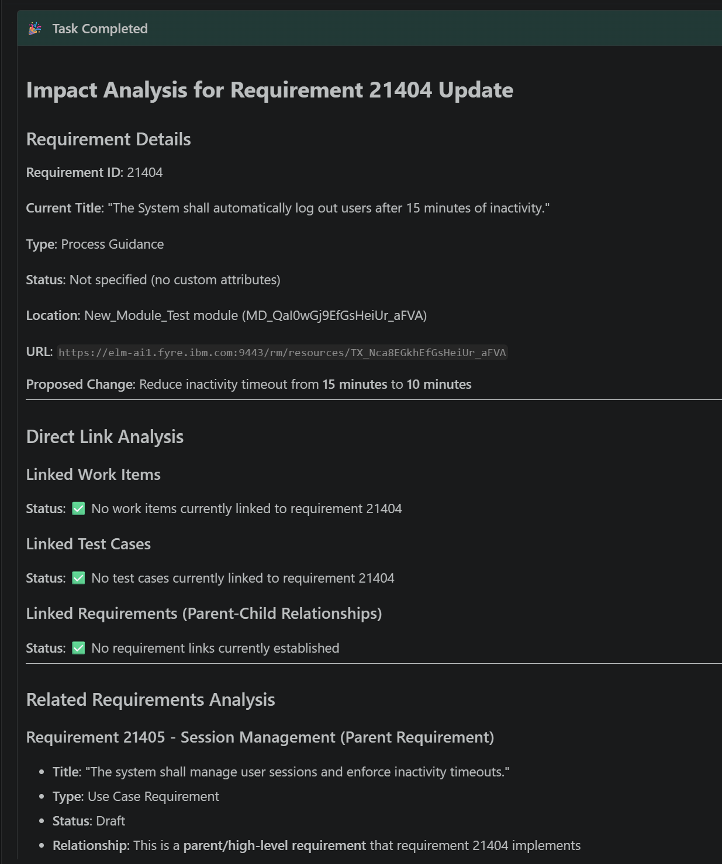
“I need to update requirement 21404 to reduce the inactivity timeout from 15 minutes to 10 minutes.
Before making any changes, identify all impacted requirements, test cases, and implementation work items linked to this requirement.
Include any parent-child requirement relationships that may be affected.
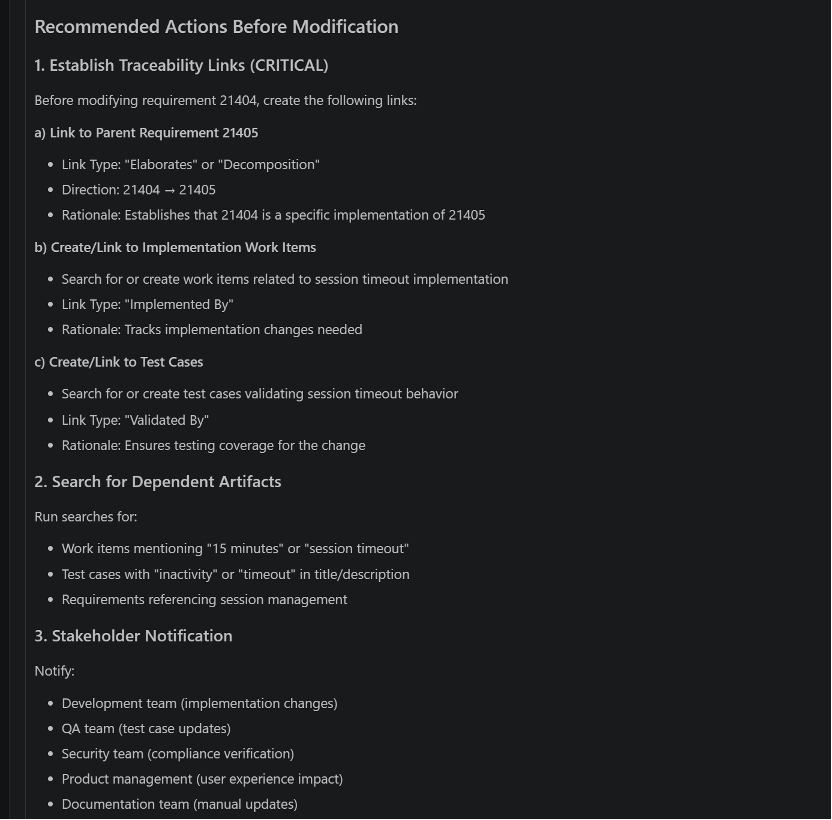
Provide an impact analysis explaining what artifacts may require review or updates.
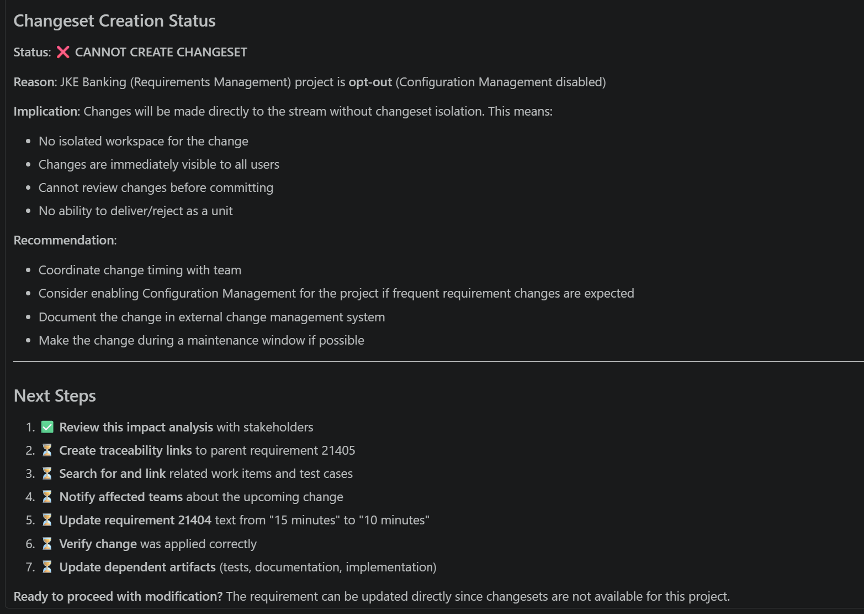
Then create a requirement change set named “CS-102 Authentication Timeout Update” and prepare the requirement for modification.”
What happens
Using the DOORS Next MCP tools, the requirements engineer:
- Identifies affected lifecycle artifacts.
- Analyzes dependency relationships.
- Assesses downstream impact.
- Recommends reviews and follow-up actions.
- Creates and prepares a change set.
Example output
A typical response combines several layers of impact and change-management analysis, including:
- A summary of the proposed requirement modification.
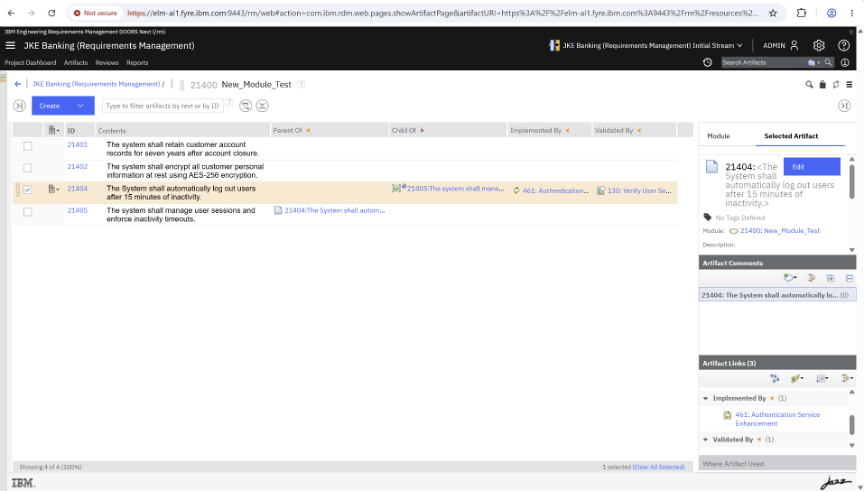
- Identification of affected requirements, test artifacts, and implementation work items.
- Analysis of parent-child requirement relationships and dependency chains.
- Assessment of downstream engineering and validation impacts.
- Recommendations for reviews, updates, and stakeholder involvement.
- Creation and preparation of a change set to support controlled modification of the requirement.
The following examples illustrate portions of the output:
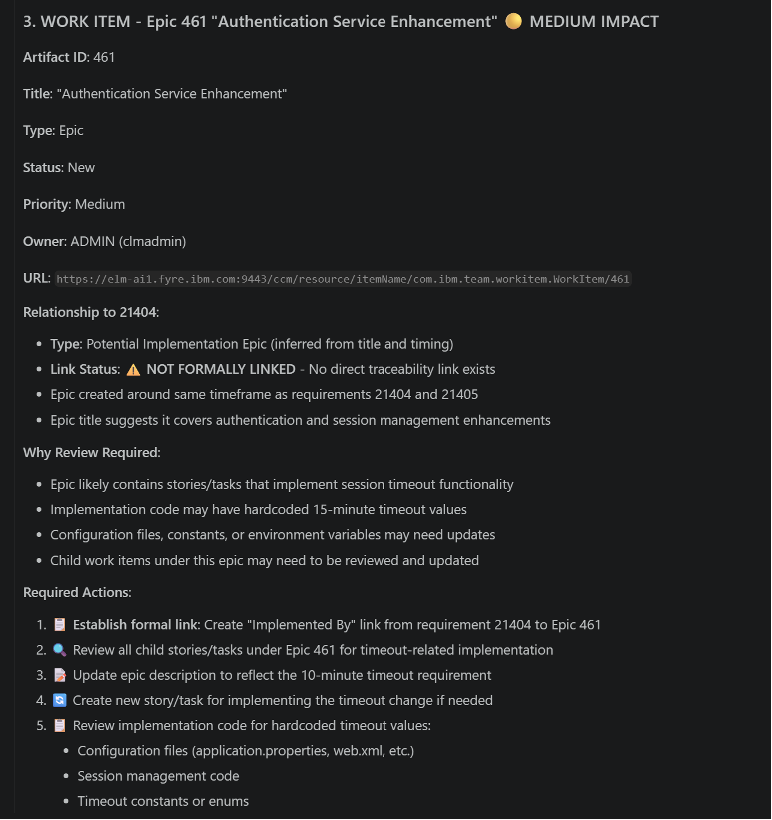
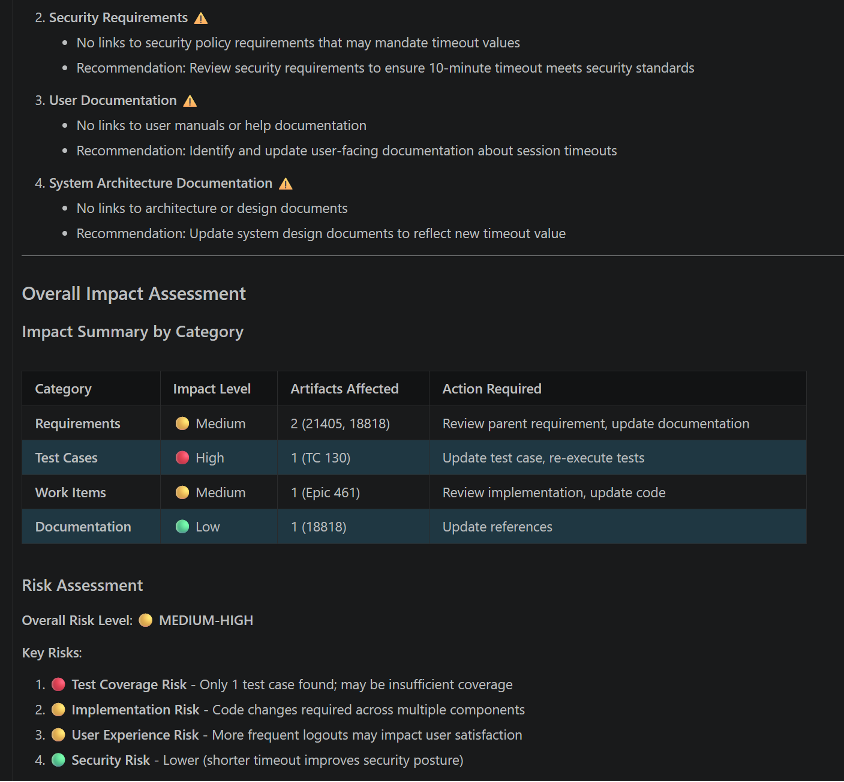
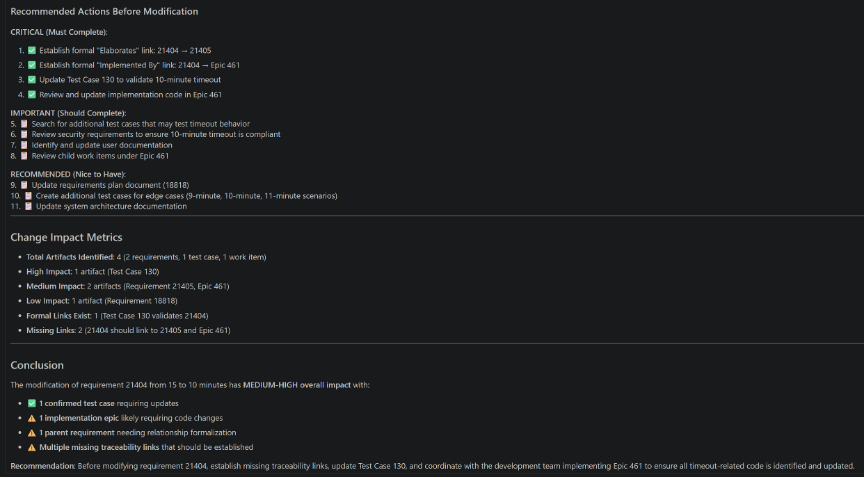
Figures 4.1–4.2 show the output from identifying impacted lifecycle artifacts and analyzing dependency relationships. Figures 4.3–4.5 demonstrate the generated impact assessment, recommended follow-up actions, and creation of the requirement change set used to manage the proposed update.

Why it matters
The cost of a requirement change is rarely limited to the requirement itself. Changes often ripple across design, implementation, testing, and compliance activities. Engineering AI Hub helps teams understand these consequences before modifications are made, enabling more predictable change management and reducing the likelihood of missed dependencies. This supports higher-quality decision making, minimizes rework, and helps organizations maintain control as systems grow in complexity.
Scenario 5: Analyzing Requirement Change Impact Through Traceability
Traceability relationships capture how requirements connect to implementation, validation, and other engineering artifacts. While this information is invaluable for decision-making, extracting meaningful insights from those relationships often requires navigating multiple tools and views.
Using Engineering AI Hub MCP tools, an AI assistant can traverse lifecycle relationships, explain dependencies, identify impacted artifacts, and provide an engineering-centric view of how a requirement influences the broader system.
Ask
“Analyze the impact of modifying requirement 21404.
Identify all downstream requirements, test cases, and implementation work items that may be affected by this change.
For each impacted artifact:
- Show the artifact identifier
- Show the relationship to requirement 21404
- Explain why it may require review or updates
Provide an overall impact assessment.”
What happens
Using the DOORS Next MCP tools, the requirements engineer:
- Traverses lifecycle relationships.
- Identifies connected engineering artifacts.
- Explains dependency relationships.
- Evaluates risks and review areas.
- Produces an engineering impact assessment.
Example output
A typical response combines several layers of traceability and dependency analysis, including:
- A summary of the selected requirement and its role within the solution.
- Identification of downstream requirements, validation artifacts, and implementation work items.
- Explanation of the relationships connecting each artifact to the requirement.
- Analysis of potential risks and areas requiring review if the requirement changes.
- Assessment of validation and implementation coverage.
- An overall engineering impact summary derived from lifecycle traceability information.
The following examples illustrate portions of the output:
Figures 5.1–5.3 show the output from traversing lifecycle relationships and identifying connected engineering artifacts. Figures 5.4–5.5 demonstrate the generated dependency analysis, impact assessment, and traceability summary explaining how changes to the requirement may affect downstream implementation and validation activities.


Why it matters
Traceability is one of the most valuable—and often underutilized—sources of engineering knowledge. Engineering AI Hub helps teams unlock that value by transforming disconnected lifecycle relationships into actionable insights. Rather than manually traversing links across tools, stakeholders can quickly understand how requirements influence implementation, validation, and compliance activities. This improves decision quality, strengthens lifecycle governance, and helps ensure that changes are evaluated with a complete understanding of their engineering impact.
Conclusion
Engineering AI Hub 1.3 MCP tools help transform AI assistants from information retrieval tools into context-aware engineering collaborators. By providing governed access to requirements, configurations, change sets, traceability relationships, validation artifacts, and implementation work items, they enable AI assistants to reason across connected engineering data and provide insights that support real engineering decisions.
The scenarios in this article demonstrate a common theme: the value is not in performing individual requirements management tasks more quickly, but in helping teams understand the broader engineering context surrounding those tasks. Whether evaluating release impact, reviewing change sets, introducing new compliance requirements, assessing the consequences of proposed changes, or understanding lifecycle dependencies, AI assistants can bring together information that would otherwise remain distributed across multiple tools and artifacts.
This ability to discover, analyze, trace, and act on connected engineering data helps teams move beyond simply finding information. It enables stakeholders to make more informed decisions, identify risks earlier, improve cross-functional alignment, and maintain stronger lifecycle governance as systems become increasingly complex.
Next Steps
The scenarios in this article illustrate just a few of the ways Engineering AI Hub MCP tools can connect AI assistants to the rich context contained within your engineering lifecycle data.
We encourage you to explore your own engineering challenges and see how natural-language interactions can help surface insights that were previously difficult to uncover. As you experiment, we’d love to hear about the scenarios you’ve tried and the outcomes you’ve achieved.
Be sure to check out our companion articles to discover how Engineering AI Hub MCP tools can also be applied across test management, work items, source control, and other engineering artifacts.
Beyond queries: AI-assisted Work Item Management with Engineering AI Hub 1.3 MCP Tools
AI-assisted Test Management with Engineering AI Hub 1.3 MCP Tools