


AI-assisted Test Management with IBM Engineering AI Hub 1.3 MCP Tools
Introduction
This article explores how the Model Context Protocol (MCP) tools available in IBM Engineering AI Hub 1.3 enable AI-assisted engineering workflows. By providing trusted, governed access to IBM Engineering Test Management (ETM) artifacts, execution records, relationships, and quality metrics, these MCP tools allow AI assistants and AI-enabled IDEs to interact with engineering data through natural language.
The value of the MCP tools available in Engineering AI Hub 1.3 goes beyond simple artifact retrieval. They enable AI assistants to work across connected engineering data, discovering information, tracing relationships, identifying patterns, synthesizing insights, and performing governed actions within existing workflows. This makes it possible to move naturally from asking a question, to analyzing the results, to taking action, all within a conversational workflow.
This article explores a handful of practical test management scenarios that illustrate what is possible with the ETM MCP tools available in IBM Engineering AI Hub 1.3. These examples are not intended to be an exhaustive catalog of capabilities, but rather a showcase of how AI-assisted workflows can help teams move seamlessly from discovery to analysis and action.
Note: The examples in this article use IBM Bob as the AI assistant. However, the workflows and capabilities described here are enabled by the IBM Engineering AI Hub 1.3 MCP tools and can be used from any MCP-compatible AI assistant or AI-enabled IDE.
What You’ll Learn
In this article, you’ll see how the ETM MCP tools in Engineering AI Hub 1.3 can be used to:
- Assess release readiness across multiple test plans
- Investigate failed test executions and identify common patterns
- Manage capacity based on tester Workload analysis & recommendations
- Investigate workflow and process bottlenecks
Prerequisites
Before you begin, ensure you have:
- IBM Engineering Test Management 7.0.3 or later
- IBM Engineering AI Hub 1.3
- An MCP-compatible AI assistant like IBM Bob, MS Co-pilot is configured with the ELM AI Hub MCP server. Refer to Setting up MCP server in AI assistants and Manage Personal Access token.
- Appropriate permissions to access test artifacts and related engineering artifacts.
- Basic familiarity with your project’s structure and planning process.
Note: The examples shown in this article illustrate typical interactions between an AI assistant and the ETM MCP tools. The exact prompts and responses may vary depending on the AI assistant being used, your project configuration, available test data, and user input.
Scenario 1: Assess Release Readiness
As a release milestone approaches, teams need to quickly understand overall testing progress, identify quality risks, and communicate release status. This often requires gathering information from multiple test plans, execution records, and linked artifacts.
With the Engineering AI Hub MCP tools, a test manager can consolidate this information into a single conversational workflow, helping teams move from status discovery to sign-off decisions without manually navigating reports and dashboards.
Ask
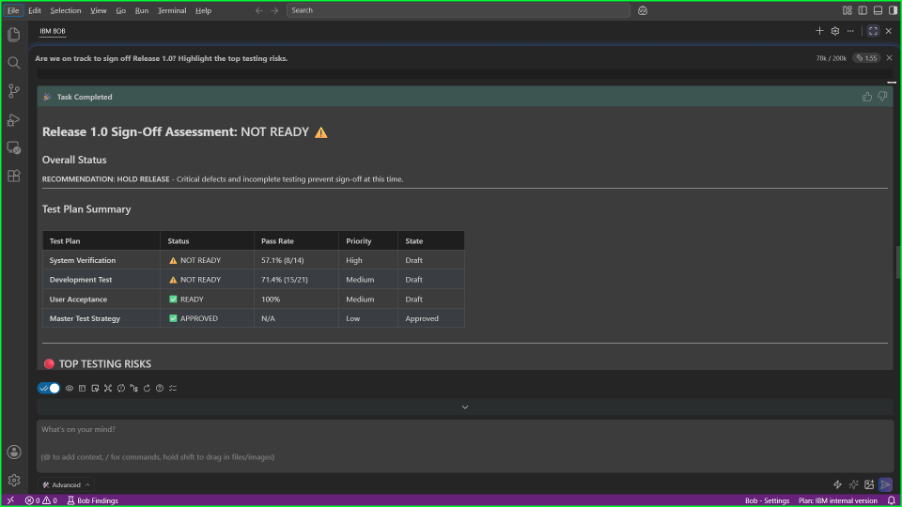
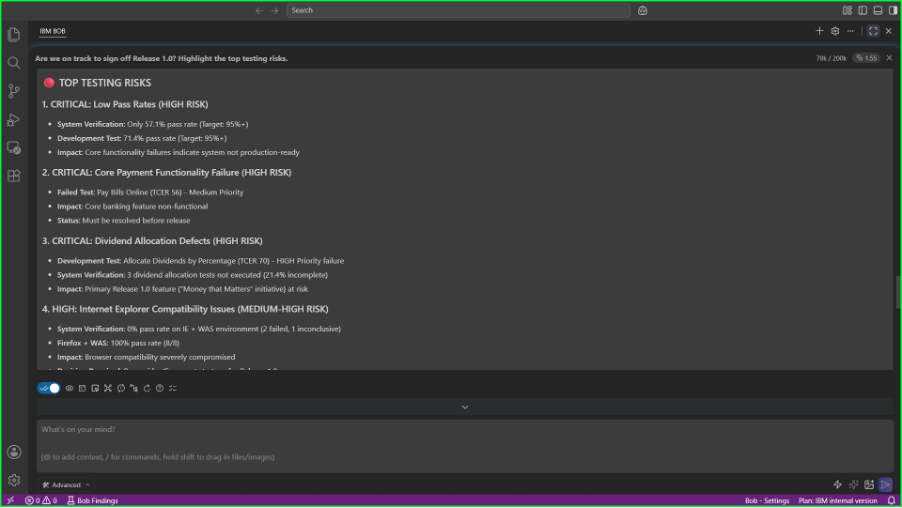
Are we on track to sign off Release 1.0? Summarize testing progress, highlight the biggest testing risks, and create a release readiness summary for the associated test plans.
What happens
The Engineering AI Hub MCP tools work with the AI assistant to:
- Discover the test plans associated with Release 1.0.
- Correlate execution status and quality metrics across those plans.
- Identify critical failures, blockers, and incomplete testing activities.
- Synthesize the findings into a concise release readiness assessment.
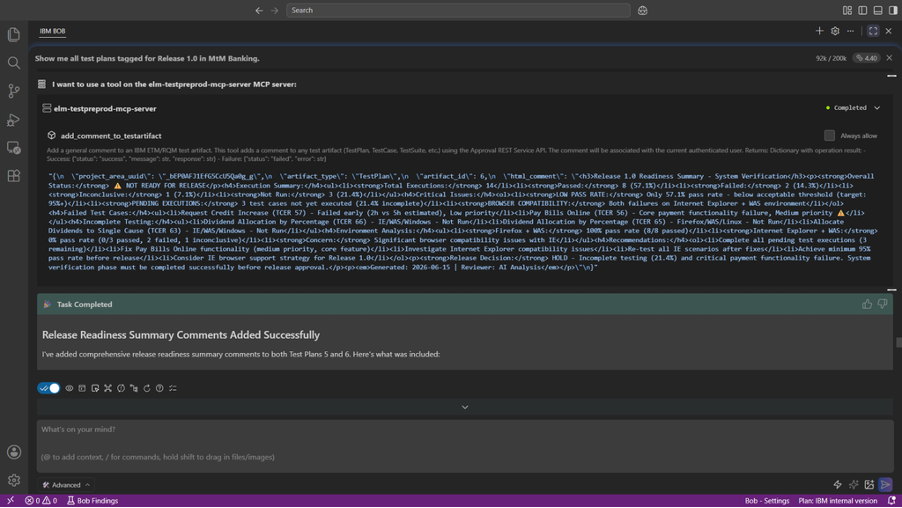
- Generate and adds a governed release readiness summary to the relevant ETM test plans.
Example output
A typical response combines several layers of information, including:
- A concise assessment of release readiness and the primary risks.
- An overview of the test plans included in the release.
- Overall execution completion and pass/fail distribution.
- Critical failures, blockers, and notable quality trends.
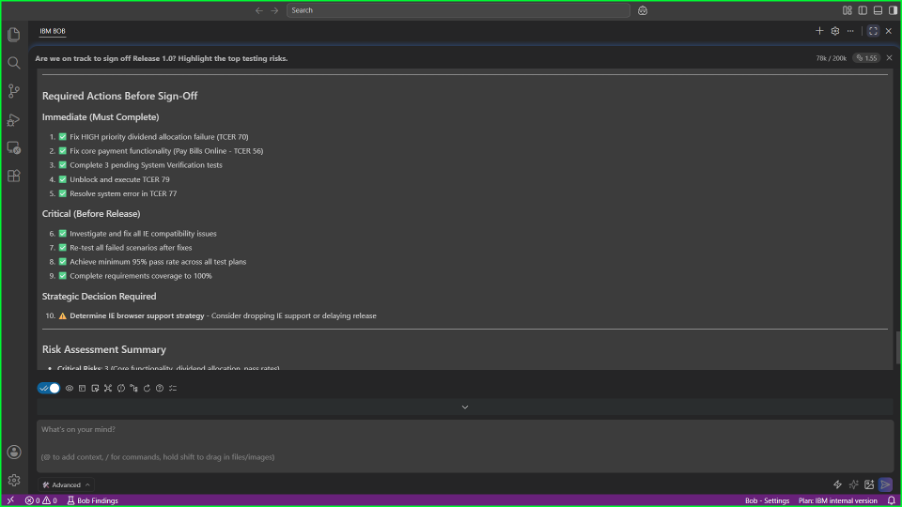
- Recommendations to support sign-off decisions.
- A generated release summary that is added as a comment to the associated ETM artifacts.
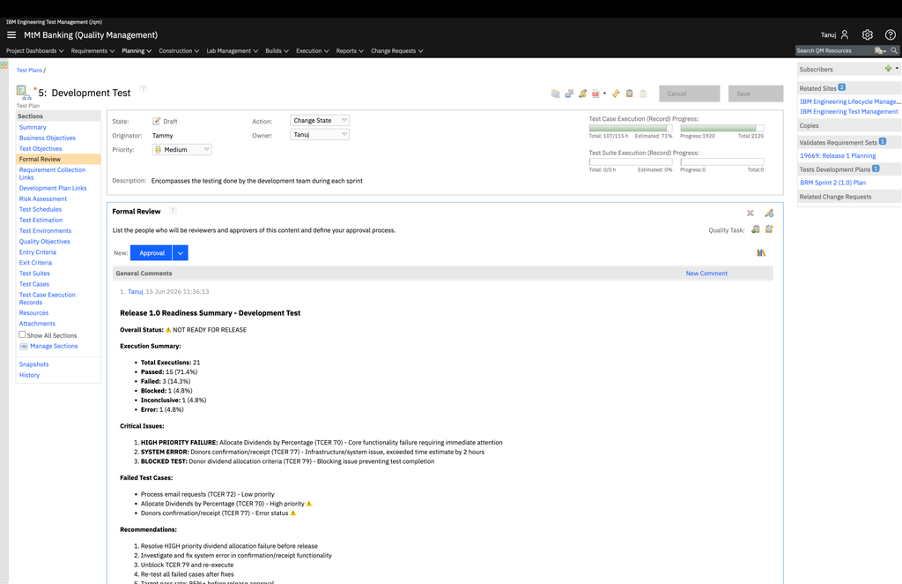
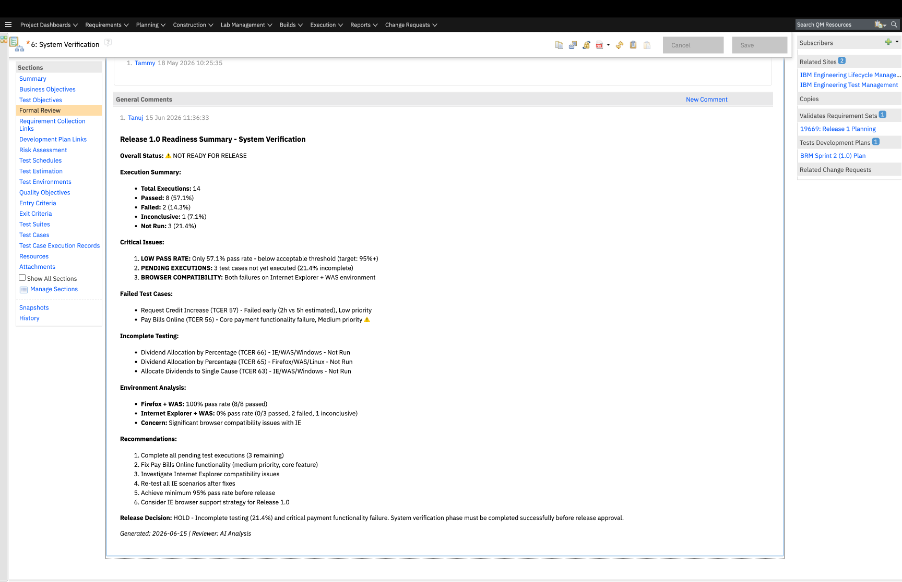
In ETM, the summary added in the Test Plan includes:
- Overall execution completion percentage with summary.
- Pass/fail/Incomplete distribution and notable trends.
- Critical failures or blockers requiring attention.
- A high-level recommendation regarding release readiness.
- Release Decision based on the analysis.
The following examples showcase portions of the output:
Figures 1.1–1.4 illustrate output from consolidating release status, highlighting the top testing risks, and generating sign-off recommendations. Figures 1.4–1.6 show the resulting release readiness summary being added to the corresponding ETM test plans.
Why it matters
This scenario demonstrates how the Engineering AI Hub MCP tools assisted by AI help go beyond reporting. Rather than collecting information from multiple artifact views, teams can ask a single question and receive a consolidated assessment that combines discovery, analysis, traceability, and governed action. This reduces manual effort while allowing test managers to focus on release decisions rather than data gathering.
Scenario 2: Investigate Failure Patterns
When multiple test failures occur, reviewing individual execution records rarely provides the full picture. Understanding whether failures are related, what components they affect, and which requirements may be at risk often requires correlating information across several engineering artifacts.
The Engineering AI Hub MCP tools enable test engineers to discover and analyze test artifacts with multiple failures and surface broader quality trends through natural language interactions.
Ask
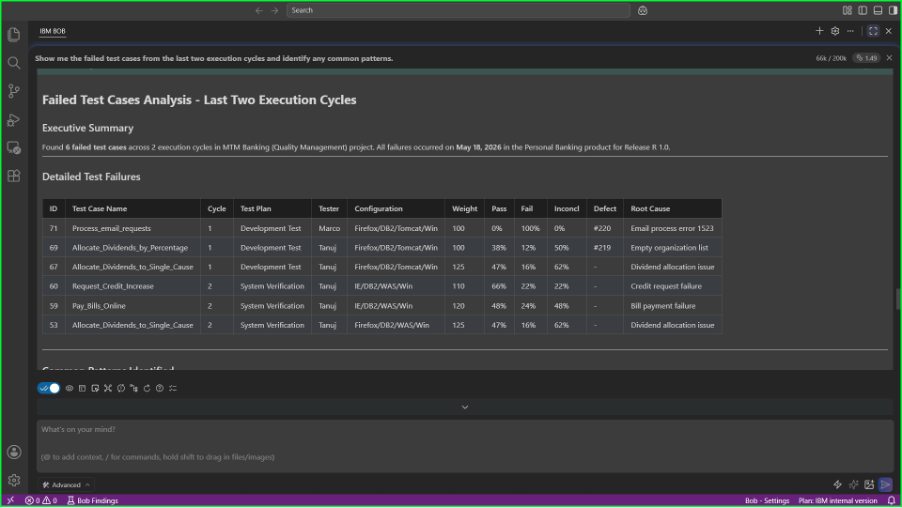
Show me the failed test cases from the last two execution cycles and identify any common patterns.
What happens
Using the Engineering AI Hub MCP tools, the test engineer:
- Retrieves failed execution records from recent execution cycles.
- Examines related test cases and linked engineering artifacts.
- Traces failures to associated requirements and defects.
- Groups failures based on shared components, functional areas, or underlying issues.
- Highlights recurring patterns and identifies areas that may require immediate investigation.
Example output
A typical response includes:
- A summary of the failed execution records and their current status.
- Correlated information about affected components and functional areas.
- Relationships between failed tests, linked defects, and associated requirements.
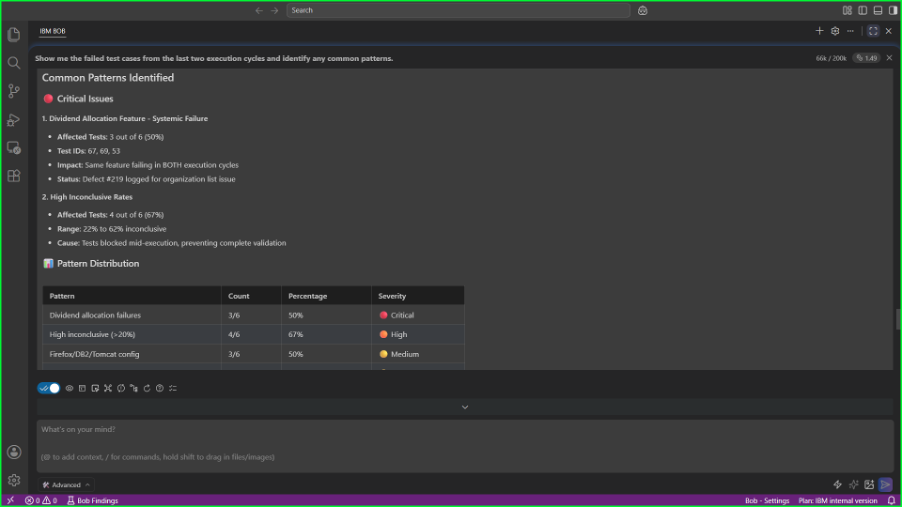
- Observed trends or recurring patterns across execution cycles.
- Recommendations for prioritizing investigation and remediation efforts.
The following examples illustrate portions of the output:
Figure 2.1 illustrates output from analyzing failed test executions and their context, while Figure 2.2 shows how related failures are grouped to highlight common quality risks.
Why it matters
The value of AI-assisted workflows lies not in listing failed tests, but in helping teams understand what those failures mean. By connecting execution records with related engineering artifacts, the Engineering AI Hub MCP tools allow AI to uncover patterns that would otherwise require significant manual investigation, helping teams focus on the issues with the greatest impact.
Scenario 3: Manage capacity based on tester Workload analysis & recommendations
As testing progresses, workload can become unevenly distributed across the team. Some testers may be overloaded with critical execution records, while others have available capacity. Identifying these imbalances and understanding their impact on delivery often requires reviewing assignments, execution progress, and team utilization across multiple artifacts.
With the Engineering AI Hub MCP tools, test leads can analyze execution data, identify workload patterns, and recommend opportunities to rebalance assignments, helping teams maintain delivery momentum without manually consolidating information from multiple views and reports.
Ask
Analyze the active execution records for the current iteration. Assess workload distribution across the team and recommend reassignment opportunities to improve balance and delivery efficiency.
What the AI assistant does
Using the Engineering AI Hub MCP tools, the test lead:
- Discovers the active execution records for the current iteration.
- Correlates assignment information with execution status and estimated effort.
- Analyzes workload distribution and identifies concentration of work across team members.
- Detects underutilized capacity, unassigned execution records, and potential delivery risks.
- Generates data-driven reassignment recommendations and estimates their impact on overall workload balance.
Example output
A typical AI response includes:
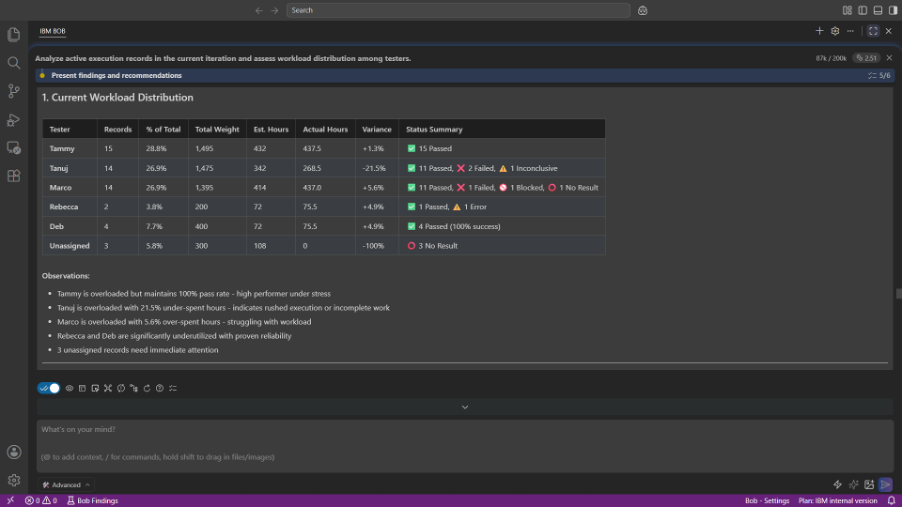
- An overview of active execution records and their distribution across testers.
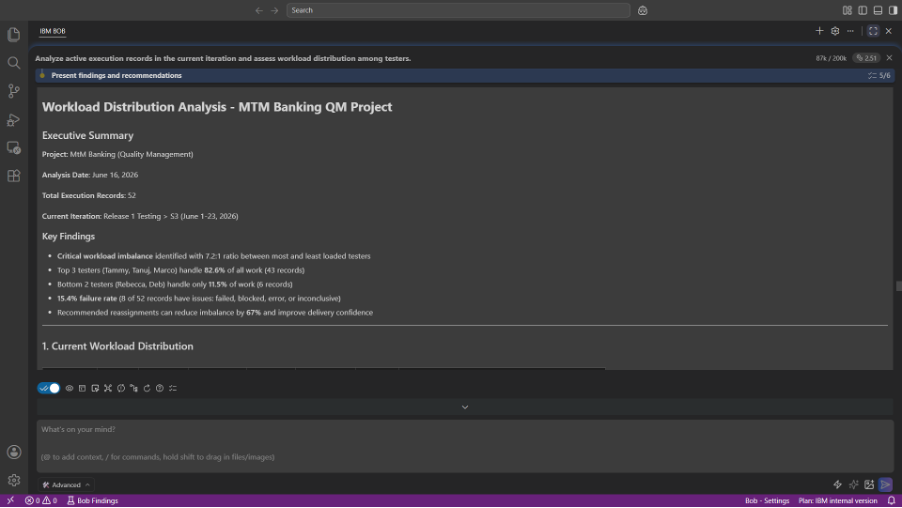
- A summary of workload concentration, highlighting overloaded and underutilized team members.
- Analysis of estimated versus actual effort and any significant variances.
- Identification of unassigned or blocked execution records that require attention.
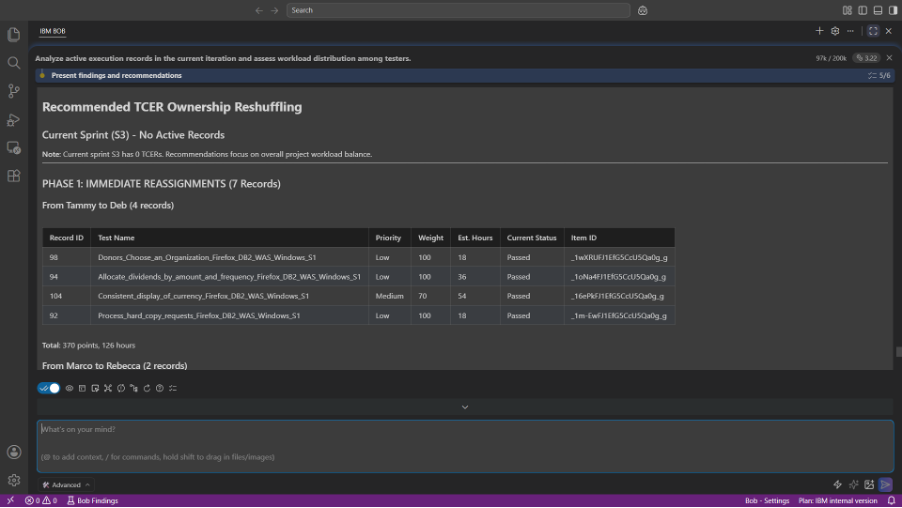
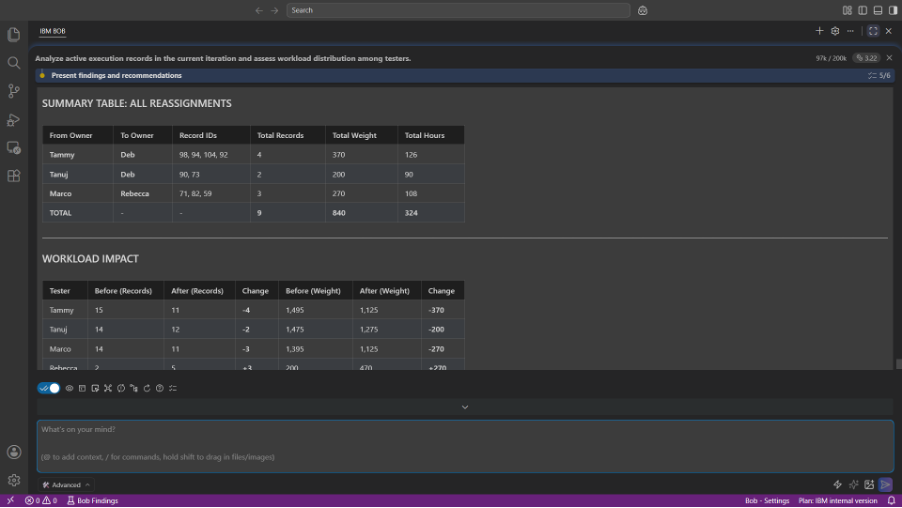
- Recommended reassignment opportunities, including affected execution records and proposed ownership changes.
- A before-and-after comparison illustrating the expected improvement in workload distribution and team capacity utilization.
The following examples showcase portions of the output:
Figures 3.1 and 3.2 illustrate executive summary and outputs from analyzing tester workload and identifying imbalances across the current iteration. Figures 3.3 and 3.4 show example reassignment recommendations and the projected impact on overall workload distribution.
Why it matters
Effective test execution depends not only on understanding the state of testing, but also on ensuring that work is distributed in a way that supports delivery goals. By combining execution data, assignment information, and team context, the Engineering AI Hub MCP tools surface workload issues early and provide actionable recommendations. This reduces the effort required to monitor team capacity, helps prevent bottlenecks, and enables test leads to spend less time coordinating work and more time driving quality outcomes.
Scenario 4: Investigate Workflow Bottlenecks
Large projects often accumulate hidden issues that are difficult to identify through isolated artifact views. Test cases without linked requirements, incomplete execution progress, stale records, or blocked activities can all affect delivery readiness.
The Engineering AI Hub MCP tools help examine these relationships across the project and provide a consolidated view of potential bottlenecks.
Ask
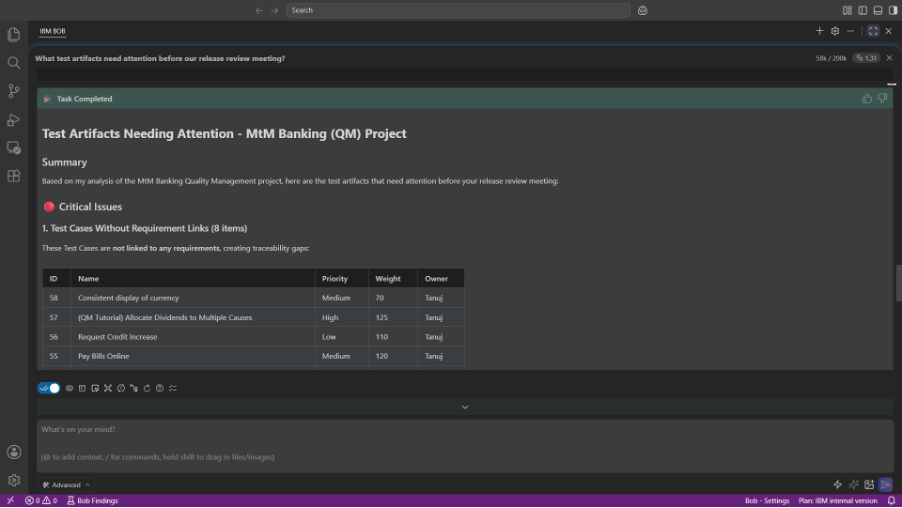
What test artifacts need attention before our release review meeting?
What happens
Using the Engineering AI Hub MCP tools, the AI assistant:
- Reviews the current state of test management artifacts across the project.
- Identifies incomplete or inconsistent traceability relationships.
- Examines execution progress and workflow status.
- Detects artifacts that may require attention because they are incomplete or outdated.
- Prioritizes the findings based on their potential impact on release activities.
Example output
A typical response highlights:
- Test cases without linked requirements.
- Requirements that are not adequately validated by executed tests.
- Test plans with incomplete execution progress.
- Artifacts that have not been updated recently.
- Missing information or workflow issues that require attention.
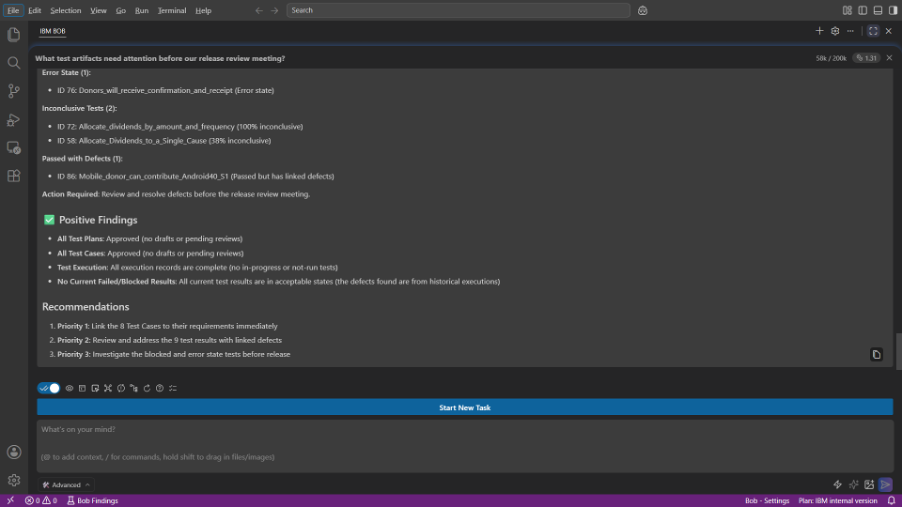
- A prioritized summary of recommended next steps.
The following examples showcase portions of the output:
Figure 4.1 illustrates the AI assistant identifying project workflow issues, while Figure 4.2 shows a consolidated summary of findings and recommended actions.
Why it matters
Engineering teams often spend significant time coordinating information across multiple dashboards and artifact views before major milestones. The Engineering AI Hub MCP tools allow AI assistants to continuously connect, evaluate, and summarize project health across related engineering data, helping teams identify issues earlier and spend more time resolving them than searching for them.
Conclusion
The ETM MCP tools available in IBM Engineering AI Hub 1.3 transform how teams interact with test management data. By providing AI Assistants and AI-enabled IDEs with trusted, governed access to ETM artifacts and relationships, these MCP tools enable workflows that combine discovery, traceability, and analysis all through natural language.
The scenarios presented here represent only a small sample of what becomes possible. Whether teams are assessing release readiness, investigating quality risks, or improving project health, the Engineering AI Hub MCP tools help AI assistants synthesize information across connected engineering data and present it in a way that supports better decisions.
This AI-assisted approach to engineering:
- Accelerates workflows by reducing manual navigation and report creation.
- Combines discovery, traceability, and analysis into a single conversational experience.
- Lowers the learning curve for new team members.
- Improves consistency in reporting and documentation.
- Enables test managers to focus more on quality decisions and less on gathering information.
As IBM Engineering AI Hub continues to evolve, the MCP tool catalog will enable even richer engineering workflows, deeper cross-domain reasoning across the engineering lifecycle.
What next
We encourage you to explore these scenarios with your own projects and discover how Engineering AI Hub MCP tools can enable natural-language interactions with your trusted ELM data, relationships, and other constructs.
We’d love to hear about the use cases you’ve tried, the insights you’ve uncovered, and the workflows you’ve transformed. Last but not the least, be sure to explore our other articles showcasing how Engineering AI Hub MCP tools can be used for requirements and work items, source control.
Beyond queries: AI-assisted Work Item Management with Engineering AI Hub 1.3 MCP Tools