


Beyond queries: AI-assisted Work Item Management with Engineering AI Hub 1.3 MCP Tools
Introduction
Work item management drives many of the decisions made throughout software delivery – from sprint planning and backlog prioritization to release readiness and execution tracking. Yet the hardest part of planning is often not deciding what to do next. It’s understanding everything that should influence the decision.
While AI assistants excel at reasoning and natural-language interactions, the quality of their insights depends on the quality of the context available to them. Engineering AI Hub 1.3 MCP tools provide that context by enabling AI assistants to discover engineering data, trace relationships, and analyze information across the delivery lifecycle.
By combining AI reasoning with trusted engineering context, MCP tools for EWM help teams discover and understand work items, uncover risks, identify priorities, understand dependencies, and make more informed planning and execution decisions. Instead of spending time gathering information from multiple sources, teams can focus on planning and decision-making while the AI assistant handles the complexity of discovery, traceability, and analysis.
The scenarios in this article demonstrate how Engineering AI Hub MCP tools enable AI assistants to discover, analyze, trace, and reason across work items, change sets, and related engineering artifacts to support planning and work management decisions.
Note: The examples in this article use IBM Bob as the AI assistant. However, the workflows and capabilities described here are enabled by the IBM Engineering AI Hub 1.3 MCP tools and can be used from any MCP-compatible AI assistant or AI-enabled IDE.
What You’ll Learn
In this article, you’ll see how the MCP tools in Engineering AI Hub 1.3 for Engineering Workflow Management (EWM) can be used to:
- Discover and organize work across backlogs, iterations, and projects using natural language.
- Analyze delivery status and planning risk by identifying trends, blockers, and dependencies that are difficult to see from individual work items.
- Trace relationships across the engineering lifecycle by connecting work items with requirements, defects, and other linked artifacts.
- Correlate information from multiple engineering sources to answer complex planning and execution questions.
- Deliver actionable insights that help teams make more informed decisions.
Prerequisites
Before you begin, ensure you have:
- IBM Engineering Workflow Management 7.0.3 or later
- IBM Engineering AI Hub 1.3
- An MCP-compatible AI assistant like IBM Bob, MS Co-pilot is configured with the ELM AI Hub MCP server. Refer to Setting up MCP server in AI assistants and Manage Personal Access token
- Appropriate permissions to access work items and related engineering artifacts.
- Basic familiarity with your project’s structure and planning process.
Note: The examples shown in this article illustrate typical interactions between an AI assistant and the MCP tools for EWM. The exact prompts and responses may vary depending on the AI assistant being used, your project configuration, available test data, and user input.
Scenario 1: Preparing for Sprint Planning
Preparing for sprint planning is rarely as simple as reviewing the top of the backlog. The challenge is not a lack of information, but the effort required to bring together everything that should influence the discussion.
Collecting this information often means switching between multiple dashboards, queries, and reports. Instead of manually gathering this information from multiple views and reports, a Scrum Master using MCP tools for EWM, a scrum master can understand how the current sprint outcomes, backlog readiness, changing priorities, and delivery dependencies influence the next planning cycle.
Ask
“Help me prepare for tomorrow’s sprint planning. Summarize unfinished work from the current sprint, identify blocked stories, highlight cross-team dependencies, and suggest the best backlog candidates for the next sprint.”
What happens
The EWM MCP tools allows the scrum master to:
- Discover active sprint work.
- Identify stories unlikely to complete.
- Analyze estimate and priority changes.
- Trace dependencies across teams.
- Evaluate backlog candidates.
- Produce a planning brief with recommendations and rationale.
Example output
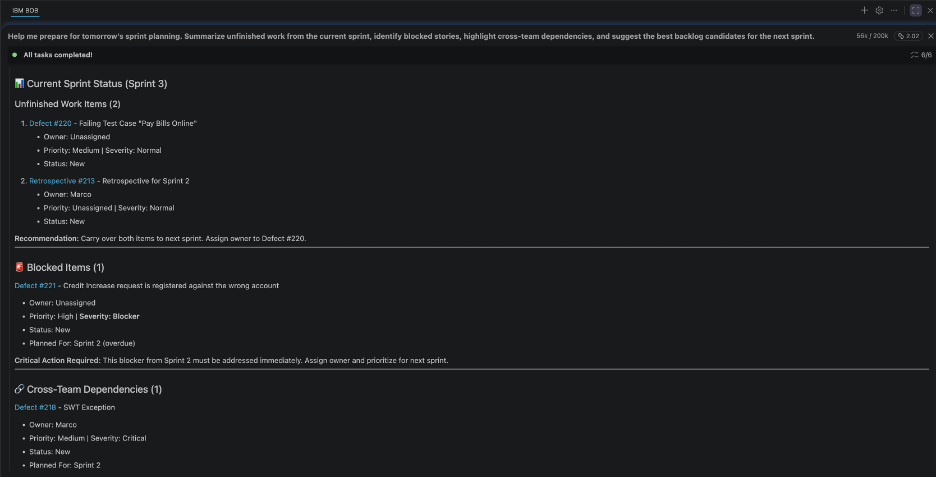
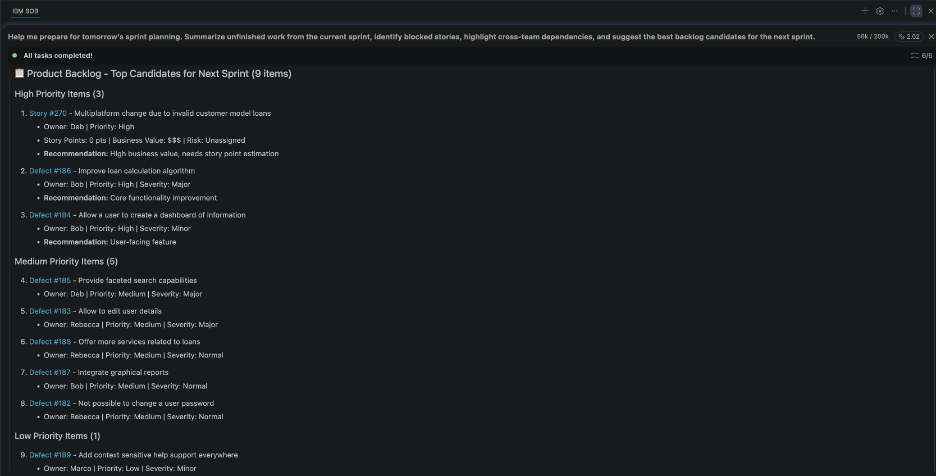
A typical response combines several layers of planning and delivery context, including:
- A summary of the current sprint’s execution status and work likely to carry over
- Blocked stories, unresolved dependencies, and delivery risks that may affect the next iteration
- Backlog items ranked by readiness, priority, and dependency considerations
- Recent estimate, priority, or scope changes that could influence planning decisions
- Recommendations for sprint scope based on available capacity and delivery objectives
- A concise planning brief that can be used to facilitate sprint planning discussions.
The following examples illustrate portions of the output:
Figures 1.1–1.2 show the output from analyzing the current sprint, identifying planning risks and dependencies, and recommending backlog candidates for the next sprint.
Why it matters
Sprint planning discussions often begin with teams gathering information from multiple dashboards, reports, and work item views before they can evaluate options and make commitments. Engineering AI Hub MCP tools reduce this effort by providing AI assistants with access to the relationships between work items, iterations, dependencies, and planning data.
Rather than spending planning sessions assembling context, teams can start with a consolidated view of the factors that should influence the decision. This allows discussions to focus on priorities, trade-offs, and delivery outcomes rather than information gathering.
Scenario 2: Identifying Work That Puts the Release at Risk
Release risk rarely exists within a single work item. It emerges through relationships between planned work, dependencies, unresolved defects, execution trends, and delivery history. Identifying these risks manually requires reviewing multiple artifacts and correlating information from different sources.
Engineering AI Hub MCP tools enable AI assistants to access and correlate this broader context across releases, iterations, work items, and related engineering artifacts. This allows risks to be identified based on evidence across the delivery lifecycle rather than isolated status indicators.
Ask
“In Automative Systems project area, review the work planned for Release 1.0 and identify the top delivery risks. Include blocked stories, unresolved dependencies, linked critical defects, and work items that are unlikely to complete on time.”
What happens
Using the EWM MCP Tools, the Project Manager:
- Retrieves release scope
- Analyzes execution progress across iterations
- Identifies blocked and dependent work
- Traces linked defects
- Detects repeated estimate and schedule changes
- Produces a prioritized risk assessment
Example output
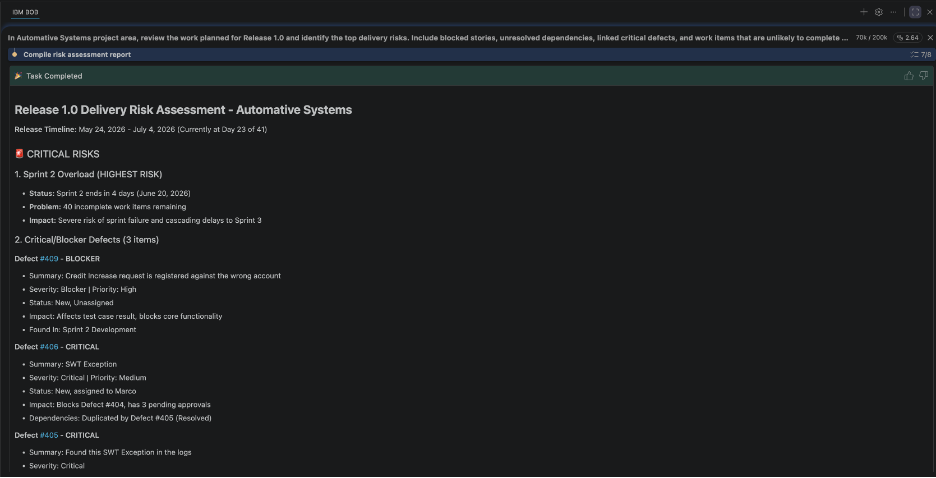
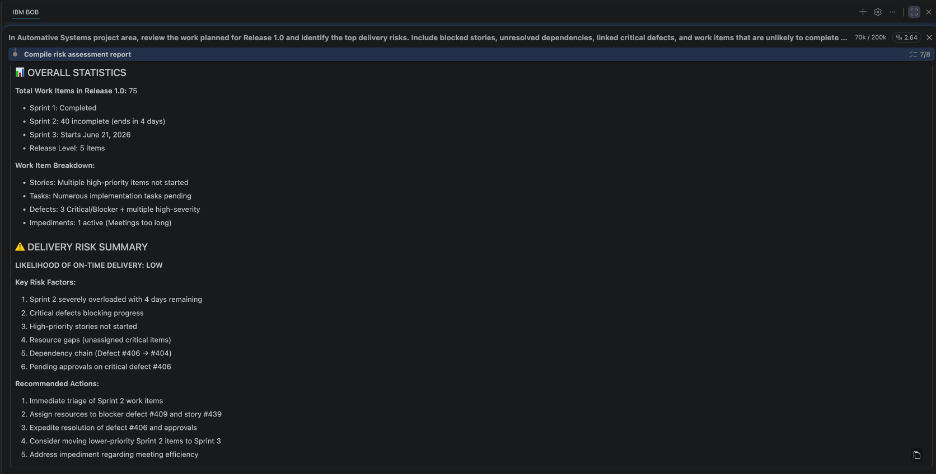
A typical response combines multiple delivery and execution signals, including:
- A concise assessment of overall release health and readiness
- The highest-priority work items that threaten delivery commitments
- Blocked stories, unresolved dependencies, and cross-team risks
- Critical defects and quality concerns associated with release scope
- Historical schedule, estimate, and execution trends that indicate elevated risk
- Prioritized recommendations to improve delivery confidence
The following examples illustrate portions of the output:
Figures 2.1–2.2 show the output correlating information from release plans, work items, dependencies, and defects to identify delivery risks and explain their potential impact.
Why it matters
Release decisions require an understanding of how delivery signals interact across multiple engineering artifacts. Engineering AI Hub MCP tools provide the connected context needed for the AI assistant to identify emerging risks, explain contributing factors, and help managers focus on mitigation rather than manually correlating information from multiple reports and dashboards.
Scenario 3: Turn Defect trends into role-specific action items
Persona: Team Lead, Development Manager, QA Engineer
Defect data can reveal valuable insights about product quality, delivery risks, and testing effectiveness. However, the actions that should be taken depend heavily on who is interpreting the information.
A team lead needs to determine which defects should be prioritized in the next sprint. A development manager needs to identify recurring patterns that may indicate architectural weaknesses, technical debt, or resource constraints. A QA engineer needs to understand where testing is failing to detect issues before release and how test coverage can be improved.
While the underlying defect data may be the same, answering these questions typically requires correlating information across defects, work items, iterations, components, features, and historical delivery data. Engineering AI Hub MCP tools provide the context layer that enables AI assistants to discover these relationships, analyze trends over time, and tailor recommendations to the responsibilities of each role.
Ask
For example, a team lead might ask:
“Analyze defects from the last two sprints and recommend which ones we should prioritize for the upcoming sprint based on severity, customer impact, and team capacity.”
A development manager might ask the same underlying question differently:
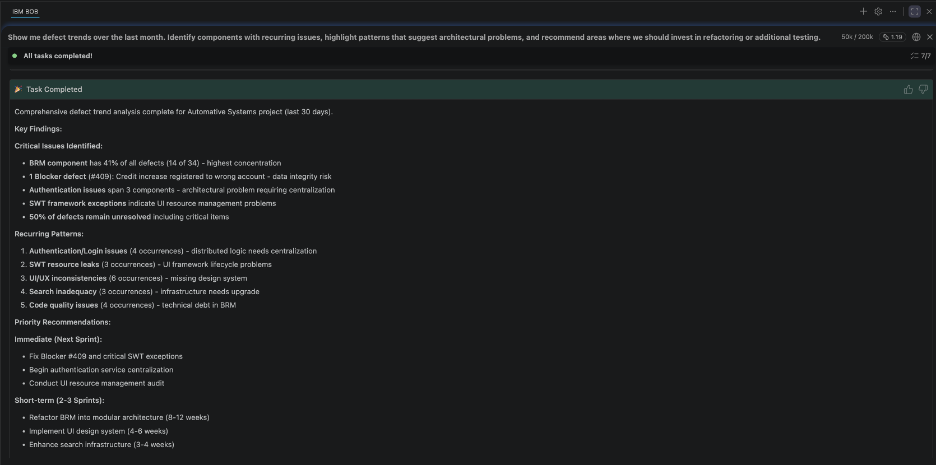
“Show me defect trends over the last quarter. Identify components with recurring issues, highlight patterns that suggest architectural problems, and recommend areas where we should invest in refactoring or additional testing.”
A QA engineer might focus on test effectiveness:
“Review recent defects and identify gaps in our test coverage. Which areas are producing the most escaped defects, and what types of testing should we strengthen?”
What happens
Using Engineering AI Hub MCP tools, the manager/lead:
- Retrieves defects across the requested time period.
- Analyzes trends across iterations, releases, components, and features.
- Correlates defects with related work items and delivery activities.
- Identifies recurring patterns, hotspots, and quality risks.
- Evaluates defect severity, frequency, and business impact.
- Tailors recommendations to the user’s role and decision-making responsibilities.
Although each persona starts from the same defect data, the assistant produces different insights depending on the context of the request—prioritization guidance for team leads, strategic quality insights for development managers, and test improvement recommendations for QA engineers.
Example output
In general, a typical response combines several layers of defect and delivery context, including:
- Overall defect trends across the selected time period
- Components, features, or teams associated with recurring quality issues
- Distribution of defects by severity, priority, and customer impact
- Relationships between defects, work items, and recent delivery activity
- Quality hotspots that warrant additional attention
- Role-specific recommendations aligned to planning, quality improvement, or testing objectives
For a team lead, the response may include:
- Defects recommended for inclusion in the next sprint.
- Priority rankings based on severity, business impact, and implementation effort.
- Risks associated with postponing remediation.
For a development manager, the response may include:
- Components with recurring defect patterns.
- Areas indicating architectural instability or technical debt.
- Recommendations for refactoring, training, or process improvements.
For a QA engineer, the response may include:
- Areas producing the highest number of escaped defects.
- Test coverage gaps across features or components.
- Recommendations for strengthening functional, integration, performance, or regression testing.
The following examples illustrate portions of the output:
Figure 3.1 shows a development manager view highlighting recurring defect patterns, component-level quality hotspots, and recommended investment areas.
Why it matters
Defect reports often answer the question “What defects do we have?” but not “What should we do about them?”
Engineering AI Hub MCP tools provide the relationships and delivery context needed for AI assistants to move beyond defect reporting and generate actionable recommendations. By connecting defects to work items, iterations, components, and delivery outcomes, MCP tools enable the assistant to tailor insights to the decisions each role needs to make. This allows teams to spend less time analyzing defect data and more time improving product quality, managing delivery risks, and prioritizing the work that will have the greatest impact.
Scenario 4: Creating a Personalized Weekly Work Briefing
Persona: Team Member, Development Lead, Scrum Master
Individual contributors often manage multiple stories, tasks, and defects simultaneously. Priorities change throughout the sprint as dependencies shift, new comments are added, blockers emerge, or related work is completed. Staying current typically requires checking multiple dashboards and notifications throughout the day.
An AI assistant can review a user’s assigned work items, analyze recent project activity, identify newly introduced blockers or dependencies, detect stale work items without recent updates, and summarize which tasks deserve immediate attention.
Ask
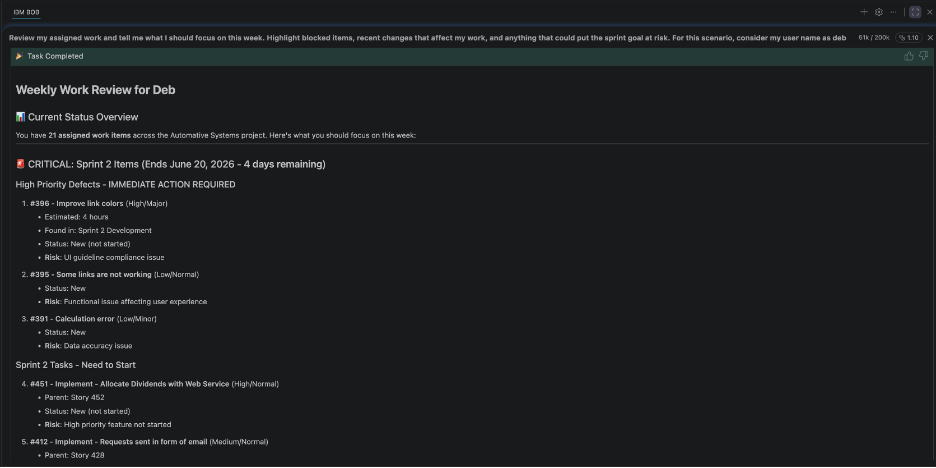
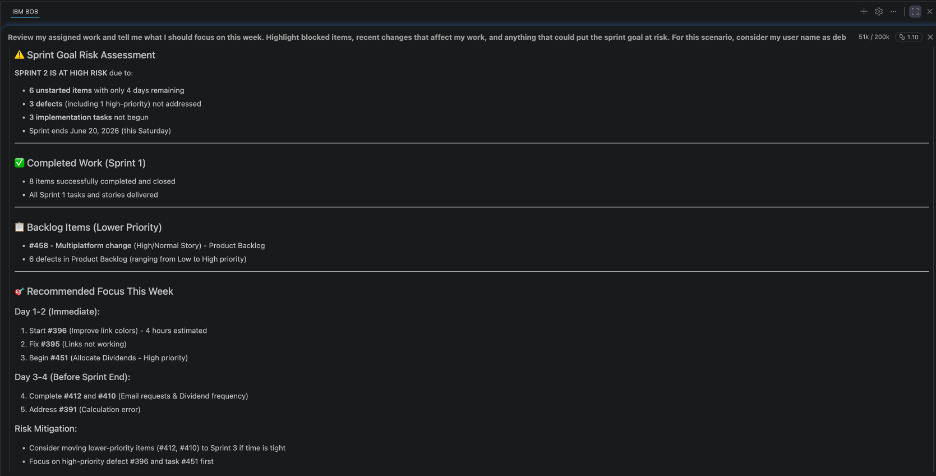
“Review my assigned work and tell me what I should focus on this week. Highlight blocked items, recent changes that affect my work, and anything that could put the sprint goal at risk.”
What happens
The EWM MCP Tools help the team member to:
- Review assigned work.
- Analyze recent project activity.
- Identify blockers and dependencies.
- Detect stale or neglected work.
- Prioritize areas requiring attention.
- Produce a personalized action briefing.
Example output
A typical response combines individual work status with broader project context, including:
- A prioritized summary of assigned work requiring attention
- Newly introduced blockers, dependencies, or risks affecting current commitments
- Recent project activity that may influence ongoing work
- Stale work items or tasks lacking recent progress
- Areas that could affect sprint objectives if left unresolved
- Recommended actions to help focus effort on the highest-impact work
The following examples illustrate portions of the output:
Figures 4.1–4.2 show the output from ranking assigned work, highlighting delivery risks, and generating a personalized action plan for the upcoming week.
Why it matters
Engineering AI Hub MCP tools help transform fragmented project information into meaningful context. By understanding relationships between assigned work, project activity, and delivery objectives, the AI assistant can help individuals avoid reacting to a stream of notifications and focus on the work most likely to influence sprint and release outcomes
Scenario 5: Assess Feature implementation quality and security risks
As a feature approaches completion, one of the most difficult tasks is understanding whether the collective implementation across all associated stories meets quality and security expectations.
A feature may consist of dozens of child stories implemented by different developers over multiple iterations. The implementation details are often distributed across work items, change sets, code reviews, comments, and quality reports. Assessing the overall health of the feature typically requires manually navigating these artifacts, reviewing implementation history, and identifying potential quality or security concerns before the feature is considered complete.
Engineering AI Hub MCP tools allow AI assistants to traverse work item hierarchies, discover linked implementation artifacts, analyze related change sets, and correlate information across the delivery lifecycle. Rather than reviewing each story independently, teams can evaluate the feature as a whole and identify areas that require additional attention before release.
Ask
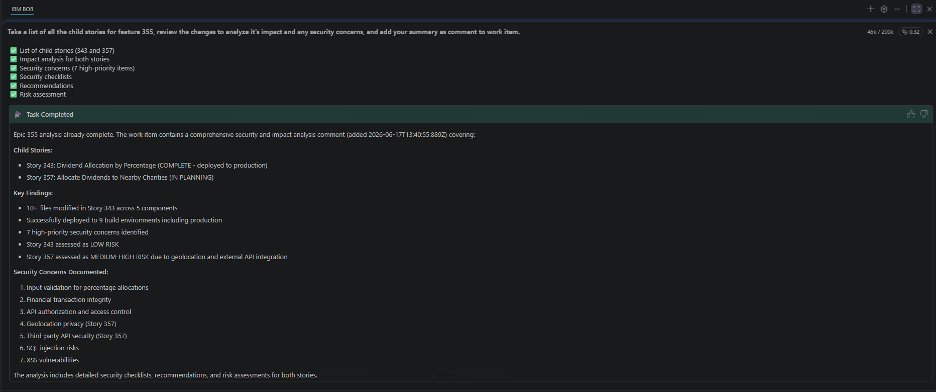
“Take a list of all the child stories for feature 355, review the changes to analyze its impact and any security concerns, and add your summary as comment to work item.”
What happens
Using Engineering AI Hub MCP tools, the team lead:
- Traverses the feature hierarchy to identify all child stories and tasks.
- Retrieves associated change sets and implementation artifacts.
- Analyzes implementation patterns across the feature.
- Reviews code review comments, discussions, and linked quality information.
- Identifies potential quality, maintainability, and security concerns.
- Highlights implementation areas that warrant additional review or testing.
- Generates a consolidated feature assessment.
- Adds the summary and recommendations as a comment on the parent feature work item.
Rather than producing isolated observations for individual stories, the assistant assembles a feature-level view of implementation quality and security posture.
Example output
A typical response combines several layers of implementation, quality, and security context, including:
- An overall assessment of feature implementation health.
- A summary of child story completion and implementation coverage.
- Significant change sets and areas of code impacted by the feature.
- Potential quality concerns, code complexity issues, or maintainability risks.
- Security-related observations, including areas requiring additional review or validation.
- Recommendations for remediation, testing, or follow-up actions before release.
- A generated summary that is automatically added as a comment to the parent feature work item.
The following examples illustrate portions of the output:
Figure 5.1 shows the output consolidating implementation activity across child stories and generating an overall feature health assessment.
Why it matters
Feature completion decisions are often made using status indicators and manual reviews of a subset of implementation artifacts. This can make it difficult to identify concerns that emerge only when examining the feature as a whole.
Engineering AI Hub MCP tools provide the connected engineering context required for AI assistants to analyze implementation activity across work item hierarchies, change sets, reviews, and related artifacts. By assembling this information automatically and presenting it as a consolidated feature assessment, teams gain earlier visibility into quality and security risks, reduce the effort required for feature reviews, and improve confidence in release readiness.
Most importantly, stakeholders can focus on addressing identified risks and making informed delivery decisions rather than spending time gathering implementation evidence from multiple engineering systems.
Conclusion
Engineering AI Hub 1.3 MCP tools do more than provide conversational access to engineering data. They give AI assistants the context needed to discover relevant artifacts, analyze delivery signals, trace relationships, and synthesize insights across the engineering lifecycle.
By combining AI reasoning with trusted engineering context, MCP tools transform AI assistants from search interfaces into context-aware engineering collaborators. A single natural language request can uncover dependencies, identify risks, correlate information across artifacts, and deliver decision-ready insights.
The result is a fundamentally different way of interacting with engineering data, helping teams spend less time gathering information and more time planning, prioritizing, and delivering value.
What next
The scenarios in this article represent only a small sample of what’s possible when AI assistants can access trusted engineering context through Engineering AI Hub MCP tools. Try these scenarios with your own projects and experiment with the questions your teams ask every day. Whether you’re planning a sprint, assessing delivery risks, tracing implementation decisions, or evaluating quality, MCP tools can help AI assistants uncover the context needed to support better decisions.
We’re always interested in learning how teams are applying these capabilities. Share the use cases you’ve explored, the insights you’ve gained, and the workflows you’ve enhanced.
To continue your journey, explore our related articles that demonstrate how Engineering AI Hub MCP tools enable AI-assisted interactions across requirements management, test management, and other engineering disciplines.
AI-assisted Test Management with Engineering AI Hub 1.3 MCP Tools