How to configure IBM Engineering Workflow Management Plugin for Visual Studio Code (VSC) correctly?

Hey Jazz Community,
I just found out that there is some EWM Plugin fir Visual Studio Code available and I installed it on my machine.
For configuration, it asks for the path of the EWM SCM Daemon Location.
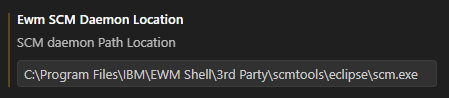
This seams not to be the correct tool to be used, but I could not find any more detailed information.
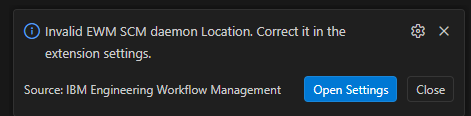
Which tools have to be installed?
- From the file "CommandLine_Readme.txt", it's saying that is the Version Release 404.
- From the file "rtc-net-readme.txt" it's saying com.ibm.team.scm.commandline_7.0.2.0-EWM-CLIENT-I20220731-0234
- Latest Visual Studio Code version is used and latest EWM plugin available.
One answer
This SCM Tools seems to be the one installed with EWM Shell client. While this should also work, but the path may need to be specified little differently. Please try with the path till "3rd party" - C:\Program Files\IBM\EWM Shell\3rd Party
What is the version of Windows Shell client you are using? Based on the details in "rtc-net-readme.txt", I am suspecting it to be 7.0.2? If so, please note that this is not a supported version for EWM VS Code plugin. The plugin supports integration with EWM versions 7.1 and above.
Your SCM Tools version should match version of EWM that you want use. Please see these links:
Installing Engineering Workflow Management extension for Visual Studio Code editor
Installing Engineering Workflow Management extension for Visual Studio Code editor