Jazz Forum Welcome to the Jazz Community Forum Connect and collaborate with IBM Engineering experts and users

DOORS NG: obtain the direction of linkTypes through REST API

I'm trying to develop a widget for DOORS NG in which I need to navigate the linked artifacts, and I need to know which link types exist along with their directions (IN or OUT). I've already used the REST endpoint "rm/types?resourceContext=PROJECT_ID", where all link types are defined, but the directions are either missing or incorrect (subToObj or ObjToSub).

Do you know REST API that returns the direction (IN or OUT) for each linktypes? 


THANKS!

1 vote

Comments
What do you mean - be specific - by "missing or incorrect (subToObj or ObjToSub)" - if possible give an example.

Link types don't have a direction, they're just a definition - if you find an instance of a link, i.e. on an artifact, that has a subject and object, so has a direction which is always outgoing.

The subToObj/objToSubj allows for different names in each direction so it's more obvious what the meaning of the link is, i.e. not just Satisfaction but much clearer Satisfies and Satisfied By. In general the outgoing link (e.g. Satisfied By outgoing from a System Requirement) should be on the downstream artifact, so you only need write permission to that to create a link to e.g. a Stakeholder Requirement which may be a specification you aren't allowed to modify.

With configuration management enabled links are (strictly, i.e. no way of avoiding it) stored at the outgoing end. Messing with the direction naming to subvert this doesn't change the fact the link is stored at the outgoing end and you risk confusing people :-o

Hi @Ian Barnard, I'll give you an example, maybe you can help clarify things:
An artifact, or rather, a requirement, has a "satisfies" link (which is represented by an outgoing arrow) and also has a "satisfied by" link (represented by an incoming arrow). 


Now, in my widget, if I wanted to create a link type of 'satisfaction', I need to define in which direction I want it (IN or OUT), but I haven't found a "systematic" way (using the REST call above or other REST API) to determine which direction corresponds to each name, i.e., 'satisfies' corresponds to (OUT) and 'satisfied by' corresponds to (IN).

Thanks

These are the data obtained from the REST:
        <owl:sameAs rdf:resource="http://open-services.net/ns/rm#satisfaction"/>
        <dcterms:description>A stakeholder request</dcterms:description>
        <rm:subjectToObjectLabel>Satisfies</rm:subjectToObjectLabel>
        <dcterms:title>Satisfaction</dcterms:title>
        <rm:objectToSubjectLabel>Satisfied by</rm:objectToSubjectLabel>
</rm:LinkType>

With configuration management enabled, if you create a link on a resource then that *is* an outgoing link, and the label is the subjectToObjectLabel.

Strongly suggest you only provide outgoing link creation, because allowing incoming link creation means your code has to go to the thing at the other end of the link and create it there, which makes it an outgoing link from that end. The DOORS Next UI hides this from you, but that's what it does.


@Ian Barnard, Yes, okay, that makes sense to me. However, my goal is not to create a link on a requirement, but to read all the links present on it (or only the selected link types in the widget).
So, if I select "satisfies" in the widget, I need to read the link of type "satisfaction" with direction "OUT", while if I select "satisfied by", I need to read the same type of link but in the "IN" direction.
Since in DOORS there are many other links (such as "satisfied by architecture element", "validated by", etc.), and I want to "follow" these links on a requirement, I need to find an "automatic" way to determine the direction of the links.
Do you know of any REST APIs that allow me to determine the direction for each label?
The REST API I used only provides "subToObj" and "objToSub", but I don’t believe they respectively indicate the "OUT" and "IN" direction of the link type, because in some link types they appear to be reversed — please correct me if I’m wrong.

Using the OSLC APIs the only links you'll see on an artifact are outgoing links - so there's zero confusion about direction.

@Ian Barnard, Okay, but in my case, I am developing a widget for DOORS NG, where I can use the client extension API 'RM.Data.getLinkedArtifacts' from RMExtensionsAPI703, which returns all the links present on an artifact, including both incoming links like 'satisfied by' and outgoing links like 'satisfies'.

This API also returns the direction of the links, and by checking, I found that 'satisfied by' has direction 'OBJ' and 'satisfies' has direction 'SUB', which aligns with the result from the REST API I sent you earlier ('rm/types?resourceContext=PROJECT_ID'). However, for other link types like 'satisfy architecture element', the direction returned by the REST API is reversed, meaning 'SUB' corresponds to 'satisfies by architecture element' and 'OBJ' corresponds to 'satisfied by architecture element'. So, this leads me to believe there is another REST API to get the 'correct' link directions.
I need these directions to use the 'RM.Data.getLinkedArtifacts' API (you can also use the name/string directly, but the behavior for some link types is always reversed).

At this link: "https://jazz.net/wiki/bin/view/Main/DNGTypeAPI" (cap 5.4 LinkType ResourceShape), I found the result of a REST that shows the two directions of a link type under different tags: "label" and "inverseLabel".

However, I can't figure out which endpoint or REST API was used, Can you give me any information about it?

That API is the OSLC RM API. https://docs.oasis-open-projects.org/oslc-op/rm/v2.1/requirements-management-spec.html You are supposed to discover the endpoint. You get the rootservices document, then you look up the service provider for the rm application. Then you look up the project area service provider, from there you can find the factories and resource shapes.

Hi @rschoon,
yes, I had already obtained the URIs of the Resource Shapes (for each project area there are several), for example:
"https://server/rm/types/OT_FmdoQPDVEe6urYqUOHltWQ"
but none of them contain "Property" elements with tags like
"<rdfs:label>MyLinkTypeOut</rdfs:label>" or
"<oslc:inverseLabel>MyLinkTypeIn</oslc:inverseLabel>".
All the links are listed in the resource shape URIs, but the link directions are not defined in the properties.
Maybe a specific parameter needs to be added to the request?
Or would you happen to have more information about this URI ("http://jazz.net/ns/rm/dng/types#LinkType")?
Thanks.

I don't. What I have done in the past is to use a REST client and GET the pages I am interested in and then try to find out what is in there. You seem to avoid providing useful examples of what calls you do, so do not expect useful answers. Tips

1. Be sure what API you are using (OSLC, Reportable REST, Javascript client) 
2. Avoid mixing APIs if possible, Be careful with Content-Type and Accept, be sure to use a supported value.

If there is a link returned with a link type, you can try to follow that, if there is useful information.

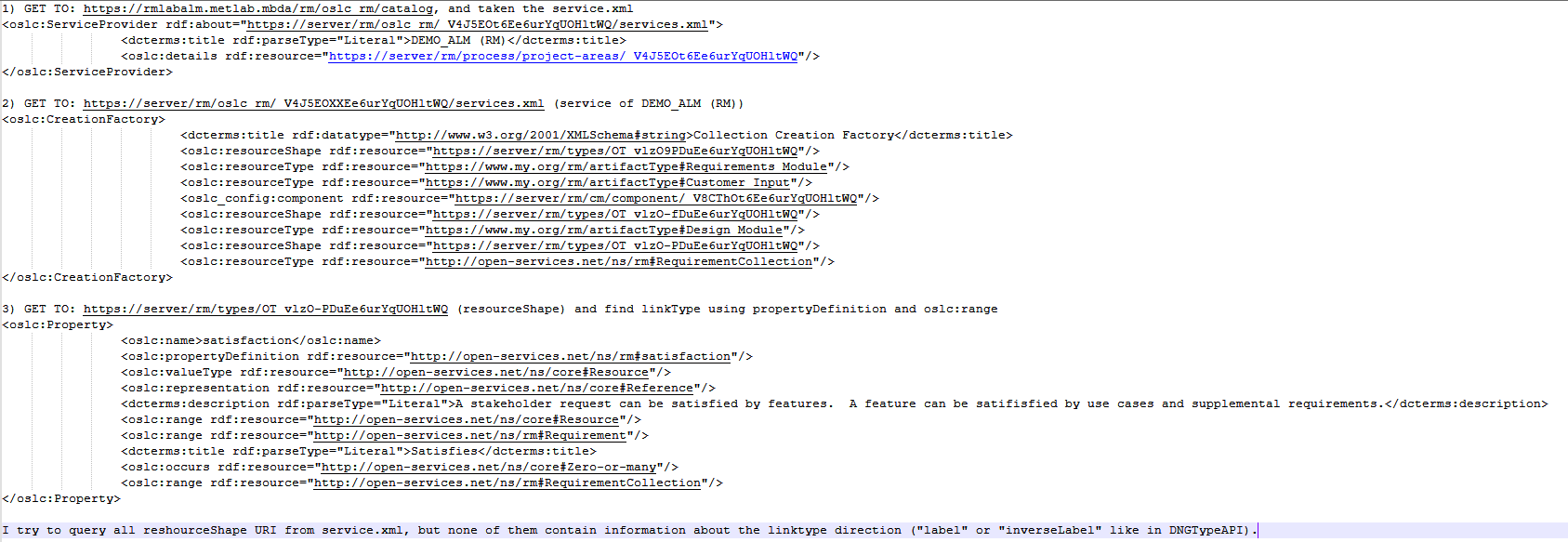
@rschoon, I can provide you with as many examples as you want; the problem is that the REST results are large, and I can't include more than a certain number of characters here (in the comments). Moreover, I can't avoid mixing REST APIs because the client JavaScript API (RMExtensions) isn't able to retrieve all types of links, unlike OSLC API. The Reportable REST API — specifically this one: "https://server/rm/publish/linktypes" (with accept=application/xml and content=null) — returns an empty response. Below, I will try to provide the response XMLs and the OSLC URIs I queried in order to retrieve the link types (although I wasn’t able to get information about the directions).

Using this URI: "https://server/rm/oslc_rm/catalog" i get the service.xml URI for the specific project area.

After using the service.xml URI, I find all resourcheShape URI, but nothing of this have link drection. See xml response in the answer.


showing 5 of 13 show 8 more comments


4 answers

Permanent link

Hi,


My idea:
Is the 'IN/OUT link type' the same for every requirement? 
-> If yes then I would create a getter. Parse through every requirements and see what this getter returns. 
The getter consists mainly of the query(target URL). Do you already know which xml field/attribute is responsible for containing this link?
     -> if yes then make the query. Query example using the cap 5.4 LinkType ResourceShape  you shared:   query = (
            r"{}/views?oslc.query=true&projectURL={}&"
            r"oslc.prefix=label=<http://...>&"   # <- IDK what prefix this label is used with or if it even requires one.
            r"oslc.where=rdfs:label=%22MyLinkTypeOut%22".format(rm_url, project_area_url),  #<- %22 might not be needed, they mark the string.
            )
           And another query for the xml field where you store the IN (in the cap 5.4 that would be "<oslc:inverseLabel>".
    -> if not, GET some requirements and look at their XML. You should see similar IN/OUT link type fields then.
-> if not, I can't think of anything.

Alex
           

0 votes

Comments

can you provide my some example uri?


Permanent link

In the Type System XML, do you want to check the following node. Node name mentioned "To". Check this node name in the other link also.

objectToSubjectLabel
0 votes

Comments

Already done, but for some link types the order is reversed compared to the direction displayed on the web, so it's not acceptable.


Permanent link
uri request


0 votes


Permanent link
I'm also unable to see information about links in the Requirement XML itself, let's try a different approach.

I'll provide an example that works for me, please let me know if I misunderstood what you're looking for.


rm_nr = 'rm1' # for me.
For the next variable, you need to know your element/artifact/requirement URL. 
artifact_itemId = 'BI_oVSksBOREfCyoOBaQxWUzQ'
query_url = f"https://{your_jazz_site}/{rm_nr }/publish/resources?linksonly=true&resourceURI={artifact_itemId}"
configuration_context = 'This_must_be_your_GLOBAL_config.' # I did not find a way to work with links in change sets / local configurations, please use your global one.

Your GET consists of URL=query_url and headers = {'Configuration-Context': 'configuration_context'}

If you print the response text, you'll see all the links you have. e.g. I only have 'ValidatedBy'.

You can then play with the response, encode it, parse it etc.

0 votes

Comments

okay, this work for custom type links, but not work standard link type like "Parent of" or "Satisfied By Architecture Element", because it retrieved URI: "http://jazz.net/ns/dm/linktypes#satisfy" or "http://www.ibm.com/xmlns/rdm/types/Decomposition" from which i can't get any other information.

'Decomposition'/'Parent Of' worked for me:<ds:Link type="Decomposition"><rrm:title>Parent Of</rrm:title><ds:linkType>

But you're right about 'Satisfied By Architecture Element'. It might be because on my end it's a weak/superficial link, it doesn't require a change-set to deliver the changes, creating a dummy link by itself works.

I have another idea that I can't make ends meet with.


query_url = f'https://server/rm1/links?sourceOrTarget={requirement_url}
 
My 2 cents if you still wanna investigate: play around with Developer Tools (Section Network) and search for 'satisfy'. I found a great response XML that lists the links (with the ones you want too). E.g.:

  <rdf:Description rdf:nodeID="A1">;
    <rdf:subject rdf:resource="url"/>;
    <rdf:object rdf:resource="url"/>;
    <dcterms:format>application/rdf+xml</dcterms:format>
    <dcterms:title>link title (I think)</dcterms:title>
  </rdf:Description>

Best of luck.

Your answer

Register or log in to post your answer.

Dashboards and work items are no longer publicly available, so some links may be invalid. We now provide similar information through other means. Learn more here.

Search context
Follow this question

By Email: 

Once you sign in you will be able to subscribe for any updates here.

By RSS:

Answers
Answers and Comments
Question details
× 11,073

Question asked: Apr 30, 12:02 p.m.

Question was seen: 1,429 times

Last updated: May 13, 5:44 a.m.

Confirmation Cancel Confirm