Link Types Predecessor and Successor is missing in RTC Project created using SaFE template

Hello Team,
I am using RTC 6.0.6 version. I have created the RTC Project using the Process template "SAFe 4.5 Process (Essential SAFe)" here for me to add dependency between work Items, i am not able to find and add Predecessor and Successor links for any work Item Type.
These links are not available from the default work Item Link section. also these link types are not available to be selected manually while Editing the Links Section.
These links are available in RTC Projects which are created using Formal Process Template.
Is there any option to enable this links in Safe Template?
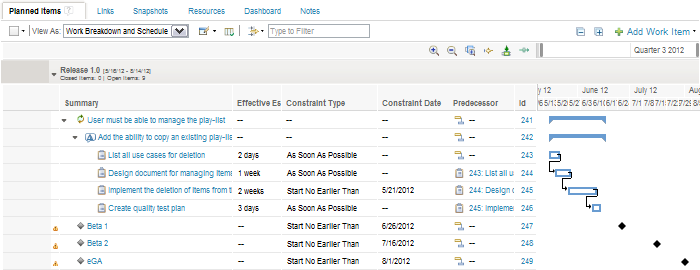
My main goal is to create dependency between items to show the planning like below image(Image added at the end of Description). Where we have Dependency Arrows from Predecessor to Successor.
Can anyone help me if i can configure these Successor and Predecessor link types in SAFE project? or is there any other option to add Dependencies between work Items?
Thanks for the help!
Abhilash
One answer
The predecessor and successor link types are only available out of the box in the Traditional Planning template. No other template has this link type. As far as I am aware, the planning using this link type is only available in the traditional planning template. You can use agile planning and the latest versions of EWM consider dependencies on iterations and have views to show conflicting planning for iterations.