Rational Quality Manager (RQM) 6.0 - how to set up different users as reviewers and approvers of test case?

Using RQM 6.0, I have tried to set up different users as reviewers and approvers of a test case but was not successful
The steps I have followed:
Open Test Case, under Formal review, set up users for review, save the test case. Then set up users for approval, and save the test case. It seems the last list is applied to both reviewers and approvers.
Can you please advise how to separate the list of reviewers from approvers for a specific test case?
Thank you ..
The steps I have followed:
Open Test Case, under Formal review, set up users for review, save the test case. Then set up users for approval, and save the test case. It seems the last list is applied to both reviewers and approvers.
Can you please advise how to separate the list of reviewers from approvers for a specific test case?
Thank you ..
Accepted answer
Hi, Nadra
I tested with v6.0.1(+ifix03) and I can add reviewer and approver separately.
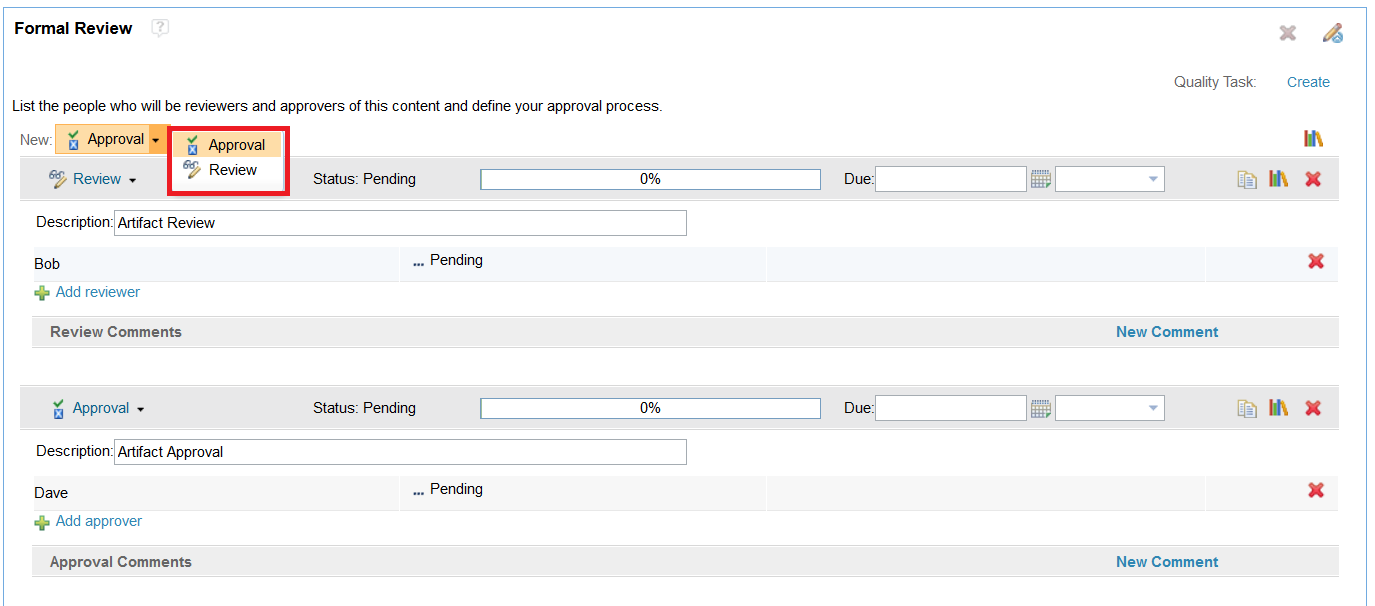
First of all, I changed New: Approval to Review and then add reviewer Bob. Save the test case
then under New: Approval, I select Approval and then add new approver Dave following the screen(see below)
I don't see anything abnormal here. Did you do anything different or my understanding of the issue is wrong?
Thanks
I tested with v6.0.1(+ifix03) and I can add reviewer and approver separately.
First of all, I changed New: Approval to Review and then add reviewer Bob. Save the test case
then under New: Approval, I select Approval and then add new approver Dave following the screen(see below)
I don't see anything abnormal here. Did you do anything different or my understanding of the issue is wrong?
Thanks
Comments
