IBM Jazz Reporting Services - reports: T1.CREATION_DATE date comparison

Hello,
I have one question about custom reports by IBM Jazz Reporting Services.
I have problem with selecting work items which were created till 30 days.
Is any comparison to make a query in a report like
T1.Creation_Date is less than 10 days ? (work items created from today to 10 days ago)
The only example which I found was:
YEAR(CURRENT_DATE - T1.CREATION_DATE) >1) - to check work items created before year ago
Is any function which can be used to make date comparison in Jazz Reporting Services?
I have tried functions from MSSQL/ DB2 / ORACLE and even T1.CREATION_DATE conversion does not work....
PS. Is any guide with functions to Jazz Reporting Services?
I would be grateful for help!
Thank you!
I have one question about custom reports by IBM Jazz Reporting Services.
I have problem with selecting work items which were created till 30 days.
Is any comparison to make a query in a report like
T1.Creation_Date is less than 10 days ? (work items created from today to 10 days ago)
The only example which I found was:
YEAR(CURRENT_DATE - T1.CREATION_DATE) >1) - to check work items created before year ago
Is any function which can be used to make date comparison in Jazz Reporting Services?
I have tried functions from MSSQL/ DB2 / ORACLE and even T1.CREATION_DATE conversion does not work....
PS. Is any guide with functions to Jazz Reporting Services?
I would be grateful for help!
Thank you!
Accepted answer
Hi Marta,
Great question. Yes, in the Jazz Reporting Service, you can create a report that shows work items that were created within the last 30 days, more than 30 days ago, or exactly 30 days ago. If you need to, you could even report on work items that were created any day that is not exactly 30 days ago. You can use the GUI to do this, as I show below. I've also posted the SQL at the end.
In the Jazz Reporting Service Report Builder:
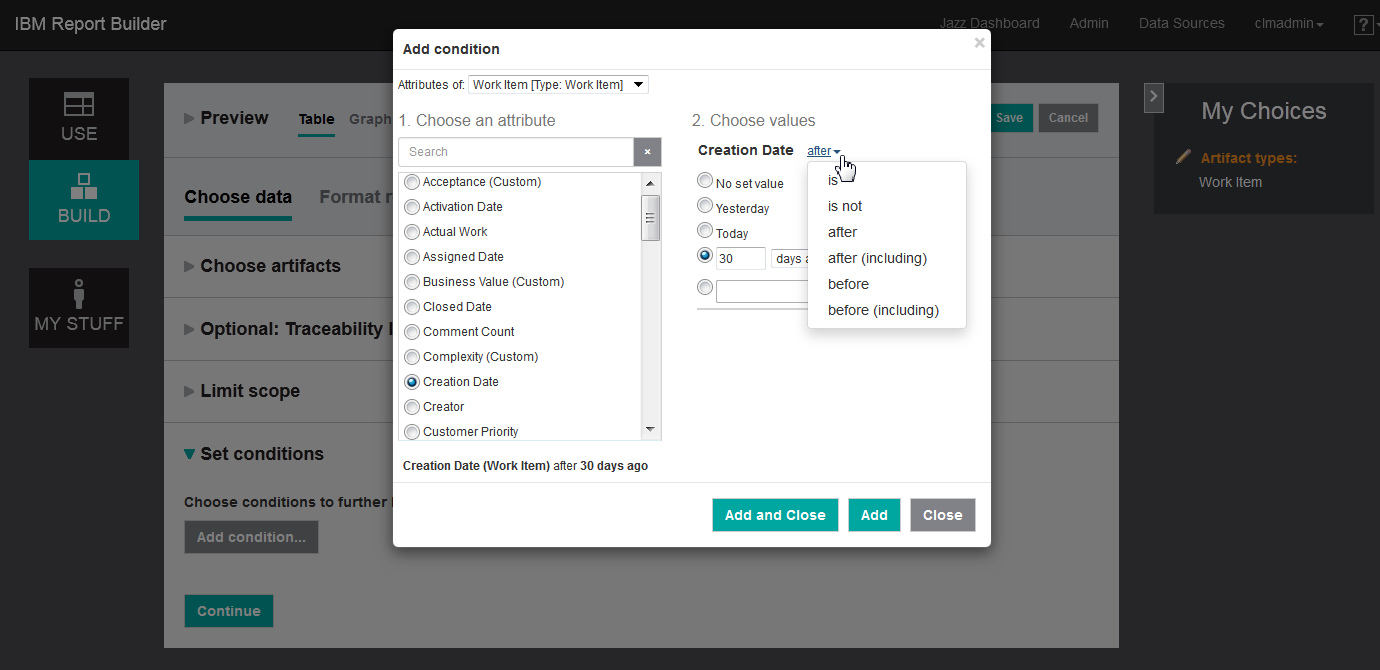
Image 2
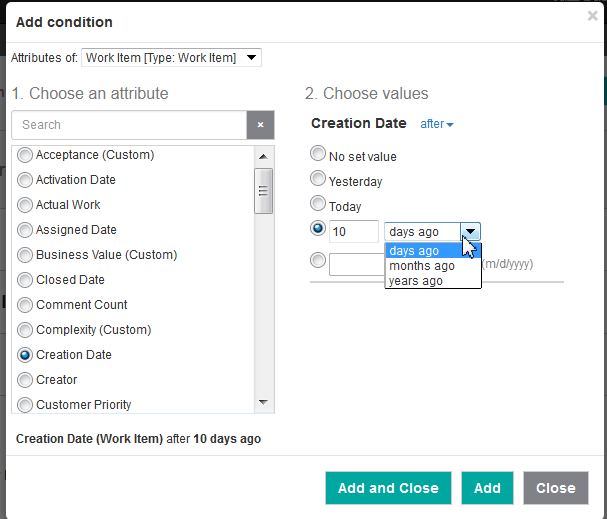
Image 3
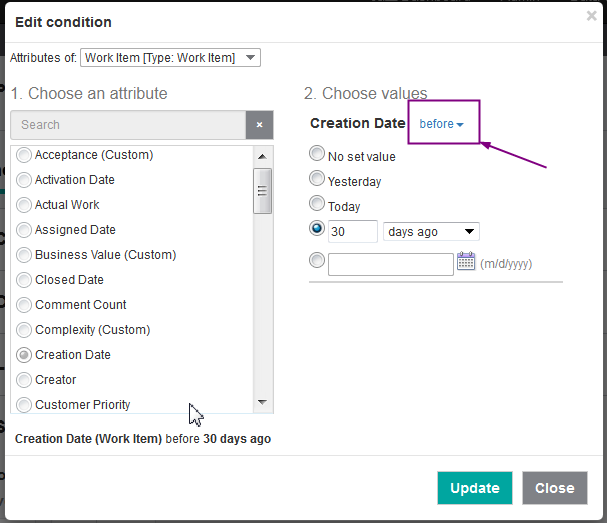
I went through these steps and ran a report, against our sample data, with the condition "Creation date is after 30 days ago". In the results below, you can see that there are only work items from less than 30 days ago. 30 days ago was Feb. 17 so results from Feb 18 and later are shown. If I had chosen "after (including)", I would also see results from Feb. 17.
Conversely, if I change the condition to show only results from before 30 days ago..
... then I get results showing work items created before Feb 17. (Note: The screenshot shows nothing from before Feb 15 because that's as far back as our sample data goes.)
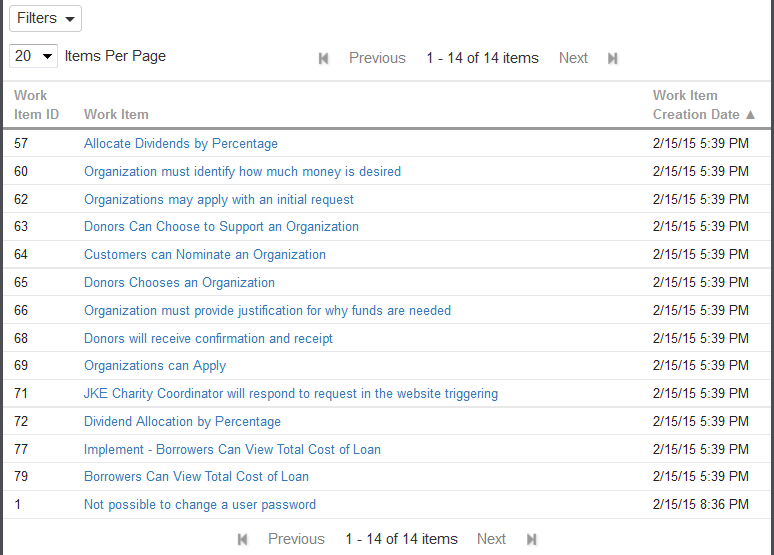
The image that I've included is from 6.0 M10, but this functionality was also available in 5.0.1 and 5.0.2.
Here is the SQL code for "Creation data is after 30 days ago" for reference:
SELECT DISTINCT T1.REFERENCE_ID,
T1.NAME AS URL1_title,
T1.URL AS URL1,
T1.CREATION_DATE
FROM RIDW.VW_REQUEST T1
WHERE T1.PROJECT_ID = 0 AND
( DAYS(CURRENT_TIMESTAMP) - DAYS(T1.CREATION_DATE) < 30
) AND
(T1.ISSOFTDELETED = 0)
I hope this helps! If you have additional question, please ask.
You can find more information about the Jazz Reporting Service in the IBM Knowledge Center.
If you're interested in learning more about using the Advanced SQL feature of the Report Builder, see this article by Steve Shaw.
Cheers!
Karen Gosciminski
Great question. Yes, in the Jazz Reporting Service, you can create a report that shows work items that were created within the last 30 days, more than 30 days ago, or exactly 30 days ago. If you need to, you could even report on work items that were created any day that is not exactly 30 days ago. You can use the GUI to do this, as I show below. I've also posted the SQL at the end.
In the Jazz Reporting Service Report Builder:
- In the Choose artifact type section, select work item.
- In the Set conditions section, add a condition and choose the Work item Creation date attribute.
-
For the type of condition, choose from: is, is not, after, after (including), before, before (including).
-
To choose after, see image 1.
-
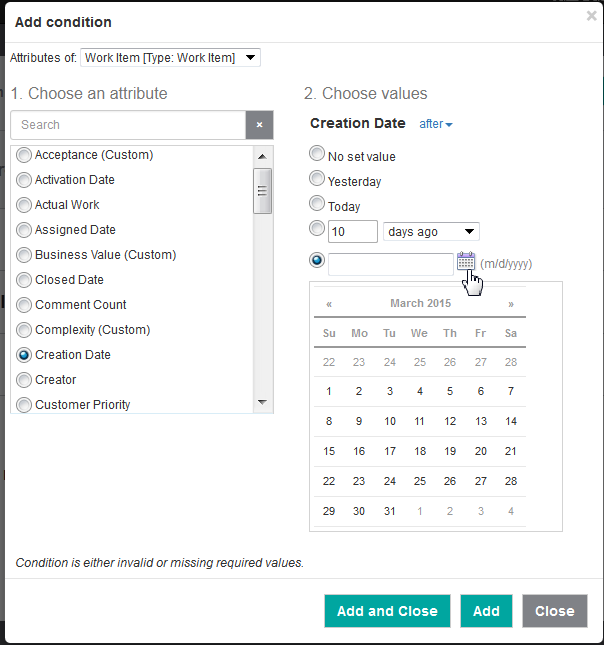
For the day or date to set as your boundary, choose from: today, yesterday, any number of days / months / years, or choose a specific date
-
To choose 30 days ago, see image 2
-
To choose a specific date, see image 3
Image 2
Image 3
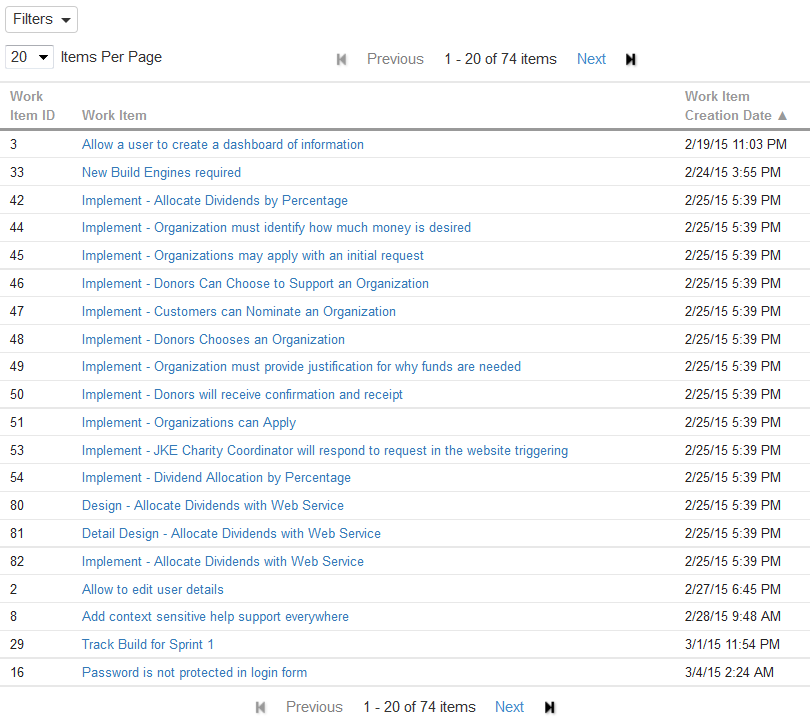
I went through these steps and ran a report, against our sample data, with the condition "Creation date is after 30 days ago". In the results below, you can see that there are only work items from less than 30 days ago. 30 days ago was Feb. 17 so results from Feb 18 and later are shown. If I had chosen "after (including)", I would also see results from Feb. 17.
Conversely, if I change the condition to show only results from before 30 days ago..
... then I get results showing work items created before Feb 17. (Note: The screenshot shows nothing from before Feb 15 because that's as far back as our sample data goes.)
The image that I've included is from 6.0 M10, but this functionality was also available in 5.0.1 and 5.0.2.
Here is the SQL code for "Creation data is after 30 days ago" for reference:
SELECT DISTINCT T1.REFERENCE_ID,
T1.NAME AS URL1_title,
T1.URL AS URL1,
T1.CREATION_DATE
FROM RIDW.VW_REQUEST T1
WHERE T1.PROJECT_ID = 0 AND
( DAYS(CURRENT_TIMESTAMP) - DAYS(T1.CREATION_DATE) < 30
) AND
(T1.ISSOFTDELETED = 0)
I hope this helps! If you have additional question, please ask.
You can find more information about the Jazz Reporting Service in the IBM Knowledge Center.
If you're interested in learning more about using the Advanced SQL feature of the Report Builder, see this article by Steve Shaw.
Cheers!
Karen Gosciminski