REST | OSLC : How to get workitem types, its workflow and then the actions possible in that workflow?

I am looking for some pointers to connect the workitem type --> workitem Workflow.
1. I use the workitem services URL to get the workitem types in a project area..
eg : https://clm.admin.ws/ccm/oslc/contexts/_u4qKYqUSEeOZfPTW9a4EhA/workitems/services.xml
2.1 I am interested in looking at the states / actions available in a particular workitem type.
eg: https://clm.admin.ws/ccm/oslc/types/_u4qKYqUSEeOZfPTW9a4EhA/defect
2.2. The URL to which will be :
https://clm.admin.ws/ccm/oslc/workflows/_u4qKYqUSEeOZfPTW9a4EhA/actions/com.ibm.team.workitem.defectWorkflow
I am looking for pointers on how to get from 2.1 to 2.2 using REST/ OSLC. I tried various ways but somehow the workitem type and links to their workflows dont seem to have a continuum.
Is there a sequential step to get from workitem type to its workflow link?
-or- 1 place where we can look at both workitem types, and the links to their workflows?
Thanks in advance...
1. I use the workitem services URL to get the workitem types in a project area..
eg : https://clm.admin.ws/ccm/oslc/contexts/_u4qKYqUSEeOZfPTW9a4EhA/workitems/services.xml
2.1 I am interested in looking at the states / actions available in a particular workitem type.
eg: https://clm.admin.ws/ccm/oslc/types/_u4qKYqUSEeOZfPTW9a4EhA/defect
2.2. The URL to which will be :
https://clm.admin.ws/ccm/oslc/workflows/_u4qKYqUSEeOZfPTW9a4EhA/actions/com.ibm.team.workitem.defectWorkflow
I am looking for pointers on how to get from 2.1 to 2.2 using REST/ OSLC. I tried various ways but somehow the workitem type and links to their workflows dont seem to have a continuum.
Is there a sequential step to get from workitem type to its workflow link?
-or- 1 place where we can look at both workitem types, and the links to their workflows?
Thanks in advance...
Accepted answer
Hi Sunil,
At your step 2.1, check the work item "shape" rather than the type itself, namely
https://clm:9443/ccm/oslc/context/_pz7gsD7rEeSp1IF8DHJaNQ/shapes/workitems/defect
In the output, look for the "state" attribute and it should contain all the allowed state values
https://clm:9443/ccm/oslc/workflows/_pz7gsD7rEeSp1IF8DHJaNQ/actions/com.ibm.team.workitem.defectWorkflow
The challenge is to determine the allowed action(s) for a particular state, which does not seem possible with OSLC at this stage.
https://jazz.net/forum/questions/152920/how-find-available-actions-to-change-states-in-rtc-with-oslc
It is doable using Java API though.
http://rsjazz.wordpress.com/2012/11/26/manipulating-work-item-states/
At your step 2.1, check the work item "shape" rather than the type itself, namely
https://clm:9443/ccm/oslc/context/_pz7gsD7rEeSp1IF8DHJaNQ/shapes/workitems/defect
In the output, look for the "state" attribute and it should contain all the allowed state values
<oslc:AllowedValues rdf:about="https://clm:9443/ccm/oslc/context/_pz7gsD7rEeSp1IF8DHJaNQ/shapes/workitems/defect/property/internalState/allowedValues">You also get the workflow id at the same time. Replace the "states" with "actions" in the URL and you will get all the actions in the workflow.
<oslc:allowedValue rdf:resource="https://clm:9443/ccm/oslc/workflows/_pz7gsD7rEeSp1IF8DHJaNQ/states/com.ibm.team.workitem.defectWorkflow/4"/>
<oslc:allowedValue rdf:resource="https://clm:9443/ccm/oslc/workflows/_pz7gsD7rEeSp1IF8DHJaNQ/states/com.ibm.team.workitem.defectWorkflow/3"/>
<oslc:allowedValue rdf:resource="https://clm:9443/ccm/oslc/workflows/_pz7gsD7rEeSp1IF8DHJaNQ/states/com.ibm.team.workitem.defectWorkflow/6"/>
<oslc:allowedValue rdf:resource="https://clm:9443/ccm/oslc/workflows/_pz7gsD7rEeSp1IF8DHJaNQ/states/com.ibm.team.workitem.defectWorkflow/1"/>
<oslc:allowedValue rdf:resource="https://clm:9443/ccm/oslc/workflows/_pz7gsD7rEeSp1IF8DHJaNQ/states/com.ibm.team.workitem.defectWorkflow/2"/>
</oslc:AllowedValues>
https://clm:9443/ccm/oslc/workflows/_pz7gsD7rEeSp1IF8DHJaNQ/actions/com.ibm.team.workitem.defectWorkflow
The challenge is to determine the allowed action(s) for a particular state, which does not seem possible with OSLC at this stage.
https://jazz.net/forum/questions/152920/how-find-available-actions-to-change-states-in-rtc-with-oslc
It is doable using Java API though.
http://rsjazz.wordpress.com/2012/11/26/manipulating-work-item-states/
Comments

One other answer
In summary I used the steps as below....
To get from a project area to its workitem type(s) and then from the workitem type to its possible actions.
1. Obtain list of RTC project area ids using URL below.
https://clm.admin.ws/ccm/process/project-areas
2. Query for workitem type(s) available in this project area using the workitem services URL.
Append '/workitems/services.xml' to the URL from Step 1 and perform a GET.
https://clm.admin.ws/ccm/oslc/contexts/_u4qKYqUSEeOZfPTW9a4EhA/workitems/services.xml
2.1. Look for the workitem calm:id of which the workitem actions are to be known and note down its
<oslc:cm:url>
https://clm.admin.ws/ccm/oslc/contexts/_u4qKYqUSEeOZfPTW9a4EhA/workitems/defect
3. Query for the 'shape' of the workitem obtained in 2.1 to get to its possible actions.
To do this, append '/shapes' and chance '/contexts' to '/context' in the URL from step 2.1 as shown in example below and perform a GET.
https://clm.admin.ws/ccm/oslc/context/_u4qKYqUSEeOZfPTW9a4EhA/shapes/workitems/defect
3.1. Look for a sample "oslc:allowedValue" under rdf:description rdf:about ending with “/property/internalState/allowedValues” to get to the workflow link for defect.
https://clm.admin.ws/ccm/oslc/workflows/_u4qKYqUSEeOZfPTW9a4EhA/states/com.ibm.team.workitem.defectWorkflow/4
4. Query for possible actions in the defect workitem. Replace '/states' with '/actions' and remove the workflow index '/4' for example and perform GET on the URL obtained.
https://clm.admin.ws/ccm/oslc/workflows/_u4qKYqUSEeOZfPTW9a4EhA/actions/com.ibm.team.workitem.defectWorkflow
To get from a project area to its workitem type(s) and then from the workitem type to its possible actions.
Using RESTClient on FireFox; with headers 'Accept: application/rdf+xml' and 'OSLC-Version: 2.0'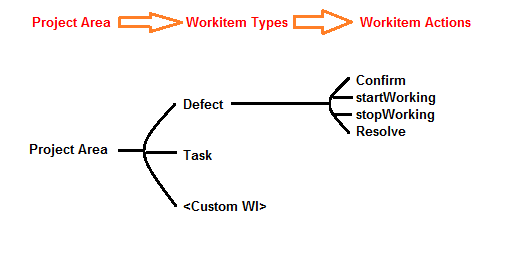
1. Obtain list of RTC project area ids using URL below.
https://clm.admin.ws/ccm/process/project-areas
2. Query for workitem type(s) available in this project area using the workitem services URL.
Append '/workitems/services.xml' to the URL from Step 1 and perform a GET.
https://clm.admin.ws/ccm/oslc/contexts/_u4qKYqUSEeOZfPTW9a4EhA/workitems/services.xml
2.1. Look for the workitem calm:id of which the workitem actions are to be known and note down its
<oslc:cm:url>
https://clm.admin.ws/ccm/oslc/contexts/_u4qKYqUSEeOZfPTW9a4EhA/workitems/defect
3. Query for the 'shape' of the workitem obtained in 2.1 to get to its possible actions.
To do this, append '/shapes' and chance '/contexts' to '/context' in the URL from step 2.1 as shown in example below and perform a GET.
https://clm.admin.ws/ccm/oslc/context/_u4qKYqUSEeOZfPTW9a4EhA/shapes/workitems/defect
3.1. Look for a sample "oslc:allowedValue" under rdf:description rdf:about ending with “/property/internalState/allowedValues” to get to the workflow link for defect.
https://clm.admin.ws/ccm/oslc/workflows/_u4qKYqUSEeOZfPTW9a4EhA/states/com.ibm.team.workitem.defectWorkflow/4
4. Query for possible actions in the defect workitem. Replace '/states' with '/actions' and remove the workflow index '/4' for example and perform GET on the URL obtained.
https://clm.admin.ws/ccm/oslc/workflows/_u4qKYqUSEeOZfPTW9a4EhA/actions/com.ibm.team.workitem.defectWorkflow
Comments
