Troubleshooting IBM Engineering Lifecycle Management 7.0.x to 7.1/7.2 Upgrades
Authors: WillChatham, BharathRaoLast Updated: February 2026 | Applies to: ELM 7.0.x → 7.1, 7.2
Overview
This article helps troubleshoot ELM upgrades from V7.0.x to V7.1 or V7.2 and is a companion to Planning for upgrade to ELM 7.1.Who Should Use This Guide
- System administrators planning ELM upgrades
- Technical teams troubleshooting upgrade issues
- Anyone experiencing problems during 7.0.x to 7.1/7.2 migration
Pre-Upgrade Checklist
⚠️ CRITICAL: Complete These Steps Before Upgrading
- Test the upgrade in a staging environment
- Use latest iFixes for your source and target versions
- Review product-specific critical notes below
- Document baseline timings and system state
Step 1: Test Your Upgrade
🎯 UPGRADE TESTING REQUIREMENTS
Why Testing is Critical:
- Detects data issues before production impact
- Provides accurate upgrade timing estimates
- Validates compatibility with your environment
- Hardware comparable to production (CPU, RAM, disk I/O)
- Copy of production data (ideal) or comparable dataset
- Network configuration similar to production
- Pre-upgrade task duration: _ hours.
- Upgrade execution time: _ hours.
- Post-upgrade task duration: _ hours.
- Any errors or warnings encountered.
Step 2: Use Latest iFixes
💡 RECOMMENDATION: Latest iFixes
IBM recommends upgrading using the latest iFixes for both source and target releases.
If using older iFixes: Review the known issues list to identify potential upgrade impacts.
iFix Documentation:
The lists show known issues organized by Product and Component/area.
Critical Product-Specific Notes
⚠️ MUST READ BEFORE UPGRADING
Review the critical notes for products in your environment before proceeding.
LQE/RS (Lifecycle Query Engine / Relational Store)
⚠️ CRITICAL CONSIDERATIONS
Key Issues and Considerations:
Review the comprehensive guide before upgrading:
Key considerations and known issues when upgrading to ELM 7.2.0 (LQE relational store)
Starting with ELM 7.2.0, LQE Jena-based storage is no longer supported. This release supports only the LQE relational store (LQE rs). If you are using LQE Jena in earlier versions, you must migrate your reports and usage to LQE rs before upgrading to ELM 7.2.0.
Important: Before upgrading to ELM 7.2.0, you must first upgrade to ELM 7.1.0 SR1 (or any later 7.1.0 iFix) to complete the migration and validation of your reports.
This document covers:
- Known limitations.
- Performance considerations.
- Migration constraints identified.
ETM (Engineering Test Management)
💡 RECOMMENDED iFix: ETM 7.1 iFix008 or higher
Why iFix008 is Important:
Contains critical TRS performance fixes that improve:
- TRS Feed Validation speed
- LQE indexing performance
- LDX indexing efficiency
Known Issues and Solutions
ETM: OSLC Migration Task Performance
🔧 KNOWN ISSUE
 Figure 1: ETM Advanced Property (Administration > Advanced Property)
Reference: ETM 7.0.3 New & Noteworthy
Post-upgrade, an OSLC Migrator updates archived approval details in the artifact schema. If the property is enabled before migration completes, archived approvals appear only for migrated artifacts.
Summary: Existing reports work as before upgrade while migration is in progress.
Figure 1: ETM Advanced Property (Administration > Advanced Property)
Reference: ETM 7.0.3 New & Noteworthy
Post-upgrade, an OSLC Migrator updates archived approval details in the artifact schema. If the property is enabled before migration completes, archived approvals appear only for migrated artifacts.
Summary: Existing reports work as before upgrade while migration is in progress.
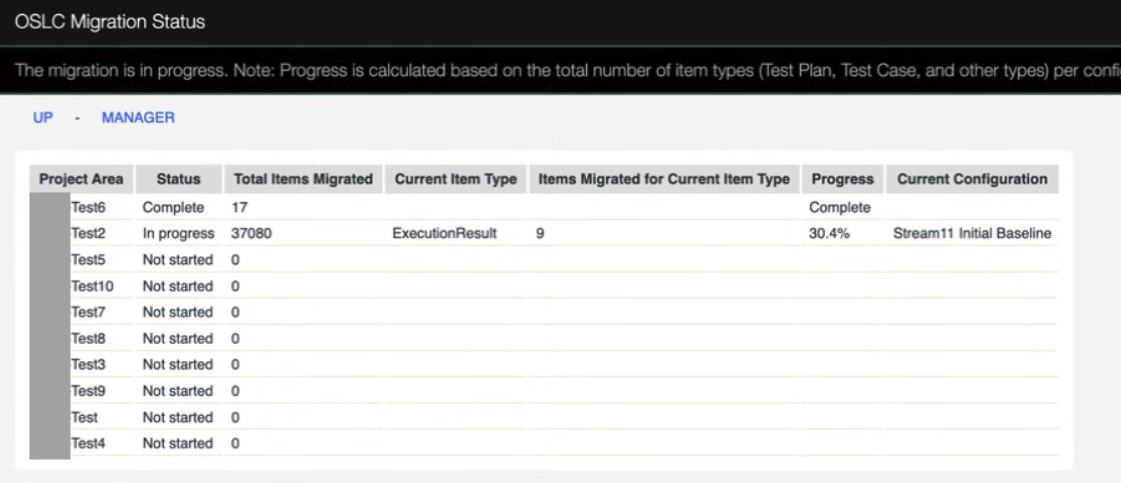 Figure 2: OSLC Migration Status Page showing progress
What to Monitor:
Figure 2: OSLC Migration Status Page showing progress
What to Monitor:
Problem Description
OSLC Migration Task shows poor performance, running for extended periods (days) with no indication of completion.Background: What is OSLC Migration?
OSLC migration is a background process that runs after an upgraded ETM server starts: Key Characteristics:- Manages OSLC Migrators for specific artifact types
- Publishes delete and create events in TRS2 feed
- Runs asynchronously (does not block server operations)
- Users can continue normal activities during migration
Impact on Your System
What Works:
Example Impact:
ETM 7.0.3/7.1 introduced an advanced property to include archived approval groups in REST/OSLC APIs, PDF, and JRS Reports:
- ✅ Server remains fully functional
- ✅ Users can create and modify artifacts
- ✅ Normal ETM operations continue
- ⚠️ Some JRS features unavailable until completion
- ⚠️ Archived approval groups not visible in reports (if enabled)
- ⚠️ New features dependent on migration incomplete
Figure 1: ETM Advanced Property (Administration > Advanced Property)
Reference: ETM 7.0.3 New & Noteworthy
Post-upgrade, an OSLC Migrator updates archived approval details in the artifact schema. If the property is enabled before migration completes, archived approvals appear only for migrated artifacts.
Summary: Existing reports work as before upgrade while migration is in progress.
Monitoring Migration Progress
Status Page Location:https://elm.host.name/<qm-context>/oslcMigrationStatus
Figure 2: OSLC Migration Status Page showing progress
What to Monitor: - Overall completion percentage
- Individual migrator status
- Estimated time remaining
- Any error messages
Resolution Steps
📋 TROUBLESHOOTING PROCEDURE
Step 1: Gather Database Diagnostics
The migration time depends on data volume and database performance. Collect diagnostics:
For Oracle:
- Run Must-gather for long-running SQL statements on Oracle
- Generate AWR report for the migration period
- Document findings
- Run Must-gather for long-running SQL statements on DB2
- Document findings
- Migration exceeds expected time-frame for your data volume
- Status page shows errors
- Migration appears stalled (no progress for extended period)
- System performance severely degraded
Additional Resources
External Links
Contributors
Authors: WillChatham, BharathRao *Additional Contributors:Feedback
Was this article helpful?
Please provide feedback to help us improve this documentation:
- Contact the authors with suggestions
- Report issues or corrections
- Share your upgrade experiences
 Copyright © by IBM and non-IBM contributing authors. All material on this collaboration platform is the property of the contributing authors.
 Contributions are governed by our Terms of Use. Please read the following disclaimer.
Dashboards and work items are no longer publicly available, so some links may be invalid. We now provide similar information through other means. Learn more here.