Create link for different products in RELM view of V Process

Say for example I have two Products :Product A & Product B in RELM , My view has to provide the complete traceability dynamically depending on which product I choose.
Meaning If i click on Product A i should view the artifact links of Product A in V Process .
It is some how related to view the Under the hood: Understand the impact of proposed changes using Rational Engineering Lifecycle Manager“.
Here the physical is water meter so intially to me I should have a box in view of V process with multiple products.
Meaning If i click on Product A i should view the artifact links of Product A in V Process .
It is some how related to view the Under the hood: Understand the impact of proposed changes using Rational Engineering Lifecycle Manager“.
Here the physical is water meter so intially to me I should have a box in view of V process with multiple products.
Accepted answer
Hi Girish,
You can also use a parameterized query to construct a View based upon each Product. Instead of:
?resource a sysml:Block ;
the type of a RELM Product would be:
?resource a pd:Item ;
So if you have already constructed the V Process diagram for one Product, it's quite easy to substitute the Product URI with a parameter, so that the contents of the container are populated based upon the instantiated parameter at the time that the View is run.
One way to do this is to use the GRAPH function as follows:
PREFIX dcterms: <http://purl.org/dc/terms/>
PREFIX rdf: <http://www.w3.org/1999/02/22-rdf-syntax-ns#>
PREFIX pd: <http://jazz.net/ns/pd#>
SELECT ?resource ?title ?type
WHERE {
GRAPH <$Product_URI$> {
?resource
a pd:Item ;
dcterms:title ?title ;
rdf:type ?type .
}
}
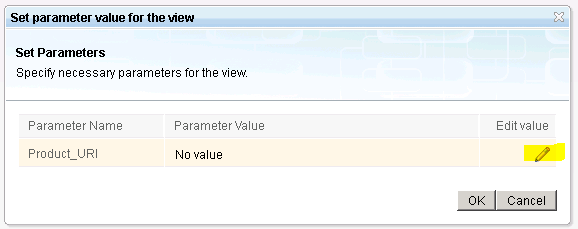
Running this query will prompt the user for the value of the <$Product_URI$> parameter, and that value may be selected from a list of products in a Search list by clicking on the pencil icon in the 'Set parameter value...' dialog:
I hope that helps,
John