


Workaround: Integration Certificate Dialogs can not be Accepted and Bypassed on Firefox 11
Workaround Summary
In a distributed Rational solution for Collaborative Lifecycle Management (CLM) environment with untrusted certificates, if you use Firefox version 11 or later, you cannot add an exception for the untrusted certificate. This issue occurs when a remote server is surfaced for the first time inside an iFrame, which is common for work item pickers and other cross-server integration workflows. When this issue occurs, you cannot continue your work.
More Information
Problem
Firefox recently changed the behavior for untrusted certificate errors inside of iFrames. You are now required to access the remote server in a new browser window or tab in order to add an exception for the untrusted certificate. Then, the remote server is saved in the browser and no future action is necessary.
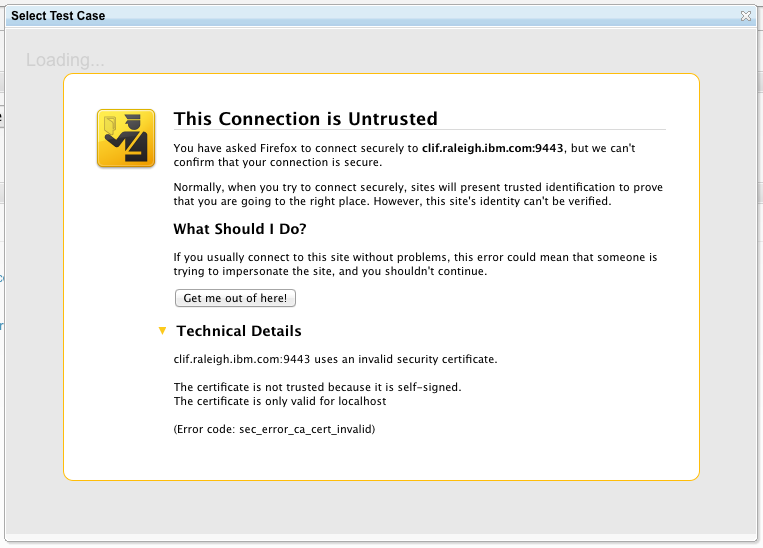
Typically when this issue occurs, the following error message is displayed. This message does not suggest any actions to resolve the problem.
my.server.com:9443 uses an invalid security certificate.
The certificate is not trusted because it is self-signed.
The certificate is only valid for localhost
(Error code: sec_error_ca_cert_invalid)
Here is an example:
Firefox versions 3.6 and 10.0 ESR are not affected by this issue. Both of those versions provide a way to add the exception for the certificate directly within the iFrame.
Workaround
If you encounter this problem, take these steps to resolve the issue:- Right-click near the error message. Select This Frame > Open Frame in New Tab. A message that states This Connection is Untrusted is displayed.
- Expand I Understand the Risks.
- Click Add Exception and follow the instructions. The page reloads and the Jazz web client is displayed.
- Close the tab that just opened.
- Right-click again near the original error message. Select This Frame > Reload Frame.
- If necessary, follow the instructions to log on to the remote Jazz server.
If you are the administrator of the server, you can prevent users from encountering this problem by installing valid certificates or by using Firefox 10.0 ESR.
Copyright © 2012 IBM Corporation