


Using an SMTP Relay for reliable e-mail notifications from the Jazz Team Server
E-mail is one of the primary means to receive event notifications from Jazz. Notifications are an essential part of the server which allows team members to see work item changes, build completion status, and a plurality of other important events. Sometimes it is possible for the e-mail notifications to never make it to their destination. Network problems are often the culprit in this scenario. This article is going to show you how an SMTP relay server can be used as a more reliable way to transport e-mail notifications to their intended destination
Jazz Team Server E-mail Notification Flow
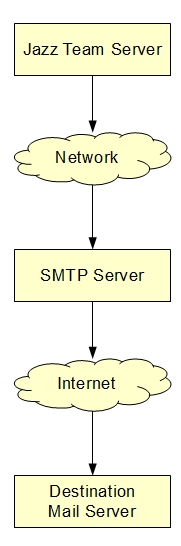
Typically the e-mail settings on the Jazz Team Server (JTS) point to a SMTP server where the e-mail message is sent out to the internet to its destination. This can at times be unreliable in the presence of a network outage. The notifications will attempt to be delivered from the JTS to the SMTP server, but if a network failure is present, the messages will not make it to the SMTP server and will be lost.
A simplified view on the routing of an e-mail message from the JTS.
Using A Local SMTP Relay
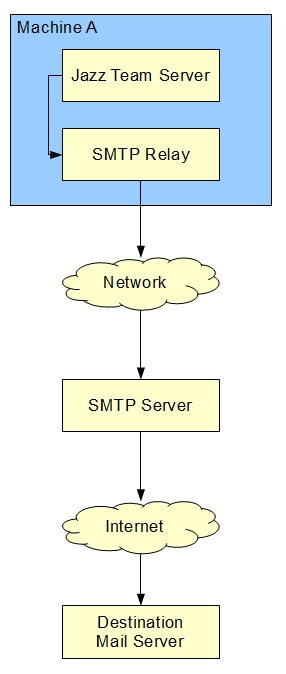
A SMTP relay can be used by the JTS as a way to ensure e-mail delivery. The SMTP relay server must be installed on the same machine that the JTS is installed on. The importance of this, is that it eliminates a network call from the JTS to the SMTP relay. Once the e-mail message is on the relay server, it allows you to take advantage of the features of a relay server, most importantly the retry capability, which will keep trying to send the message to the real SMTP server even in the presence of network problems. A simplified view of a SMTP relay server when used with JTS:
Update JTS E-mail Settings
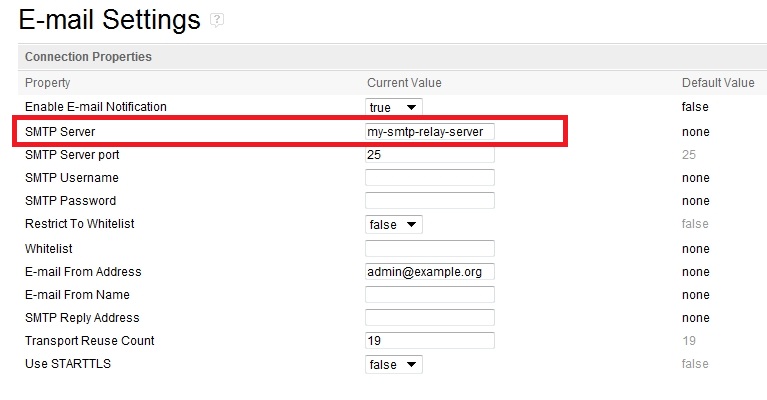
After the SMTP relay has been installed and setup, the e-mail settings on JTS must be updated to point to the relay server. From the JTS server admin page, click E-mail Settings on the left side navigator. From the e-mail settings page, the relay server name should now be used, and its port. The default is 25, however if the relay is setup on something other than port 25, that value should be used.
Suggested SMTP Relay Servers
This section suggests some open source SMTP servers and their settings to be used as a relay. The servers used were newly installed and the settings are the minimum requirements to get them to function as a relay server.
SendMail – Linux
Prerequisites:
Assumes sendmail-cf package is installed
- In the /etc/mail/sendmail.mc file uncomment out the line:
define(`SMART_HOST', `your-smtp-server') FEATURE(authinfo)dnl
- Add the real SMTP server host in place of `your-smtp-server'
- Stop sendmail by issuing the command
/sbin/service sendmail stopand log on as root to issue this command:
m4 /etc/mail/sendmail.mc > /etc/mail/sendmail.cf - Optional:
Depending on how the destination SMTP server is configured, it may require authentication between the relay and destination. - The /etc/mail/authinfo file needs to be edited/created. Edit the file and enter the info for example:
AuthInfo:{your-smtp-server} "U:{your-smtp-user}" "P:{your-smtp-password}" "M:DIGEST-MD5"Note: The M: may vary depending on the authentication capabilities of the server - Create the authinfo.db, by issuing the following command:
makemap hash /etc/mail/authinfo < /etc/mail/authinfo - Restart sendmail:
/sbin/service sendmail restart
Postfix – Linux
- Add the relayhost to the main.cf file:
relayhost = {your-smtp-server} - If postfix was running, you will need to reload the configuration using:
/usr/sbin/postfix reload
hMailServer – Windows Only
- Start the hMailServer Administrator
- In the SMTP settings panel, under the Delivery of email tab page , add your SMTP server and authentication info (if needed) in the SMTP Relayer section:

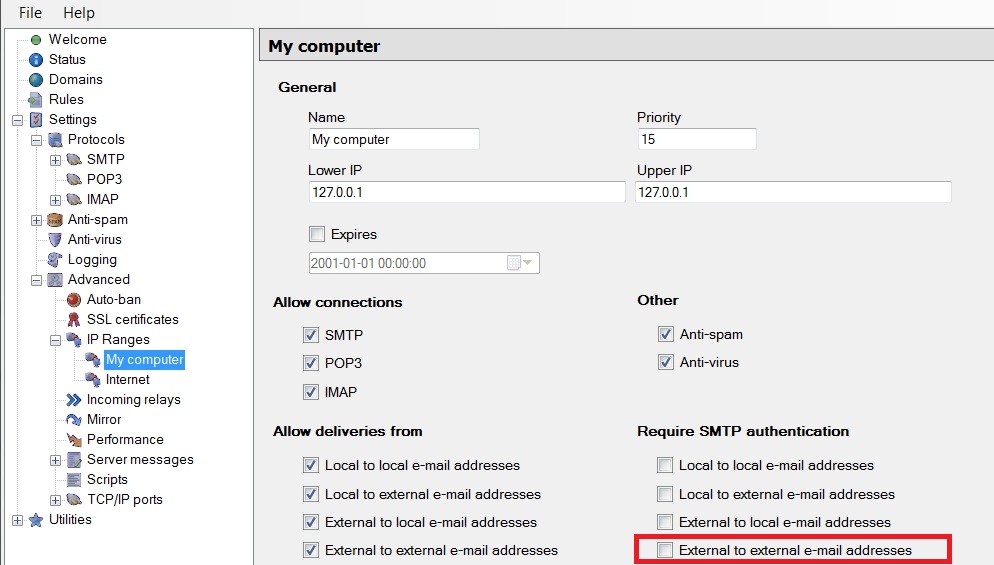
- By default, the local computer has authentication turned on for external to external email addresses turned on. It is recomended that it be turned off.
About the author
Mike Tabb works on the Repository team in the Jazz Foundation project
Copyright © 2011 IBM Corporation