


Workarounds: Problems in Rational Engineering Lifecycle Manager 6.0
Author: Rational Engineering Lifecycle Manager team
Last Updated: June 2015
Build Basis: Collaborative Lifecycle Management 6.0
The table of contents lists the known problems, workarounds, and limitations related to the Rational Engineering Lifecycle Manager 6.0 release functionality.
Workarounds
Use the links below to learn more about the issues and workarounds in this release:
- Rational Engineering Lifecycle Manager views might fail to show artifacts when the Lifecycle Query Engine that is configured as Report Builder data source, is registered with a separate Jazz Team Server.
- When you migrate your existing queries to Report Builder 6.0, the URIs in the query results show plain text instead of hyperlinks.
- The removal of back links might affect Rational Engineering Lifecycle Manager queries and views that were created prior to version 6.0.
- In Rational Engineering Lifecycle Manager 6.0 you cannot generate a matrix report in CSV format. This capability is available in Rational Engineering Lifecycle Manager 5.0.2, and in previous versions.
Problem Summary
Rational Engineering Lifecycle Manager views might fail to show artifacts when the Lifecycle Query Engine that is configured as a data source for Report Builder is registered with a separate Jazz Team Server.
Problem
SPARQL queries defined for Rational Engineering Lifecycle Manager views are run by the Lifecycle Query Engine (LQE), which is configured as data source in the Report Builder. When the Report Builder and LQE are running on separate Jazz Team Servers, and authentication is not established yet, queries from Rational Engineering Lifecycle Manager fail, and the view containers show errors.
Workaround
Complete these steps:
- Open the Report Builder that defines the data source used in the view that reports errors.
- On the Setup page
https://server:port/rs/setup, click Data Sources. - Click the data source used in the view that fails.
- Click Test Connection.
- If authentication is required, log in with the correct credentials, and click OK.
- Return to the Rational Engineering Lifecycle Manager view, and reload the page.
Related Information
Problem Summary
When you migrate your existing queries to Report Builder 6.0, the URIs in the query results are plain text instead of hyperlinks.
Problem
If you migrate your Rational Engineering Lifecycle Manager queries to Report Builder 6.0 from version 5.0.2 or earlier, the URI values in the query results are in text format. In version 5.0.2, the URIs in query results are hyperlinks.

Workaround
- Open the Report Builder, and edit the report produced by the Rational Engineering Lifecycle Manager 5.0.2 query that was imported to the Report Builder.
- Go to Format results > Advanced.
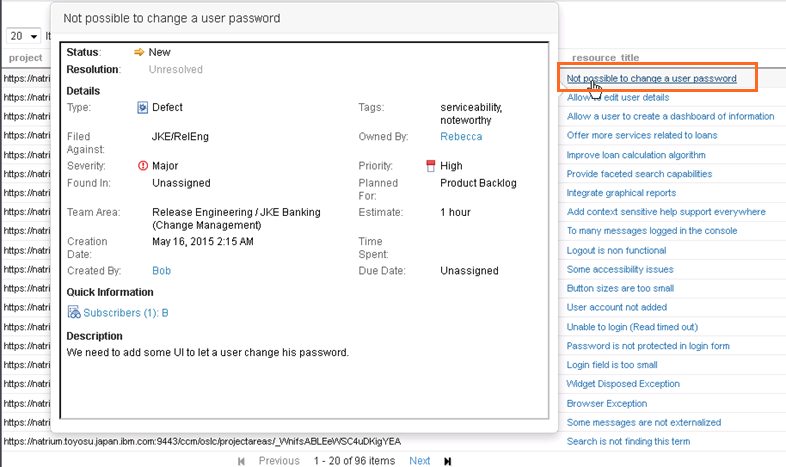
- Add or modify the label variable <ui_variable_name>_title (for example, ?resource_title for ?resource) for the URI that should be a hyperlink.
- Click Validate query.
- Expand the Columns section, and change the type of the URI variable to URI (Uniform Resource Identifier).
- Save, and run the report.
Problem Summary
The removal of back links might affect Rational Engineering Lifecycle Manager queries and views that were created before version 6.0.
Problem
Before version 6.0, lifecycle management applications such as Rational DOORS Next Generation, Rational Team Concert, and Rational Quality Manager included both forward and back links in the tracked resource set (TRS) feeds. The forward and back links were indexed in the Lifecycle Query Engine (LQE), and queried by Rational Engineering Lifecycle Manager. Starting in version 6.0, if you enable configuration management for your lifecycle management applications, and if you enable your project area for configuration management, the back links in your application are not included in the TRS feed, and are not indexed in LQE. Links are effectively one-way.
For example, in previous versions, two triples were included in the LQE index for a single conceptual link relationship: <requirement A> oslc_rm:validatedBy <test case B> and <test case B> oslc_qm:validatesRequirement <requirement A>
In version 6.0, only <test case B> oslc_qm:validatesRequirement <requirement A> is included in the LQE index. Which of the two directions is considered forward depends on each link type.
- For project areas that are not using configuration management, back links are still created, and Rational Engineering Lifecycle Manager queries work as before.
- If existing SPARQL queries in Rational Engineering Lifecycle Manager (including queries embedded in views and in artifact element definitions) use back links with an LQE index for artifacts in version 6.0 lifecycle management applications, the results of the queries might be affected by the removal of back links. To ensure that existing queries work with data coming from version 6.0 applications, the queries must be modified for the portions that depend on back links.
- When you create new queries that apply only to version 6.0 lifecycle management applications, query for the forward link in the forward direction.
- If you have a mix of version 6.0 and older lifecycle management applications or third-party applications that have not yet adopted the OSLC link simplification, use the path expression
a|^bin queries, whereais the forward link predicate,bis the back link predicate, and^is the inverse operator. This way, the query can redundantly but sufficiently match the forward and back links. Note that some additional computational cost is required for this redundant matching.
For example, if your existing query from a previous application version was ?requirement oslc_rm:validatedBy ?testCase, in version 6.0 it should be: ?testCase oslc_qm:validatesRequirement ?requirement
This syntax also works with previous versions of lifecycle management applications that store both link directions.
In the transition phase, or for third-party applications that store only the oslc_rm:validatedBy link, use the following property path: ?testCase (oslc_qm:validatesRequirement|^oslc_rm:validatedBy) ?requirement
Note that your queries might run slower, and you might find duplicate results that require further adjustment.
Workaround
- Check what version of the lifecycle management tools produced the artifacts in the LQE index.
- Identify where back link predicates are used in views and artifact element queries.
- Make the changes suggested in the problem description above.
Problem summary
In Rational Engineering Lifecycle Manager 6.0 you cannot generate a matrix report in CSV format. This capability is available in Rational Engineering Lifecycle Manager 5.0.2 and earlier.
Problem
In Rational Engineering Lifecycle Manager 5.0.2, on the Queries page, you click Generate Matrix to create a matrix report in CSV format. This capability is no longer available in version 6.0, because the Queries menu now opens the Report Builder, which does not support matrix reports in version 6.0.
Workaround
There is no corresponding function in verson 6.0.
Related Information
Copyright © 2015 IBM Corporation