


Workaround: Changing the ETL user credentials when the data collection jobs are running causes deadlock
Summary
If you change the ETL user credentials while the data collection jobs are running, the ETL job freezes.
More Information
Quality Management data collection jobs run indefinitely and go into a deadlock when you change the ETL user credentials from the teamserver.properties while the jobs are running. Currently, there is no code feature to stop this.
The qm-etl.log, which is located in $JTS_HOME/server/logs, displays this error if the user credentials are changed while the data collection jobs are running:
2012-10-23 09:37:08,498 [ http-9443-Processor13] ERROR ervice.internal.common.CommonRemoteSnapshotService - com.ibm.rational.etl.common.exception.ETLException: com.ibm.rational.etl.common.exception.ETLException: com.ibm.rational.dataservices.client.auth.AuthenticationException: CRRRE1404E: The user or password is invalid. java.sql.SQLException: com.ibm.rational.etl.common.exception.ETLException: com.ibm.rational.etl.common.exception.ETLException: com.ibm.rational.dataservices.client.auth.AuthenticationException: CRRRE1404E: The user or password is invalid.
Workaround
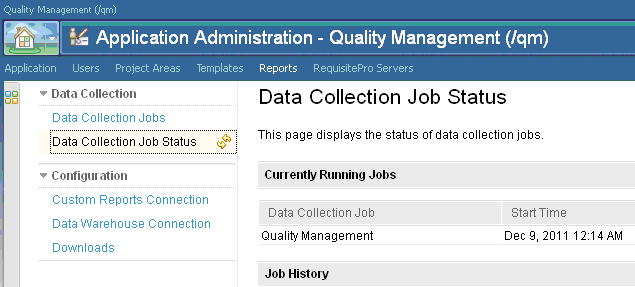
If you want to change the user credentials, first check to ensure there are no data collection jobs running. You can view job status in the Quality Management Application Administration page, Reports tab, under the Data collection jobs Status section. Wait for the jobs to complete, and then you can change the user credentials in teamserver.properties.
Related Information
The following link points to related information:
Copyright © 2013 IBM Corporation