| Finding Where Configurations are Used |
 |
 |
|
| Related Elements |
|---|
IntroductionPractitioners often need to know where a particular element, or set of elements, is used within a customer project. For example:
These use cases could be satisfied by asking the following questions:
Facilities that can be used to answer these questions include:
The following sections will present the recommended methods for each of the previous questions. 1. Which component configurations are used to define this product variant?Tool: GCM The user can explore the GC hierarchy in the GCM application UI. Here is a SPARQL 1.1 query that finds all the configurations that are recursive children of configuration:
https://localhost:9443/gc/configuration/2: In this query, note that the URI for the original configuration forms the first part of the "WHERE" clause, and would need to be changed for a different configuration. The "SELECT" clause will retrieve the URI and the configuration title for each child configuration found. Tool: RELM
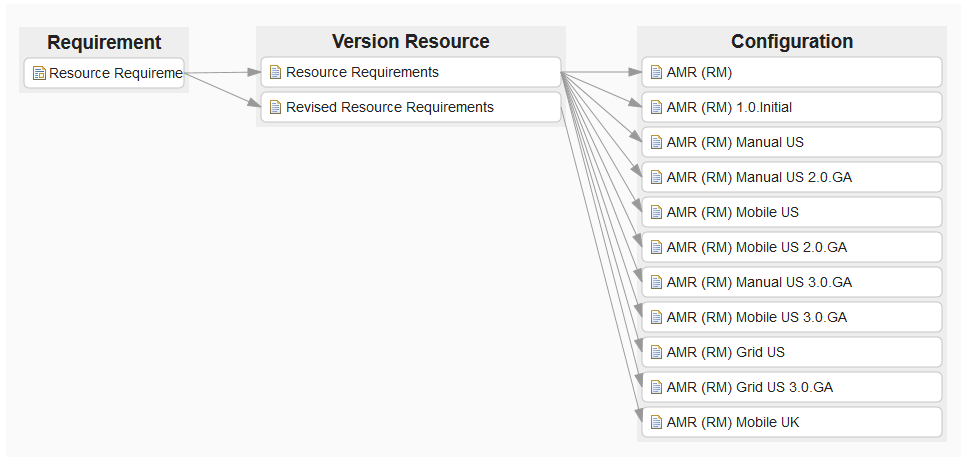
By selecting the all-data endpoint of LQE, the user can show links from artifacts to configurations, as shown below. If
the user selects a specific context, which is the usual case, then RELM will only display the version resources
belonging to that context.
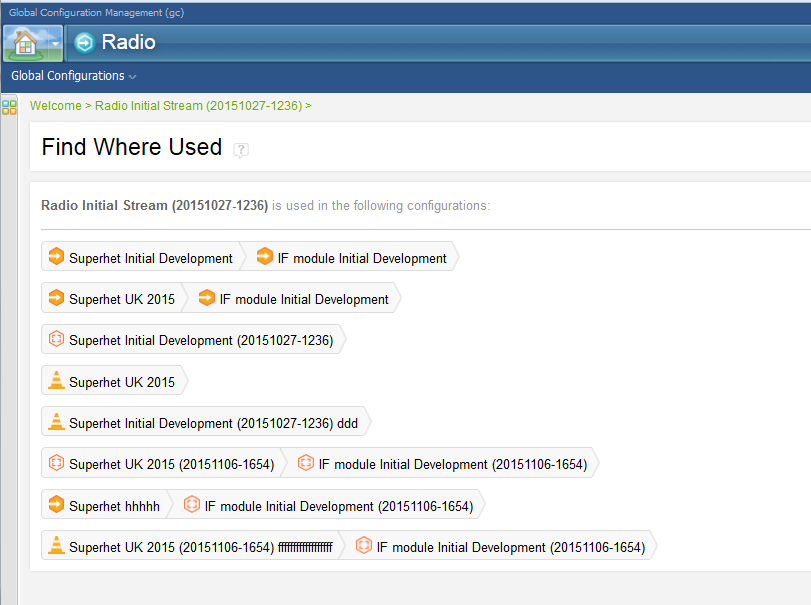
2. What configurations exist for this GC component?Tool: GCM The user can see the streams for a component in the GCM UI. Users can see the baselines created from a particular stream in the GCM UI. We recommend that users identify variants in the names of configurations as this makes the view more meaningful. 3. What are the configurations of this GC component for this branch (variant)?Tool: GCM The user can see the streams for a component in the GCM UI. Users can see the baselines created from a particular stream in the GCM UI. We recommend that users identify variants in the names of configurations as this makes the view more meaningful. 4. Which other configurations use this GC baseline or stream?Tool: GCM The GCM UI provides a finduse capability. Users can select a configuration and use the Find Where Used action to find which GCs use that configuration, as shown below:
Figure 2: Results of Find Where Used 5. Which configurations (and hence which products or product variants) use this version of this requirement (or test case or design element ...)?Tool: Report Builder Here's a sample SPARQL query for finding the versions of an artifact with a specified URI in use any configuration:
PREFIX dcterms: <http://purl.org/dc/terms/> This query will return the title, identifier and (if available) the short identifier for each version of the concept resource that exists in the different configurations they reside in (the URI of the configuration, configuration title, creation date). For example, for QM Testcase 40, this would be “40”. For DNG would you get the concept URI of a resource by retrieving the permalink for a particular version of that resource and strip out the configuration context.
Here's the permalink for this version: https://example-server.com:9602/rm/resources/_62714bffd655457e8b2e2b376734660a?oslc_config.context=https%3A%2F%2Fexample-server.com㪖02%2Frm%2Fcm%2Fstream%2F_XjCCYLk5EeWXHeCbzSr93w In this, the server is “example-server.com”, the port is “9602”, the internal ID is “_62714bffd655457e8b2e2b376734660a” and the configuration context is the stream on that server identified by “_XjCCYLk5EeWXHeCbzSr93w” Remove the configuration context to leave: https://example-server.com:9602/rm/resources/_62714bffd655457e8b2e2b376734660a And replace the URI in the "?artifact_version_uri dcterms:isVersionOf <>" clause, as above. This query would be directed to the all-data endpoint, so that all selections and requirement graphs were possible solutions. If run in a configuration-specific endpoint, that configuration itself should be seen as the solution if and only if the identified requirement were in that configuration. No other configurations would be seen. For example, for QM, there is no icon to retrieve the permalink of an artifact, as there is for DOORS Next Generation. Users must work this out manually from the structure: https://<host>:<port>/<context root>/oslc_qm/contexts/<project area UUID>/resources/<resource type>/<resource item ID> Where resource type is one of the following:
|
| Guidelines | |
|---|---|
| Supporting Materials |
© Copyright IBM Corp. 1987, 2016. All Rights Reserved. |