
Receiving a 404 when trying to copy a remotescript resource with an ID that doesn't even exist

Sean Lee-Loy (1●1●1)
| asked May 30 '13, 3:06 p.m.
retagged May 31 '13, 3:31 p.m. by Laura W. Hinson (161●2●6)
Hi,
I just started using the RQMCopyUtility to migrate test artifacts from RQM4.0.2 to another 4.0.2 project
and recieved the following error:
Right when it finished all the testcase artifacts it started on the remote scripts (test scripts)
INFO: Already Added: testcase urn:com.ibm.rqm:testcase:1574
30-May-2013 1:06:30 PM com.ibm.rqm.ct.util.Logger logInfo
INFO: Finishing: testcase urn:com.ibm.rqm:testcase:1574
30-May-2013 1:06:30 PM com.ibm.rqm.ct.util.Logger logInfo
INFO: Starting: remotescript urn:com.ibm.rqm:remotescript:8114
30-May-2013 1:06:30 PM com.ibm.rqm.ct.util.Logger logInfo
INFO: Error received: 404, retry #: 0
30-May-2013 1:06:33 PM com.ibm.rqm.ct.util.Logger logInfo
INFO: Error received: 404, retry #: 1
30-May-2013 1:06:36 PM com.ibm.rqm.ct.util.Logger logError
SEVERE: RestException executing: GET, RC: 404, message: Error 404: SRVE0295E: Error reported: 404
30-May-2013 1:06:36 PM com.ibm.rqm.ct.util.Logger logError
SEVERE: RestException executing: GET, RC: 404, message: Error 404: SRVE0295E: Error reported: 404
30-May-2013 1:06:36 PM com.ibm.rqm.ct.util.Logger logError
SEVERE: General REST Exception: RestException executing: GET, RC: 404, message: Error 404: SRVE0295E: Error reported: 404
30-May-2013 1:06:36 PM com.ibm.rqm.ct.util.Logger logError
SEVERE: FAILURE!
I then checked the following feed for a particular resource and got the same 404: in my browser
https://clm4poc.rmtools.ssh:9443/qm/service/com.ibm.rqm.integration.service.IIntegrationService/resources/OLIS+Pre+And+Post+Landing+Test+Validations/remotescript/urn:com.ibm.rqm:remotescript:8114
which means object doesn't exist...
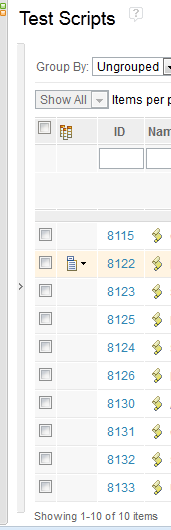
When I went to browse testscripts in RQM and ordered by ID 8114 doesn't show up. And I know I only have
10 test scripts in this project. I also checked the feed and only saw the corresponding 10 scripts:
My question is how come the RQMCopyUtility was trying to get a remotescript uri with ID 8114?
Could it be an archived testscript that I deleted from before? I know archived artifacts are not physically deleted from the repository.
|
2 answers



Sean
You can append "?includeArchived=true" to the feed URL to obtain archived artifacts
For example:
https://clm4poc.rmtools.ssh:9443/qm/service/com.ibm.rqm.integration.service.IIntegrationService/resources/OLIS+Pre+And+Post+Landing+Test+Validations/remotescript/urn:com.ibm.rqm:remotescript:8114?includeArchived=true
...if you run this does it return data?
Comments
Correction: Actually the feed url pasted from above got a 404,
Sean,
There is a known issue in regards to the Copy Utility handling archived objectives in a Test Plan
..you may be encountering something similar.
I'll do a little more digging around and post what I find
Hi I even tried using the -is switch to skip this uri, but it still failed at the same point trying to copy the artifact over. i.e. adding the following: -is=remotescript:urn:com.ibm.rqm:8114
|

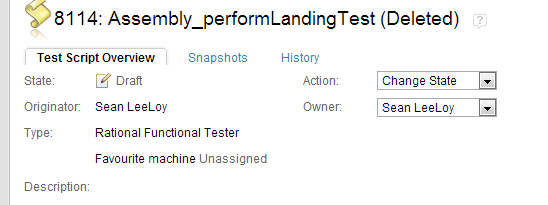 Yes it got directed to this value:
Your answer
Dashboards and work items are no longer publicly available, so some links may be invalid. We now provide similar information through other means. Learn more here.