Note: I asked this question on the DeveloperWorks RPE forum and their IBM folks directed me over here.
I have imported high resolution images (300 dots per inch - DPI) into DOORS that I need to have published to Word in full native resolution and not compressed in any way. I have been using a Word Stylesheet and RPE 2.0.1 to publish where the advanced setting (File > Options > Advanced > Do Not Compress Images In File) for abstaining from image compression is checked. However, my published documents still have the images compressed and the advanced setting for abstaining from images compression is unchecked.
The resolution coming out of Word is 96DPI. The resolution coming out of DOORS appears to be 72DPI. I was able to evaluate the intermediate image by watching a temp directory that RPE uses during publishing where the raw data coming out of DOORS is stored prior to inclusion into the output Word document. I followed the instructions by Dragos Cojocari here.
Does anyone know anything about DOORS image handling in terms of DPI?
Attachments:
- Original photo imported to DOORS at 300DPI (Sunset_2007-1.jpg)
- Image exported from DOORS using RPE DXL at 72DPI (OLE_4cbf0a9804575182_000009f94Object_Text_.png)
- Image in output Word document at 96DPI (sunset published.png)
Bob3 - Mon Oct 17 02:30:40 EDT 2016
Re: DOORS Image Compression
Mathias Mamsch - Mon Oct 17 03:38:52 EDT 2016
I guess that depends on
a) If you are talking about DOORS Images or OLE Objects?
b) What OLE Server you are using for embedding the images? (i.e. when you activate the images, which application opens)
Regards, Mathias
Re: DOORS Image Compression
DOORSHAM - Mon Oct 17 07:15:34 EDT 2016
You get what you get from DOORS -- the help file gives no clue on how to change DPI.
Re: DOORS Image Compression
Bob3 - Mon Oct 17 23:19:06 EDT 2016
Mathias Mamsch - Mon Oct 17 03:38:52 EDT 2016
I guess that depends on
a) If you are talking about DOORS Images or OLE Objects?
b) What OLE Server you are using for embedding the images? (i.e. when you activate the images, which application opens)
Regards, Mathias
Thanks for your response, Mathias. The images are being inserted into the Object Text of a DOORS object using the menu item Insert > Picture. No OLE Server is being used to embed the images.
Re: DOORS Image Compression
Bob3 - Mon Oct 17 23:19:35 EDT 2016
DOORSHAM - Mon Oct 17 07:15:34 EDT 2016
You get what you get from DOORS -- the help file gives no clue on how to change DPI.
Thanks for your reply, DOORSHAM.
Re: DOORS Image Compression
Bob_Swan - Tue Oct 18 03:38:17 EDT 2016
Bob3 - Mon Oct 17 23:19:06 EDT 2016
Thanks for your response, Mathias. The images are being inserted into the Object Text of a DOORS object using the menu item Insert > Picture. No OLE Server is being used to embed the images.
I don't have access to help files at the moment, but isn't 'Picture' now a deprecated method?
I know its around the houses but I enter images into an empty word document, then import that as an OLE. Seems to work well.
Re: DOORS Image Compression
Mathias Mamsch - Tue Oct 18 05:55:04 EDT 2016
Bob3 - Mon Oct 17 23:19:06 EDT 2016
Thanks for your response, Mathias. The images are being inserted into the Object Text of a DOORS object using the menu item Insert > Picture. No OLE Server is being used to embed the images.
I just did a quick test. Imported the above jpg to a DOORS module and exported it with "exportPicture". The result is the already mentioned 72 DPI PNG file. So I checked the server data and confirmed that DOORS created inside the module directory a pic1000000.dtc that contains a 96DPI png file (full resolution though). I changed DPI back to 300 and imported the PNG file to another picture. Again DOORS converted it back to 96 DPI.
For you that means:
- DOORS is already converting your DOORS Pictures (Images) on import (and it will always convert to PNG format), so the DPI information and the original file format is lost.
- Therefore you will have no luck in getting the original file out using DOORS images.
Therefore I would suggest, you give OLE images a chance. Since DOORS does not interpret them, you might have more luck. Still you will have to choose your OLE Server in a way, that your exporter will be able to extract the full resolution image and not give you the low resolution OLE preview.
Maybe that helps, regards, Mathias
Re: DOORS Image Compression
Bob3 - Thu Oct 20 00:00:43 EDT 2016
Mathias Mamsch - Tue Oct 18 05:55:04 EDT 2016
I just did a quick test. Imported the above jpg to a DOORS module and exported it with "exportPicture". The result is the already mentioned 72 DPI PNG file. So I checked the server data and confirmed that DOORS created inside the module directory a pic1000000.dtc that contains a 96DPI png file (full resolution though). I changed DPI back to 300 and imported the PNG file to another picture. Again DOORS converted it back to 96 DPI.
For you that means:
- DOORS is already converting your DOORS Pictures (Images) on import (and it will always convert to PNG format), so the DPI information and the original file format is lost.
- Therefore you will have no luck in getting the original file out using DOORS images.
Therefore I would suggest, you give OLE images a chance. Since DOORS does not interpret them, you might have more luck. Still you will have to choose your OLE Server in a way, that your exporter will be able to extract the full resolution image and not give you the low resolution OLE preview.
Maybe that helps, regards, Mathias
Mathias,
I conducted my own test as follows:
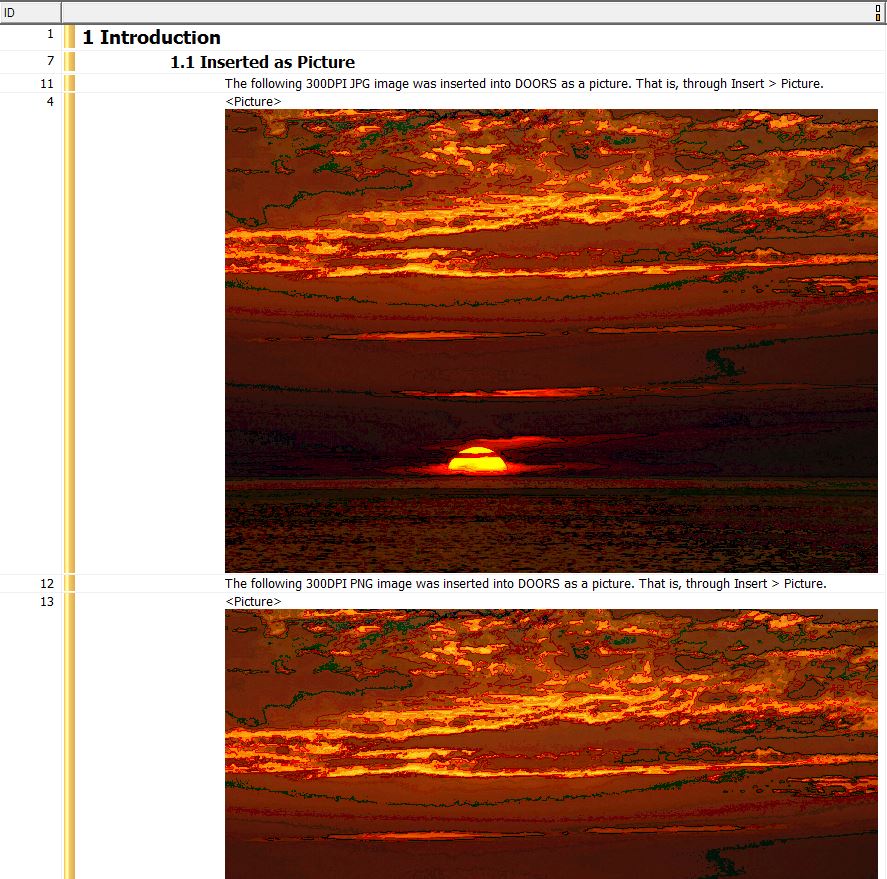

The results after publishing with RPE (where Word was instructed to not modify the DPI of images and the IBM RPE representatives say that RPE does no image compression whatsoever):
- Object 4, originally 300 DPI JPG and inserted as Picture, was automatically converted to PNG and exported at 96DPI
- Object 13, originally 300 DPI PNG and inserted as Picture, was exported at 96DPI
- Object 9, originally 300 DPI JPG and inserted as OLE Object, remained a JPG and was exported at 300DPI
- Object 10, originally 300 DPI PNG and inserted as OLE Object, remained a PNG and was exported at 300DPI
I agree with your conclusion that DOORS is internally scaling images inserted as Pictures. I further agree that a workaround is to use OLE Object image insertion instead. However, there are two drawbacks to this approach:
- JPGs and PNGs show up as icons rather than the actual image both in DOORS and in Word, even when "Display as icon" was unchecked in the DOORS Insert > OLE Object dialog box.
- All images would have to be re-inserted into each DOORS module using the Insert > OLE Object method
Can you think of any way to get DOORS to display the actual image rather than an icon in the context of Insert > OLE Object?
Re: DOORS Image Compression
EHcnck - Thu Oct 20 09:48:30 EDT 2016
Bob3 - Thu Oct 20 00:00:43 EDT 2016
Mathias,
I conducted my own test as follows:
The results after publishing with RPE (where Word was instructed to not modify the DPI of images and the IBM RPE representatives say that RPE does no image compression whatsoever):
- Object 4, originally 300 DPI JPG and inserted as Picture, was automatically converted to PNG and exported at 96DPI
- Object 13, originally 300 DPI PNG and inserted as Picture, was exported at 96DPI
- Object 9, originally 300 DPI JPG and inserted as OLE Object, remained a JPG and was exported at 300DPI
- Object 10, originally 300 DPI PNG and inserted as OLE Object, remained a PNG and was exported at 300DPI
I agree with your conclusion that DOORS is internally scaling images inserted as Pictures. I further agree that a workaround is to use OLE Object image insertion instead. However, there are two drawbacks to this approach:
- JPGs and PNGs show up as icons rather than the actual image both in DOORS and in Word, even when "Display as icon" was unchecked in the DOORS Insert > OLE Object dialog box.
- All images would have to be re-inserted into each DOORS module using the Insert > OLE Object method
Can you think of any way to get DOORS to display the actual image rather than an icon in the context of Insert > OLE Object?
// This script export a picture to PNG and re-import as Embedded OLE.
// For the image to appear as a picture rather than an ICON, you must
// ensure the DOS command "ASSOC .png" returns ".png=Paint.Picture"
// If not, execute "ASSOC .png=Paint.Picture" while having local admin rights
//https://www.ibm.com/developerworks/community/forums/html/topic?id=c78f4ea6-5fdf-43d2-b589-2873e596fec8&ps=25
Object o = current
string sFilename = "C:\\Users\\user.name\\Desktop\\" identifier(o) ".png"

// Export the picture
string sError = exportPicture(o, sFilename, formatPNG)
if (!null(sError))
{
        print sError " : " sFilename "\n"
        halt
}
else
{
        print "Successfully exported:" sFilename "\n"
        // Delete the picture
        if (deletePicture(o))
        {
                print "Successful deletion\n"
                // Re-insert the image as OLE
                if (oleInsert(o, sFilename, false))
                {
                   print "Successfully embedded image\n"
                }
                else
                {
                   print "Problem trying to embed document\n"
                }
        }
        else
        {
           print "Failed to delete picture\n"
           halt
        }
}
Re: DOORS Image Compression
Bob3 - Thu Oct 20 11:58:24 EDT 2016
EHcnck - Thu Oct 20 09:48:30 EDT 2016
// This script export a picture to PNG and re-import as Embedded OLE.
// For the image to appear as a picture rather than an ICON, you must
// ensure the DOS command "ASSOC .png" returns ".png=Paint.Picture"
// If not, execute "ASSOC .png=Paint.Picture" while having local admin rights
//https://www.ibm.com/developerworks/community/forums/html/topic?id=c78f4ea6-5fdf-43d2-b589-2873e596fec8&ps=25
Object o = current
string sFilename = "C:\\Users\\user.name\\Desktop\\" identifier(o) ".png"

// Export the picture
string sError = exportPicture(o, sFilename, formatPNG)
if (!null(sError))
{
        print sError " : " sFilename "\n"
        halt
}
else
{
        print "Successfully exported:" sFilename "\n"
        // Delete the picture
        if (deletePicture(o))
        {
                print "Successful deletion\n"
                // Re-insert the image as OLE
                if (oleInsert(o, sFilename, false))
                {
                   print "Successfully embedded image\n"
                }
                else
                {
                   print "Problem trying to embed document\n"
                }
        }
        else
        {
           print "Failed to delete picture\n"
           halt
        }
}
Thanks for sharing this script, EHcnck.
Can explain how this will help the situation where DOORS compresses and converts the image upon insertion with Insert > Picture?
Re: DOORS Image Compression
EHcnck - Thu Oct 20 12:29:08 EDT 2016
Bob3 - Thu Oct 20 11:58:24 EDT 2016
Thanks for sharing this script, EHcnck.
Can explain how this will help the situation where DOORS compresses and converts the image upon insertion with Insert > Picture?
This would convert the pic 2 ole, in your case you want to use the raw image rather converting the compressed image already in DOORS.
Re: DOORS Image Compression
Mathias Mamsch - Thu Oct 20 15:58:08 EDT 2016
Bob3 - Thu Oct 20 00:00:43 EDT 2016
Mathias,
I conducted my own test as follows:
The results after publishing with RPE (where Word was instructed to not modify the DPI of images and the IBM RPE representatives say that RPE does no image compression whatsoever):
- Object 4, originally 300 DPI JPG and inserted as Picture, was automatically converted to PNG and exported at 96DPI
- Object 13, originally 300 DPI PNG and inserted as Picture, was exported at 96DPI
- Object 9, originally 300 DPI JPG and inserted as OLE Object, remained a JPG and was exported at 300DPI
- Object 10, originally 300 DPI PNG and inserted as OLE Object, remained a PNG and was exported at 300DPI
I agree with your conclusion that DOORS is internally scaling images inserted as Pictures. I further agree that a workaround is to use OLE Object image insertion instead. However, there are two drawbacks to this approach:
- JPGs and PNGs show up as icons rather than the actual image both in DOORS and in Word, even when "Display as icon" was unchecked in the DOORS Insert > OLE Object dialog box.
- All images would have to be re-inserted into each DOORS module using the Insert > OLE Object method
Can you think of any way to get DOORS to display the actual image rather than an icon in the context of Insert > OLE Object?
In your case it seems, that neither JPG nor PNG file formats are associated with an application on your PC. In this case the fallback for the OLE Server is "Packager", the generic windows OLE Server that will simply store the file you put in. The good thing about this, is, that you can be sure that the content of your file is not interpreted at all. Fortunately for you RPE seems to be able to extract the contents of the Package object and inline the picture in your export.
You can change the default application for different file formats using the "assoc" command (from an Admin shell). You need to experiment with different OLE servers (e.g. Paint, etc.). If you choose paint for your OLE Server with assoc, e.g.
assoc .jpg=Paint.Picture
then when inserting a JPG into DOORS, a MS Paint OLE object will be created instead of a package object. However you need to test, whether or not they will still be exported with full resolution.
Hope that helps, regards, Mathias
Note: If you search for "assoc" on the forum you will find more posts.